
AI policy for your company: how to write one your team actually follows
Most companies write their first AI policy to stop people from doing something. The good ones write it to make the safe way the fastest way. That difference decides whether your policy gets followed or quietly ignored.
This guide is for founders, COOs, and operations or IT leads at companies of roughly 20 to 500 people where AI is already in daily use, with or without permission. If you are looking for a 12-page legal template to file away, this is not it. If you want a short AI policy for your company that your team actually uses, and that holds up when a client or regulator asks how you handle AI, read on.
In this article you will learn why ban-list policies fail, the simple grid of data classes and tool lanes that replaces them, the 3 kinds of AI a 2026 policy has to cover, the sections to include, what the EU rules really ask of you after the Digital Omnibus, and a 30-day plan to go from shadow AI to a policy people follow.
Key takeaways
• Your team already has an AI policy. Right now it is whatever each person decided on their own.
• A ban does not remove AI use. It removes your visibility of it.
• Write rules about data, not about tools. Tools change monthly, your data classes do not.
• 3 data classes and 3 tool lanes give you a 9-cell grid that answers most questions in 5 seconds.
• A 2026 policy must cover chat assistants, AI switched on inside tools you already pay for, and agents that take actions.
• Under the EU AI Act, Article 4 still requires you to take AI literacy measures for your staff. GDPR is the bigger day-to-day risk.
• A useful policy fits on 2 pages, has a named owner, and gets reviewed every quarter.
Your team already has an AI policy. You just did not write it.
Here is the uncomfortable starting point. According to the Microsoft and LinkedIn Work Trend Index, 75% of knowledge workers use generative AI at work, and 78% of those users bring their own AI tools. At small and medium-sized companies that figure rises to 80%. More than half of AI users are reluctant to admit they use it for their most important tasks.
Read those numbers as a description of your company, not someone else's. Your sales team is summarising calls in a free chatbot. Someone in finance pasted a supplier list into a tool to clean it up. A project manager signed up for a meeting recorder with a personal card. None of this is malicious. People found something that saves them an hour a day and nobody told them the rules.
So you do have an AI policy. It is just distributed across 40 or 200 private decisions, and none of them were made with your client contracts, your data, or your liability in mind.
The Dutch data protection authority has seen where that leads. The Autoriteit Persoonsgegevens has received data breach notifications caused by employees entering personal data into AI chatbots, including a medical practice employee who entered patient data and a telecom employee who uploaded a file of customer addresses. In both cases the employee acted against their employer's agreements. The agreements existed. They just did not work.
That is the real job of an AI policy. Not to exist, but to change what people do on a Tuesday afternoon when they have a spreadsheet and a deadline.
What is an AI policy?
An AI policy is a short set of company rules that states which AI tools employees may use, with which kinds of data, for which tasks, and who is accountable for the result. It is the operational layer of AI governance: the part that reaches every desk.
It helps to separate it from 3 things it often gets confused with.
• An AI strategy says where AI should create value for the business. The policy says how to use it safely while you get there.
• AI governance is the wider system of ownership, risk assessment, and oversight. The policy is the document employees read. Governance is the machinery behind it.
• An acceptable use policy for AI is usually a subset: a list of do's and don'ts for staff. A complete AI policy also covers the AI you build or deploy, such as agents and automations, and how new tools get approved.
For a company of 20 to 500 people, you do not need 3 separate documents. You need 1 short policy, 1 named owner, and 1 simple way to ask "can I use this?"
Why ban-list policies fail
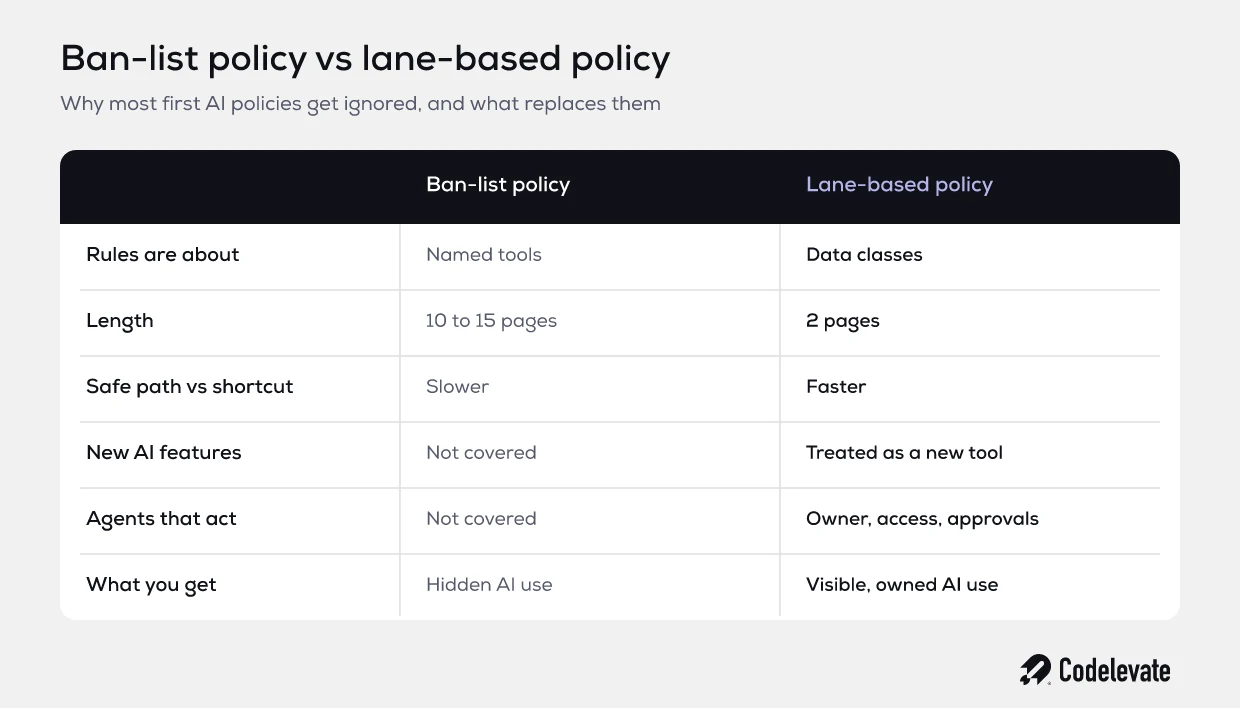
The typical first AI policy is written by legal or IT under time pressure after someone reads a scary headline. It lists forbidden tools, forbids "confidential information" without defining it, and ends with a warning about disciplinary action. It gets signed, filed, and ignored within a month.
It fails for 3 predictable reasons.
It is written about tools, not data
"Do not use ChatGPT" is out of date the week you write it. There is a new assistant in your browser, your CRM, your email client, and your design software every quarter. A policy that names tools becomes a game of whack-a-mole. A policy that classifies data survives, because the question "may this customer file leave our approved systems?" has the same answer whatever tool is asking.
It makes the safe path slower than the unsafe one
If the approved route is "submit a ticket and wait 6 weeks," and the unapproved route is "open a browser tab," you already know which one wins. Every rule that adds friction without offering a sanctioned alternative pushes usage underground. That is how you get the 52% who hide their AI use: not bad people, just a policy that made honesty expensive.
It was written for chat, and AI is no longer just chat
Most templates still picture an employee typing into a chatbot. In 2026 a lot of your AI exposure comes from features a vendor switched on inside software you already pay for, and from agents and automations that read your systems and take actions on their own. A chat-only policy has nothing to say about either.
The core of an AI policy that works: data classes and tool lanes
The fix is to stop writing rules about tools and people, and write them about 2 things instead: how sensitive the data is, and how trustworthy the tool is. Cross the 2 and you get a grid that answers almost every everyday question.
3 data classes
Keep it to 3. More than 3 and nobody remembers which is which.
• Public: anything already on your website, published marketing material, public documentation.
• Internal: day-to-day business information that would be awkward but not harmful if it leaked, such as internal process notes, draft copy, and anonymised figures.
• Restricted: personal data about customers, patients or employees, anything covered by a client NDA, financial records, source code, credentials, and trade secrets.
The test for "restricted" should be simple enough to apply in your head: would we have to tell a client, a regulator, or an affected person if this ended up somewhere it should not? If yes, it is restricted.
3 tool lanes
• Green lane: company-approved accounts on tools with a signed data processing agreement, a contractual commitment not to train on your data, company login (ideally single sign-on), and known processing locations. These are the tools you actively want people to use.
• Amber lane: tools approved for specific, named uses only. A transcription tool approved for internal meetings but not client calls is a typical example.
• Red lane: personal or free accounts, browser extensions nobody reviewed, and anything not on the approved list.
The grid
Now the policy almost writes itself. Public data can go into any lane. Internal data can go into green, and into amber for the approved use. Restricted data goes into green lane tools only, and only where that specific tool is approved for that kind of restricted data. Nothing restricted ever goes into red.
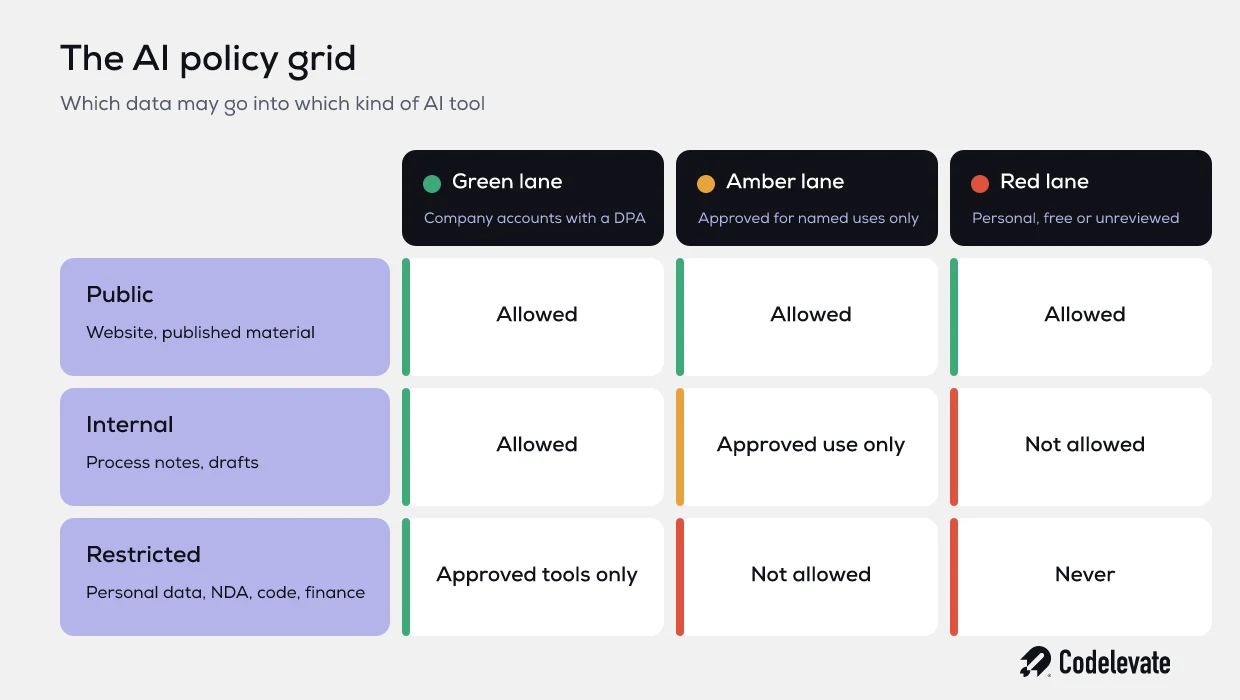
The power of the grid is speed. An account manager holding a client proposal can answer "may I use this?" in 5 seconds without reading anything. The proposal is restricted, the tool they want is red, so the answer is no, and the policy points them to the green alternative that does the same job.
That last part matters most. Every "no" in your policy should come with a "use this instead." If your green lane is empty, your policy is a ban with extra steps.
If you are also deciding which AI to build into your own product or operations, the governance questions are the same ones that come up in design. Our free SaaS founder's AI blueprint walks through them in the order a build actually happens.
The 3 kinds of AI your 2026 policy has to cover
A current policy needs a paragraph for each of these. Most templates on page 1 of Google only cover the first.
1. Chat assistants
The familiar case: someone opens an assistant and types or pastes something in. The grid covers this well. Add 2 rules that the grid does not: the employee owns the output and must check it before it reaches a client, and files uploaded to an assistant count as data leaving your systems, even if the tool deletes them later.
2. AI switched on inside tools you already pay for
This is the one that catches companies out. Your CRM, office suite, video calls, help desk, and project tool have all added AI features, often enabled by default at the next renewal. Nobody made a decision. The feature just appeared.
Your policy should say that a new AI feature inside an existing tool is treated as a new tool. Someone checks where the data is processed, whether it is used for training, and whether the existing data processing agreement covers it. Meeting summaries deserve a specific line, because recording and transcribing a call with external participants raises consent questions that a simple chat never does. If processing location matters to your clients, our guide to what an AI feature actually sends outside Europe covers the questions to ask.
3. Agents and automations that act
An assistant suggests. An agent does. Once an AI system can send an email, update a record, move money, or trigger a workflow, the policy question changes from "what data can it see?" to "what is it allowed to do, and who answers for it?"
For anything in this category, your policy should require 4 things before it goes live:
• A named owner who is accountable for its behaviour after launch, not just during the build.
• Least-privilege access: its own service account, with only the permissions it needs.
• A clear line for human approval, such as any payment, any external message to a new contact, or any change above a set value.
• Logging that shows what the agent did and why, so an incident can be reconstructed.
This is the part of the policy that grows fastest. A company that starts with 1 automation in marketing tends to have 10 across the business within a year, and each one quietly holds a set of credentials.
What to include in a company AI policy: 9 sections
A policy people read fits on 2 pages. Here are the sections, with what each one needs to say. Keep the wording plain enough that someone in their first week can follow it.
1. Purpose and scope
Two sentences. Why the policy exists (to let people use AI productively without putting clients, colleagues or the company at risk) and who it covers: employees, contractors, and interns, on any device used for work.
2. Data classes
The 3 classes, each with 3 or 4 concrete examples from your own business. Examples do more work than definitions. "Anything from the client portal" is clearer than "client-confidential information."
3. Approved tools and how to request a new one
The current green and amber list, kept as a living page rather than inside the policy text, plus a request route with a promised turnaround. Aim for 5 working days. If people can get a yes quickly, they stop working around you.
4. Prohibited uses
Keep this short and specific. Restricted data in red lane tools. Using AI to make final decisions about people, such as hiring or performance, without human review. Presenting AI output to a client as verified when it was not checked. Anything the EU AI Act prohibits outright.
5. Human review and accountability
The person who uses AI owns the result. AI output is a draft until a human with the right knowledge has checked it. State which outputs always need a second reviewer, for example anything legal, financial, or medical.
6. Transparency
When you tell clients and the public that AI was involved. Many client contracts now include AI clauses, so align this section with what you have signed. Also cover AI-generated images, audio and video, which carry specific labelling expectations in the EU.
7. Agents and automations
The 4 go-live requirements from the section above: owner, least privilege, approval lines, and logging. Plus a register listing every agent or automation that touches restricted data.
8. AI literacy and training
What training people get, when, and how you record it. This is also your evidence for the EU AI Act, covered below.
9. Incidents, ownership and review
What to do if restricted data went somewhere it should not: report it within 1 working day to a named contact, without blame for early reporting. Who owns the policy. When it gets reviewed, which should be every quarter while the tools change this fast.
What the EU rules actually require from you in 2026
Two sets of rules matter most for a typical European company using AI, and they are often mixed up.
The EU AI Act: AI literacy is still an obligation
Since 2 February 2025, Article 4 of the EU AI Act has applied to every organisation that deploys AI systems, whatever its size. The Digital Omnibus on AI, Regulation (EU) 2026/1744, entered into force on 27 July 2026 and rewrote that article. The original text asked companies to ensure "a sufficient level" of AI literacy among staff. The new text asks them to take measures to support the development of AI literacy, and explicitly does not require them to guarantee any specific level for any individual.
In plain terms, the duty shifted from a result to an effort. It did not disappear. You still need to show that you took reasonable, proportionate steps: a policy, role-based training, and a record that people received it. For a 60-person company that uses AI for writing and analysis, that can be light. For a company running agents on customer data, it should be heavier.
The same Omnibus moved the high-risk AI deadlines, pushing systems listed in Annex III to 2 December 2027 and AI embedded in regulated products to 2 August 2028. If you use AI in hiring, credit, education or access to essential services, start preparing now anyway. Those are the areas where your policy's human review section will matter most.
GDPR: the risk you will actually meet first
For most companies the AI Act is not the rule that bites first. GDPR is. As the Autoriteit Persoonsgegevens cases show, an employee pasting personal data into an unapproved chatbot can be a personal data breach. That can trigger a notification to the regulator within 72 hours, and sometimes to the people affected.
This is why the grid is built on data classes. Keeping restricted data inside green lane tools with a proper data processing agreement is the single control that prevents the most likely incident.
A note on scope: this article explains what the rules require in practice, and it is not legal advice. Have a lawyer review the final text if you operate in a regulated sector.
A worked example: from shadow AI to a working policy in 30 days
Here is how this plays out, based on a composite of the companies we work with. Picture a 70-person services company. Leadership knows AI is being used but has no policy. Nobody can say which tools, by whom, or with what data.
Week 1: find out what is really happening
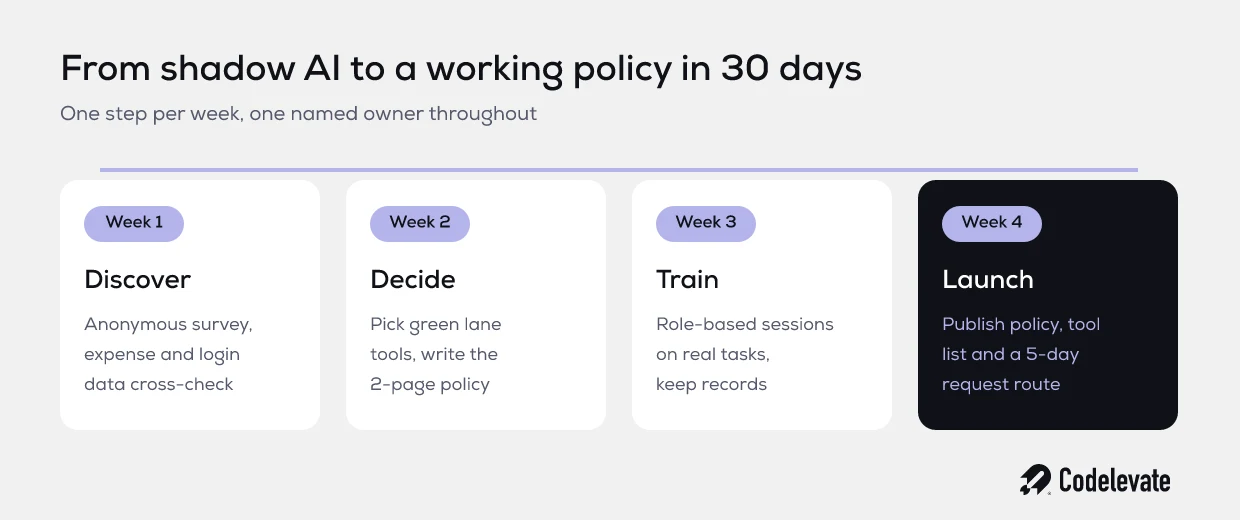
Send a short, anonymous survey with an amnesty: "tell us what you use, nobody gets in trouble for answers given this week." Cross-check against expense claims and the login data from your identity provider. In a company this size it is normal to find 10 to 15 different AI tools, a handful paid for on personal cards, and at least 1 team routinely pasting customer exports into a free tool.
Week 2: pick the green lane and write 2 pages
Choose 1 general assistant on a business plan with a data processing agreement and training switched off, plus the 2 or 3 specialist tools people clearly need. Move the personally paid subscriptions onto company accounts. Then write the policy using the 9 sections above, with examples from this company's own data.
Week 3: train by role, not by slide deck
Run 45 to 60 minute sessions per team, built around their real tasks. Sales learns what a good call summary looks like and which client data stays out. Finance learns why the supplier list is restricted. Keep attendance records. That is your AI literacy evidence.
Week 4: launch with a request route
Publish the policy, the approved tools page, and a simple form for requesting new tools with a 5-day turnaround. Name the owner. Put the first quarterly review in the calendar.
The result is not perfection. It is visibility. After 30 days, leadership knows where AI is used, restricted data has a safe place to go, spending is consolidated, and people have a reason to ask instead of hide.
How to keep the policy alive
A policy decays quickly while the tools change monthly. Three habits keep it current.
• Give it 1 owner with enough authority to approve tools. A committee means a slow request route, and a slow request route means shadow AI returns.
• Review it every quarter. Check new AI features in existing tools, new requests, incidents, and anything that changed in your client contracts.
• Track 3 numbers: how long tool requests take, the share of AI usage on company accounts, and how many incidents were reported. A rising incident count in the first months is often good news. It means people trust the process enough to report.
Common mistakes to avoid
• Copying a US template. It will reference laws you are not subject to and miss GDPR detail you are.
• Naming tools in the policy text instead of on a separate list you can update without a new version.
• Writing "no confidential data" without examples. Everyone thinks their data is not the confidential kind.
• Forgetting contractors and freelancers, who often have the least guidance and the most tools.
• Treating the policy as done at launch. The first version is a draft for the first quarterly review.
How Codelevate approaches AI policy with clients
We see the policy question from the builder's side. When a company asks us to build an AI agent or automation, the first questions are always which data it may touch, which systems it may write to, who approves its actions, and who owns it after launch. Those are policy questions, and if the company has no answer, we help write one before we write code.
That is why we often start with a short discovery. An AI audit maps where AI is already used, where it should be used, and which guardrails need to exist first. The policy then comes out of real use cases rather than a template. We are not a law firm, so for regulated sectors we work alongside your legal adviser on the final wording.
Conclusion: make the safe path the fast path
An AI policy is not a document that stops people using AI. It is a system that makes safe use faster than unsafe use. Classify your data into 3 groups, sort your tools into 3 lanes, cover chat, embedded AI and agents, give it an owner, and review it every quarter. Do that and you move from 40 private decisions nobody can see to 1 shared way of working you can defend to any client or regulator.
If you are planning AI features or agents alongside your policy, get the free SaaS founder's AI blueprint for the build-side decisions. And if you want a second pair of eyes on your policy or the AI you plan to build under it, book a free call with our team.


.svg)
.svg)


