
Prompt engineering for SMEs: from personal tricks to company assets
Most prompt engineering advice is written for one person sitting alone with ChatGPT. Be specific, give it a role, show an example, ask for a format. All true, and all of it misses the problem an SME actually has. In a company of 20 to 250 people, the question is not whether one employee can write a good prompt. It is why 12 people are writing 12 different prompts for the same job, getting 12 different answers, and taking the best ones with them when they leave.
This article is for owners, operations leaders, and CTOs at SMEs who already see their team using AI every day and want the results to be consistent, safe, and owned by the company instead of by whoever happens to be good at it. If you are looking for a list of 50 clever prompts to copy, this is not that article. If you want your prompts to work like a process your business can rely on, keep reading.
In this article you will learn what prompt engineering for SMEs really means, why the usual tips do not scale past one person, the 5 levels of prompt maturity, how to turn a prompt into a company asset with a simple prompt card, how to test a prompt without a data scientist, and how to tell when a prompt should stop being a prompt and become an automation.
Key takeaways
• Prompt engineering for SMEs is less a writing skill and more a form of process documentation: a good company prompt is a work instruction that a machine can run.
• The real cost is not bad prompts, it is inconsistent ones. The same task done 12 ways gives customers 12 different experiences.
• Microsoft found that 80% of AI users at small and medium-sized companies bring their own AI tools to work, so most of your prompting already happens outside any company process.
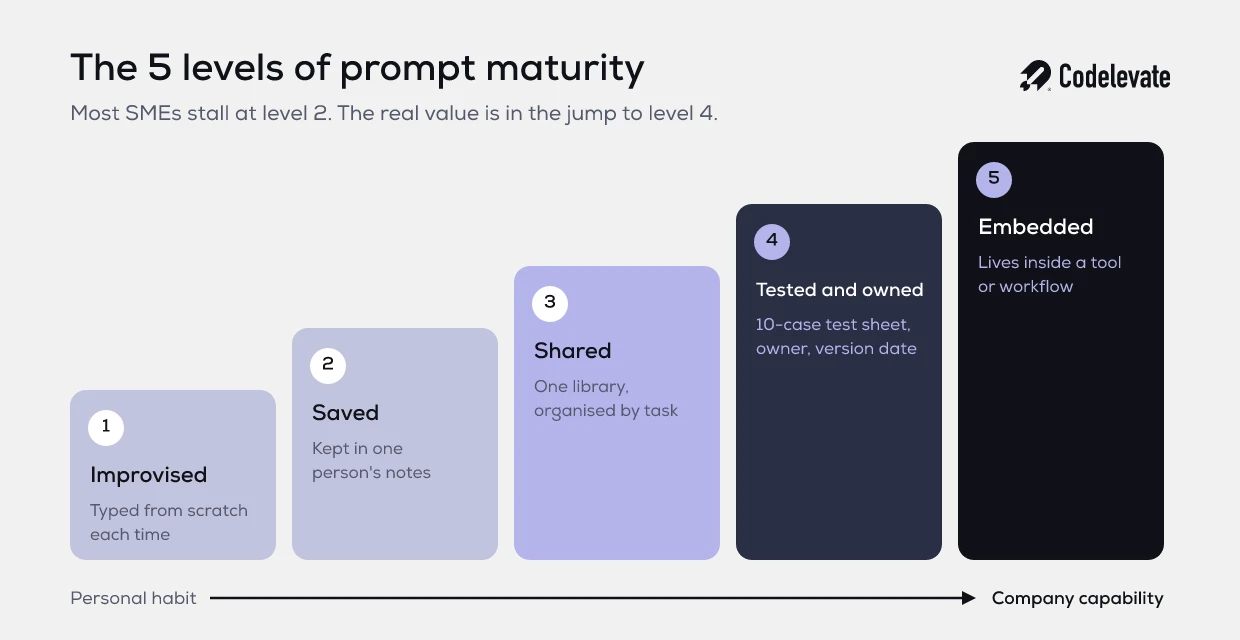
• Most prompts move through 5 levels: improvised, saved, shared, tested, and embedded. Most SMEs stall at level 2.
• A shared context pack (company facts, tone, rules, glossary) improves output more than any prompt formula.
• Test a prompt on 10 real past cases with a simple pass or fail sheet before the team relies on it.
• When a prompt runs more than about 50 times a week on the same input, it is a candidate for automation rather than more copy and paste.
Why the usual prompt tips do not fix the problem in an SME
Search for prompt engineering and you will find the same toolkit in every guide: role, task, context, format, constraints, examples. Frameworks with acronyms like CRAFT or RTF. These are useful, and your team should know them. But they are all aimed at improving a single prompt written by a single person in a single moment.
That is not where an SME loses value. Picture a 40-person wholesaler. The sales team writes follow-up emails with AI. One rep has a great prompt that produces short, friendly emails with the right delivery terms. Another rep asks the AI to "write a follow-up" and gets a stiff, generic message that promises a delivery time the warehouse cannot meet. A third rep does not use AI at all because the first results were bad. The customer experience now depends on which rep they happened to get.
Better prompting tips would help each rep a little. What actually fixes it is treating the good prompt as a company asset: written down once, tested, owned by someone, fed with the right company facts, and used by everyone. That is the shift this article is about. It is the same shift you made years ago when you wrote down how to onboard a customer instead of leaving it in one person's head.
What is prompt engineering for SMEs?
Prompt engineering for SMEs is the practice of designing, testing, and maintaining the instructions your team gives to AI tools so that recurring business tasks produce consistent, accurate, and safe results, no matter who runs them. It covers the prompt itself, the company context it depends on, the rules about what data may go in, and the owner who keeps it up to date.
The useful comparison is a work instruction or a standard operating procedure. A good SOP tells a new employee what the task is, what inputs they need, what good output looks like, what to avoid, and who to ask. A good company prompt does exactly the same for an AI model. The difference is that the model follows it literally, every time, which is both the risk and the opportunity.
This framing also answers a question many owners ask: do we need to hire a prompt engineer? For almost every SME the answer is no. You need the people who already know the process to write it down clearly, and one person who owns the library. The skill is closer to good process writing than to programming.
The hidden cost of everyone prompting their own way
Most SMEs did not decide how their team would use AI. The team decided for them. The Microsoft and LinkedIn Work Trend Index found that 75% of knowledge workers already use generative AI at work, and that 78% of those users bring their own AI tools. At small and medium-sized companies that figure rises to 80%. You can read the details in the 2024 Work Trend Index.
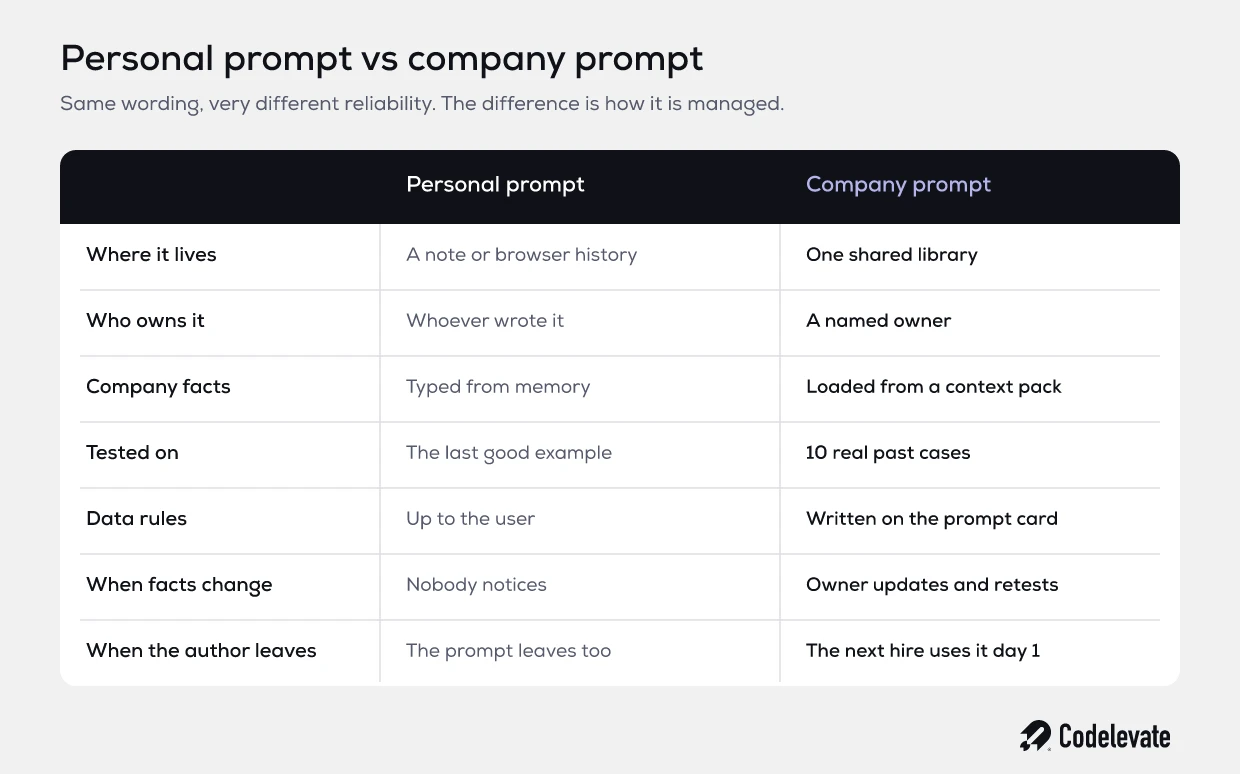
That means most of the prompting in your company is invisible to you. It happens in personal accounts, with personal prompts, on whatever tool each person prefers. That has 4 costs that rarely show up in a budget but always show up in the business.
• Inconsistent output. The same quote, email, or summary looks different depending on who made it, and customers notice.
• Silent errors. A prompt that works 8 times out of 10 feels great to the person using it. Nobody tracks the 2 times it invented a price or a policy.
• Data leaking into the wrong places. Without rules, customer names, contracts, and financials get pasted into consumer tools with unclear data terms.
• Knowledge that walks out the door. The best prompt in the company lives in one browser history. When that person leaves, it leaves too.
None of these are solved by writing a better prompt. They are solved by managing prompts the way you manage any other process. The table below shows the difference in practice.
The 5 levels of prompt maturity
In our work with SMEs we see prompts move through 5 levels. Each level adds a little structure and removes a specific risk. You do not need every prompt at level 5. You need to know which level each important task is at, and move the ones that matter.
Level 1: improvised
Someone types a request into an AI tool from scratch each time. Results vary with mood and memory. This is fine for one-off tasks like brainstorming a headline. It is not fine for anything a customer will see or anything that repeats every week.
Level 2: saved
The person who found a good prompt saves it in a note or a document. Quality goes up for that person only. This is where most SMEs are today, and it feels like progress because the individual results are good. The company still owns nothing.
Level 3: shared
Good prompts move into one shared library that everyone can find, organised by task rather than by technique. "Reply to a delivery complaint" is a useful category. "Few-shot prompts" is not. The library lives wherever the team already works, such as a shared drive, Notion, or the team workspace in your AI tool.
Level 4: tested and owned
Each important prompt has a named owner, has been tested on real past cases, and has a version date. When the prompt changes, the owner retests it. This is the level where you can honestly tell a manager that the output is reliable, because you have checked it.
Level 5: embedded
The prompt stops being something people copy and paste. It lives inside a tool: a custom assistant or project in ChatGPT, Claude, or Copilot with the context already loaded, or a step inside an automated workflow. People use the task, not the prompt. This is where time savings become real and consistent across the whole team.
The biggest jump in value is from level 2 to level 4. That is also the jump nobody makes by accident, because it requires someone to decide that prompts are company property.
If you are mapping where AI fits across your business, not just in prompts, our free SaaS founder's AI blueprint walks through how to pick the use cases that pay back first and how to structure them so they last beyond the first experiment.
How to turn a prompt into a company asset: the prompt card
The simplest way to move a prompt from level 2 to level 4 is to give it a standard format. We call it a prompt card. It takes about 20 minutes to fill in for a prompt that already works, and it makes the prompt usable by anyone on the team, including the next hire.
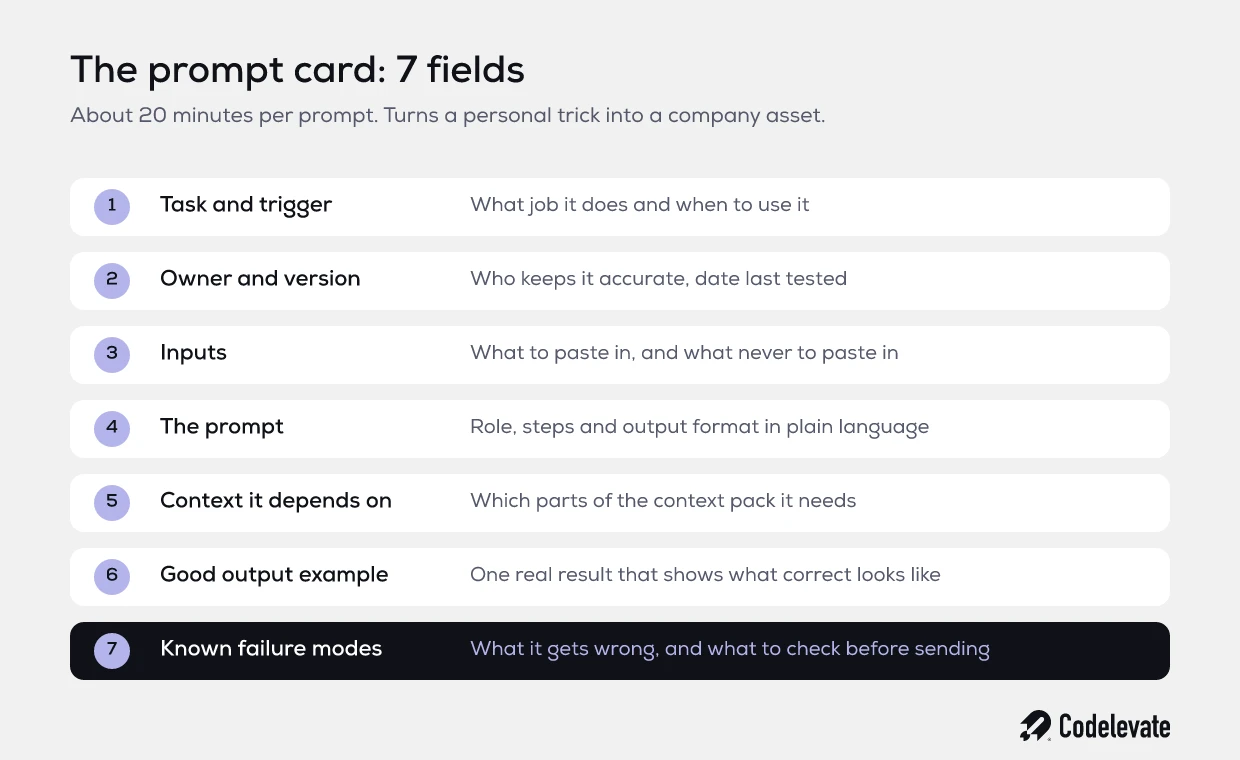
A prompt card has 7 fields.
• Task and trigger. What job this prompt does and when to use it. For example: "Draft a reply to a customer who reports a late delivery, used by the support team."
• Owner and version. The person responsible for keeping it accurate, plus the date it was last tested.
• Inputs. Exactly what the user must paste in, and what they must never paste in.
• The prompt. The instruction itself, written in plain language, with the role, the steps, and the output format.
• Context it depends on. Which parts of the company context pack it needs, such as delivery terms or tone of voice.
• Good output example. One real example of what a correct result looks like. This does more work than any adjective in the prompt.
• Known failure modes. What the AI tends to get wrong with this task, and what the user must check before sending.
The last field is the one teams skip, and it is the most valuable. Writing down "it sometimes promises next-day delivery, always check the date" turns a hidden error into a checklist item. It also tells you exactly what to fix in the next version.
The context pack: the part that does most of the work
Here is the insight that most prompt guides leave out. When AI output is wrong for a business task, the cause is usually not the wording of the prompt. It is missing context. The model does not know your delivery terms, your price rules, the name of your product tiers, or that you never offer discounts over 10% without approval. So it guesses, confidently.
The fix is a context pack: a short, maintained set of company facts that every relevant prompt can draw on. For most SMEs it fits on 3 to 5 pages.
• Company basics: what you sell, to whom, in which regions, and in which languages.
• Products and services with their correct names, tiers, and what is included.
• Commercial rules: pricing logic, discount limits, payment terms, delivery times, and what needs approval.
• Tone of voice: formal or informal, how you address customers, words you use and words you avoid.
• A glossary of internal terms and abbreviations, so the model does not misread them.
• Hard rules: things the AI must never say, promise, or decide.
Once the pack exists, you load it into the custom assistants or projects that your tools support, so nobody has to paste it by hand. Every prompt in the library gets better at once, and when your delivery terms change, you update one document instead of 30 prompts. In our experience this single step does more for output quality than all prompt formulas combined.
How to test a prompt without a data scientist
Anthropic's own guidance on prompt engineering starts with a point most business users skip. Before you work on the prompt at all, you should have a clear definition of success for the task and some way to test against it, as their prompt engineering overview puts it. That sounds technical, but for an SME it can be done in a spreadsheet in an afternoon.
Here is the method we use with clients.
• Collect 10 real past cases for the task. Include 2 or 3 awkward ones, such as an angry customer or an unusual order.
• Write 3 to 5 pass or fail checks. For example: correct delivery date, no invented discount, right tone, under 150 words.
• Run the prompt on all 10 cases and score each check. Do not edit between runs.
• Set a bar before you look at the results. For customer-facing text, 9 out of 10 passing on every check is a sensible start.
• Change one thing at a time, then run all 10 again. Keep the sheet as the record for that prompt version.
This does 3 things. It stops the team from judging a prompt on the one good example that impressed everyone in a meeting. It gives the owner a quick way to retest when the model or the context changes. And it creates evidence you can show a manager, an auditor, or a customer who asks how you use AI.
Retesting matters more than most teams expect. AI providers update and retire models regularly, and a prompt that passed in spring can behave differently in autumn. With a 10-case sheet, a retest takes 15 minutes instead of a week of complaints.
A worked example: quote follow-ups at a 35-person installation company
Take a 35-person company that installs heat pumps and solar panels in the Netherlands. Every week the office sends around 120 follow-up emails on open quotes. Four people write them. Before any changes, two of them used ChatGPT with their own prompts, one used a template from 2022, and one wrote everything by hand.
The problems were familiar. Some emails mentioned subsidies that no longer applied. Some used the formal "u" form, others the informal "je". One AI-written email promised installation within 2 weeks during a period when the lead time was 7 weeks. Nobody could say which version converted better, because every email was different.
The fix took about 3 weeks of part-time effort.
• Week 1: the office manager wrote a 4-page context pack with current lead times, the subsidy rules the company actually handles, product names, and a tone rule: always formal, always short.
• Week 1: the best of the existing prompts was turned into a prompt card, with one real email that had led to a signed order as the good output example.
• Week 2: the card was tested on 10 past quotes. The first version passed 6 of 10, mostly failing on lead times. Loading the context pack into a shared project fixed that, and the second version passed 9 of 10.
• Week 3: the prompt and context were set up as one shared assistant, so the team picks the task instead of pasting a prompt. The office manager owns it and retests monthly.
The outcome was not dramatic, and that is the point. Follow-ups became consistent, the lead-time errors stopped, and a new hire was writing correct emails on day 2. Writing time per email dropped from about 6 minutes to under 2, which across 120 emails is roughly 8 hours a week back for the office. More important, the owner now knows what every customer receives.
When a prompt should become an automation
A mature prompt library often shows you where to automate next. Once a prompt is tested and embedded, look at how it is used. If people run the same prompt dozens of times a week, copying data from one system into the AI and pasting the answer into another, the prompt has done its job. The next step is to remove the copy and paste.
We use 4 signals to decide when a prompt should graduate into an automated workflow or an AI agent.
• Volume. It runs more than about 50 times a week on the same kind of input.
• Stable quality. It passes its test sheet consistently, so you trust the output.
• System to system. The input comes from one system, such as your CRM or inbox, and the output goes into another.
• Clear review point. You can define exactly where a human checks the result before it reaches a customer.
When all 4 are true, a person spending hours copying text between windows is the expensive part of the process. That is when a small automation, built properly with logging and error handling, pays back quickly. Our guide to AI automation for SMEs and its payback shows how to estimate that return before you build anything.
When only 1 or 2 signals are true, stay at the prompt level. Automating an untested or low-volume prompt just makes mistakes faster. If you want a second opinion on which of your prompts are ready, this is exactly the kind of assessment our AI automation team does with SMEs before recommending any build.
Data rules that belong in every company prompt
Prompt engineering in a company is also a data question. Every prompt card should state what may and may not go into it, and the rules should match the tools you actually pay for. A business plan with a clear data processing agreement is a different situation from a free consumer account.
A practical baseline for most SMEs looks like this.
• Customer names and contact details only in company-approved tools with a data processing agreement.
• No health data, financial account numbers, or identity documents in prompts at all, unless a specific approved process says otherwise.
• Contracts and pricing only in tools where you have confirmed that inputs are not used for training.
• Every customer-facing output is checked by a person before it is sent.
Write these rules into the prompt cards themselves, in the inputs field, so people see them at the moment they use the prompt rather than in a policy document they read once. If you operate in the EU, this also supports the AI literacy expectations of the AI Act, because you can show that staff are given concrete guidance on how to use AI tools responsibly.
A 30-day plan to get started
You do not need a big programme to move from personal tricks to company assets. A focused month is enough to prove the approach on the tasks that matter most.
• Days 1 to 5: ask each team which AI tasks they repeat every week. List them and pick the 5 with the most volume or the most customer impact.
• Days 6 to 10: write the first version of your context pack. Keep it short and correct rather than long and complete.
• Days 11 to 20: turn the 5 chosen tasks into prompt cards, each with an owner, and test each one on 10 real cases.
• Days 21 to 25: embed the passing prompts in a shared assistant or project so nobody pastes prompts by hand.
• Days 26 to 30: review the numbers. Which prompts passed, how much time they save, and which ones meet the 4 signals for automation.
At the end of the month you have a small library the company owns, a context pack that keeps getting better, and a short, evidence-based list of where automation will pay back. That is a very different position from 12 people with 12 private prompts.
From personal tricks to a company capability
The companies that get lasting value from AI are not the ones with the cleverest prompts. They are the ones that treat prompts like any other part of how the business runs: written down, tested, owned, and improved. That turns AI from something a few enthusiastic people are good at into something the whole company can rely on.
If you want a structured way to decide which AI use cases to tackle first and how to build them so they last, download our free AI blueprint. And if you would like to talk through your own prompts, processes, and what is ready to automate, you can book a free call with our team.


.svg)
.svg)


