
n8n in production: 7 things your automation is missing
Somewhere in the last 2 years, a workflow in your company stopped being a convenience and became infrastructure. Nobody signed anything. There was no launch. Someone in operations built it on a Tuesday to save themselves an hour, and now 180 customer orders a day move through it.
The question most teams ask when they start thinking about n8n in production is whether n8n itself is production ready. That is the wrong question, and it is why so many of these conversations go nowhere. n8n is a serious piece of software that plenty of companies run at real scale. Your workflow is the part that is probably not production ready, and the gap is not technical. It is that nobody ever decided the thing was production, so none of the decisions that come with that word were ever made.
This article is written for founders, CTOs and operations leaders at companies of roughly 20 to 250 people, where automations already touch orders, invoices, payroll or customer data. If you are still evaluating tools for a first pilot, this will be early for you. If you have a workflow that would cause a bad morning if it stopped, or worse, if it kept running while being wrong, you are in the right place.
You will learn how to tell when an automation has quietly been promoted to production, the 7 properties it needs once that happens, how to decide between keeping it in n8n, splitting it or rewriting it, and what that decision looks like with real numbers on a real process.
Key takeaways
• n8n in production is an organisational problem before it is an infrastructure problem. Queue mode does not give your workflow an owner.
• A workflow is production software once it writes to a system of record, someone outside the builder depends on it, or a wrong output costs money or trust.
• The dangerous failure is not the red execution. It is the green one that did the wrong thing, which your monitoring is not looking for.
• Replay safety is the single most expensive thing to retrofit. Running a workflow twice must never pay an invoice twice.
• The default answer is not a rewrite. In most cases the right move is to split: n8n keeps the wiring, a small service you own takes the consequential write.
• Rewrite when volume, complexity, audit requirements and change frequency all point the same way. That is usually 2 or 3 signals, not 1.
• Documentation is not bureaucracy here. An undocumented critical workflow is a single point of failure wearing a person's name.
What n8n in production actually means
An automation is in production the moment a person who did not build it depends on its output and a wrong result has a cost. That is the whole definition. It has nothing to do with where it is hosted, whether you pay for the cloud plan, or how many nodes it has.
This matters because the word production carries a set of obligations that teams apply automatically to software and almost never apply to workflows. When your engineers ship a feature, nobody has to argue for code review, a staging environment, an on-call rotation or a rollback plan. Those things arrive with the category. A workflow built in a visual editor by someone in finance arrives with none of them, and the absence is invisible, because the thing works.
There is a second confusion worth clearing up. n8n being production grade and your workflow being production grade are separate claims. The platform can be perfectly capable of running your load while your particular workflow is one renamed field away from silently dropping every third order. Vendors answer the first claim. Nobody answers the second one for you.
We see this pattern constantly when we are brought in to look at an automation estate. The infrastructure is usually fine. What is missing is ownership, failure handling and any way to tell the difference between a workflow that ran and a workflow that was right.
The promotion moment nobody attends
Workflows get promoted to production without a meeting. There are 3 crossings, and the first one you pass is the one that counts.
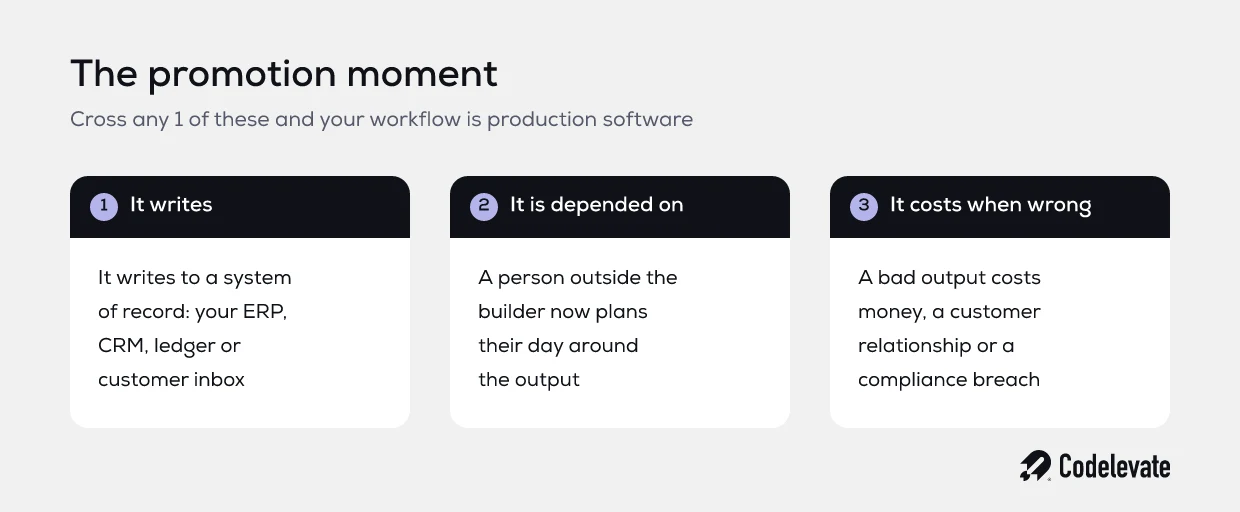
• It writes. The workflow no longer just reads and notifies, it creates or changes records in a system of record: your ERP, your CRM, your ledger, your customer inbox.
• It is depended on. Someone outside the builder plans their day around the output and stopped doing the manual version months ago.
• It costs when wrong. A bad output means money moved incorrectly, a customer told something false, or a compliance obligation missed.
The useful exercise takes 20 minutes. List every automation you run, and mark which of the 3 each one has crossed. Most teams are surprised twice. First by how many workflows have crossed at least 1 line. Second by how many of those were built by someone who has since changed role, or left.
Why automations fail quietly
Here is the failure mode that should worry you, and it is not the one people plan for.
A workflow that crashes is a good failure. It is loud, it shows as red in the execution list, someone gets an alert and the problem is visible within minutes. The expensive failure is the workflow that completes successfully and does the wrong thing. Every execution is green. The dashboard is clean. And for 11 days, purchase orders have been created against the wrong supplier because an upstream system started returning the vendor code in a different field.
The common shapes of this are worth knowing, because once you can name them you start seeing them:
• An API returns HTTP 200 and a body that says the operation was rejected. The node is happy. The record was never written.
• A field is renamed upstream, so a filter node now matches nothing. Zero items flow through, and zero items is not an error.
• A model node returns fluent, plausible, incorrect output. There is no exception to catch, because nothing technically failed.
• A retry runs a step that already succeeded, and a second invoice goes out to the same customer.
• A rate limit returns a partial page of results, and the workflow processes 50 of 200 records as if that were all of them.
Every one of those is a successful execution. This is the gap between monitoring, which watches whether the workflow ran, and observability of outcomes, which watches whether the business got the right result. Almost nobody builds the second one, which is why these problems are typically discovered by a customer or an accountant rather than by a system.
If you are working through where automation and AI genuinely pay off in your operation, our SaaS AI Blueprint covers how to scope this kind of work so it survives contact with real volume. It is free, and it is written for the person who has to defend the budget.
7 things your n8n workflow is missing
These are the properties that separate a clever workflow from production software. None of them require you to leave n8n. All of them require somebody to decide.
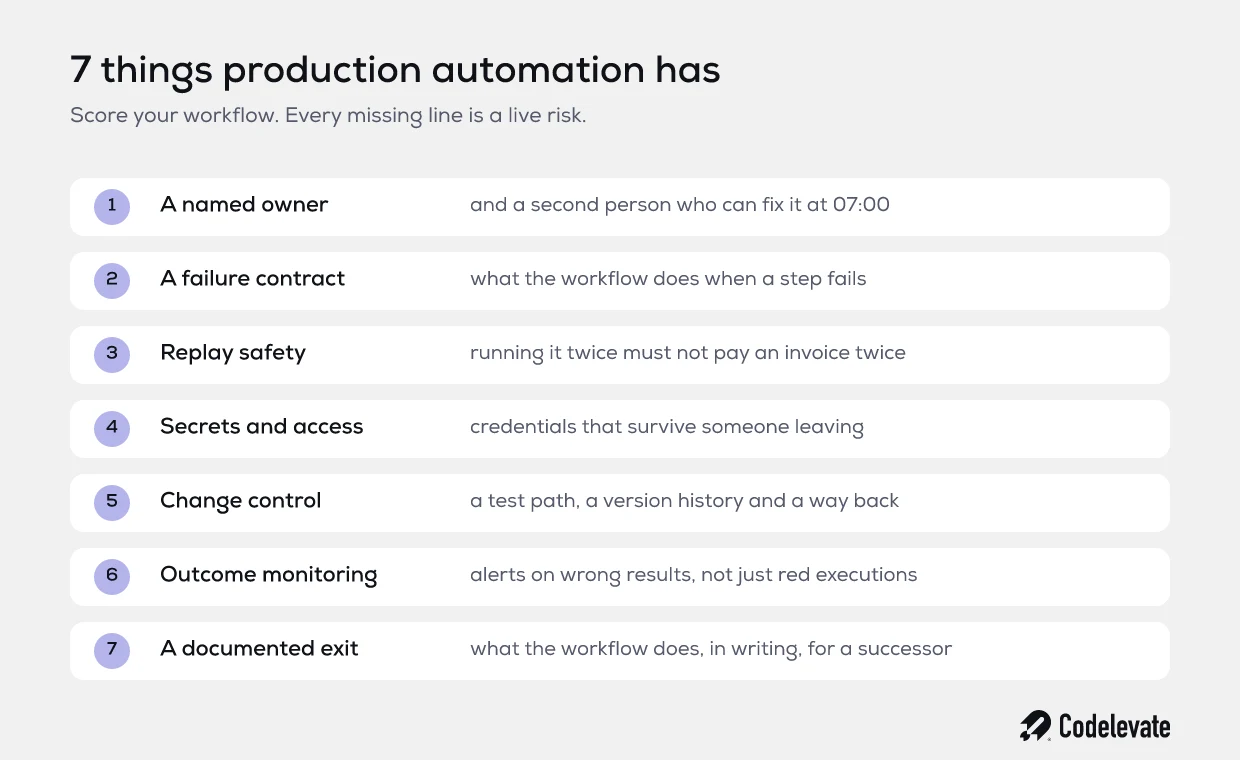
1. A named owner, and a second person
Write a name against every workflow that has crossed a line, then write a second name. The first person is accountable for whether it is still correct. The second person is the one who can fix it at 07:00 when the first is on a plane.
The bus factor on business automations is routinely 1, and it is usually somebody in operations rather than engineering, which means it sits outside every process your engineering team uses to manage risk. That is not a criticism of the builder. It is a gap in how the company treats the category.
2. A failure contract
Before you touch anything technical, answer 1 question for each workflow: when a step fails, what should happen to the work in flight? There are only 4 honest answers, and choosing one is a business decision, not a developer preference.
• Stop everything and alert a human, because a partial run is worse than no run.
• Skip this item, log it, continue with the rest, and give someone a list at the end of the day.
• Retry a set number of times, then escalate.
• Hold the item in a queue for manual review before it reaches the system of record.
Once you have the answer, n8n can implement it. The platform supports a dedicated error workflow per workflow that runs on failure and receives the error, the failing node and the execution details, which is what you route into a real alert. The n8n documentation on handling errors gracefully covers the mechanics. The part the documentation cannot give you is the decision about what your business wants to happen.
3. Replay safety
This is the one that costs the most to retrofit, so decide it early. If the same input arrives twice, or someone re-runs a failed execution to fix it, does the world change twice?
A workflow that sends an email twice is embarrassing. A workflow that creates a payment, a purchase order or a customer record twice is a finance problem with a paper trail. The fix is a stable idempotency key on every write: an order number, an invoice reference, a message ID, checked against the target system before the write happens. It is 15 minutes of thinking and 1 extra node. Without it, every retry you build is a loaded weapon pointed at your own ledger.
4. Secrets and access that survive a leaver
Open your credential list and ask who those credentials belong to. In most estates we review, the answer is a personal account: someone's Google login, someone's API token, someone's mailbox. When that person leaves, or simply rotates a password, workflows start failing in ways nobody connects to the offboarding that happened 3 weeks earlier.
Service accounts, scoped to the minimum permission the workflow actually needs, are the fix. While you are in there, check what the workflow can reach. A node authorised with a full admin token to update 1 field is a much bigger incident when something goes wrong than it needed to be.
5. Change control
Production software has a version history, a way to test a change before it is live, and a way back. Most business automations have a person editing the live workflow while it runs.
You do not need full engineering ceremony. You need 3 things: a copy of the workflow you can change safely, a small set of known inputs you run through it before promoting a change, and an exported version of what was working yesterday. The middle one matters most. A 30 node workflow cannot be verified by looking at it, and the person who understands it least is the person who built it 6 months ago.
6. Monitoring outcomes, not executions
Execution monitoring answers whether the workflow ran. Outcome monitoring answers whether it was right, and it is the one that catches silent failure.
The practical version is cheaper than it sounds. Pick 2 or 3 numbers the process should produce, and alert when they drift. If you normally create 150 to 220 orders a day, an alert on any day under 100 will catch the renamed field long before a customer does. If 6% of items normally need human review, a day at 0% means the classifier stopped classifying, not that quality improved. Volume, exception rate and time to complete will find most of what your execution list hides.
7. A documented exit
One page per critical workflow: what it does in business terms, what it touches, what happens when it breaks, who to call, and how to do this by hand for a day if it is down. If that page does not exist, the workflow is a single point of failure that happens to be wearing a person's name.
A worked example: 180 orders a day
A wholesaler we worked with, about 40 people, took customer orders by email. An operations manager built an n8n workflow that read the mailbox, used a model to pull product codes and quantities out of the message, matched them against the catalogue and created the order in the ERP. It took 2 weeks to build and removed roughly 5 hours of typing a day. By any reasonable measure it was a success.
18 months later it handled 180 orders a day and had crossed all 3 lines. It wrote to the ERP, the whole sales desk depended on it, and a wrong order shipped pallets to the wrong address. What surfaced the problem was a credit note run: over 2 weeks, 23 duplicate order lines had been created, worth about 4,100 euro in returns, admin and 1 genuinely irritated customer. The cause was a retry on a timeout, on a workflow with no idempotency key.
The instinct in the room was to rewrite it as a proper service. We scored it against the signals instead. Volume was 180 orders a day, which is nothing. The logic was 22 nodes and had barely changed in a year. There was no audit requirement. But the cost of a wrong write was real money, and 1 person owned the whole thing.
So we did not rewrite it. We added an idempotency check against the ERP order reference, moved the ERP write into a small service with validation rules the ops team could not change by accident, pointed the model output at a review queue when confidence was low, added an error workflow that posted failures into the sales desk channel, and put a daily alert on order volume and exception rate. That was 3 weeks of work rather than 4 months. The workflow is still an n8n workflow. It is just no longer the only thing standing between a timeout and a duplicate pallet.
Keep it, split it or rewrite it
When an automation reaches this point there are 3 honest options, and the industry default of rewriting everything in code is usually the worst value for money. Read each signal separately. If 2 or more land in the same column, that is your answer.
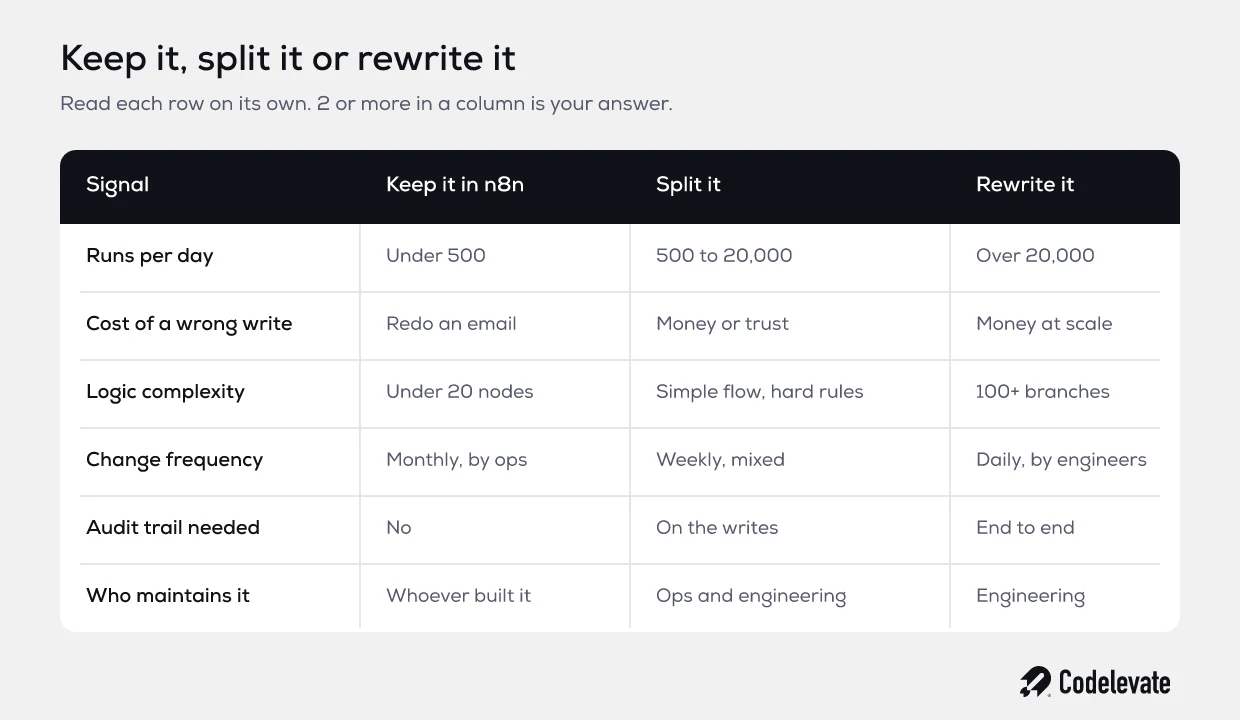
Keeping it in n8n is the right answer far more often than engineers like to admit. If the process changes monthly and the person who changes it is in operations, moving the logic into code takes a 1 hour change and turns it into a sprint ticket. You will have bought reliability by spending flexibility, and for most internal processes that is a bad trade.
Rewriting earns its cost when several signals agree: high volume, complex branching logic, an audit trail that has to hold up to a regulator, and daily changes made by engineers anyway. One signal on its own is not enough. Plenty of teams rewrite because a workflow got embarrassing to look at, which is an aesthetic argument with a 4 month price tag.
The split pattern, which most articles skip
The middle option is the one that gets left out of every comparison piece, and it is the one we recommend most often.
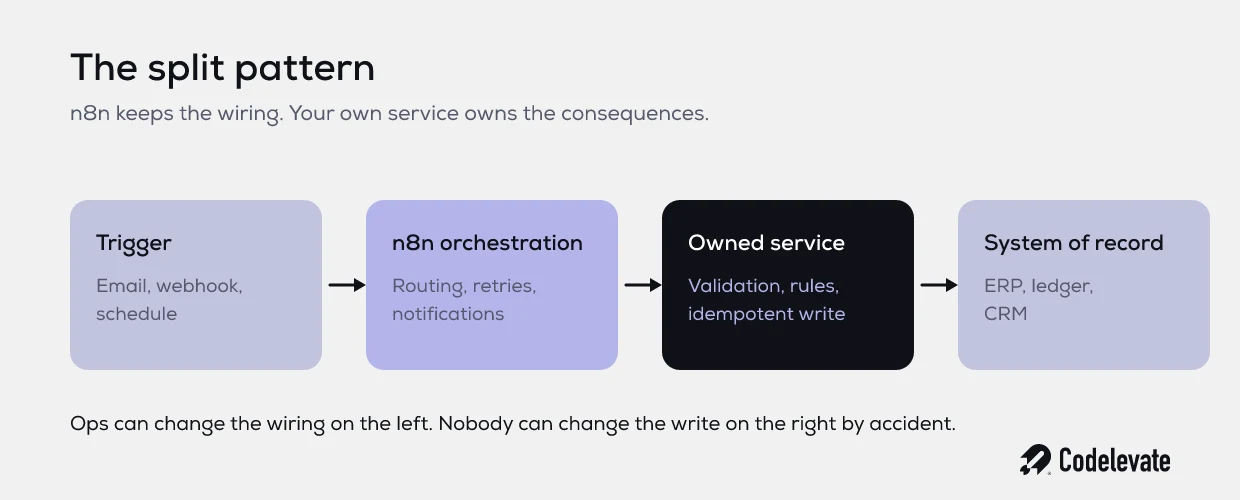
Split the workflow along the line where consequences begin. n8n keeps what it is genuinely good at: triggers, routing, retries, notifications, connecting 9 systems without writing 9 integrations. The step that changes the world moves behind a small service you own, with validation, an idempotency key, logging and tests.
The ops team keeps their speed on everything to the left of that line. They can add a notification, change a route or handle a new email format without filing a ticket. Nobody can accidentally change what it means to create an order, because that now lives in code with a test around it. You have put engineering rigour on the 5% of the process where a mistake costs money, and left the other 95% flexible.
In practice this is often 1 endpoint and a few hundred lines. It is the cheapest risk reduction available in an automation estate, and it is available to you without an architecture programme.
The infrastructure part, briefly
If you self host and volume is climbing, there is a real technical ceiling on a single n8n instance, and the answer is queue mode: a main instance that handles triggers and webhooks, Redis as the broker, and worker instances that execute the workflows. n8n's own guide to enabling queue mode sets out the constraints, including that queue mode needs PostgreSQL rather than SQLite, that workers default to 10 concurrent jobs, and that every worker has to share the main instance's encryption key.
Move to Postgres before you need to, not during an incident. Beyond that, treat this as the easy half of the problem. Infrastructure has documentation, defaults and a vendor with an interest in your success. Ownership, failure contracts and replay safety have none of those things, and they are what actually takes companies down.
How we approach this at Codelevate
When a client asks us to look at an automation estate, we do not start with the tooling. We map which workflows have crossed the 3 lines, score each one against the 7 properties, and produce a short list ranked by what a failure would actually cost. It is common to find 30 or 40 workflows where 3 of them carry nearly all the risk.
Then we fix those 3, usually with the split pattern, and leave the rest alone. As an AI automation agency we would make more money proposing a platform rebuild. It is rarely the right recommendation, and it is a slow way to reduce risk that could have been reduced in a fortnight. If you want the adjacent problem of who looks after an automated system once it is live, we went deeper on that in who owns your AI agent after launch.
Where this leaves you
The transformation here is small and unglamorous. You go from an automation estate that works until it quietly does not, to one where you know which workflows matter, who owns them, what they do when they break, and what it would cost if they were wrong for 2 weeks. That is the difference between automation as a productivity trick and automation as infrastructure you can build a business on.
Start with the 20 minute exercise. List your workflows, mark the 3 crossings, and pick the 1 with the most expensive failure. Give it an owner, a failure contract and an idempotency key this month. Those 3 alone remove most of the risk in most estates.

If you want the wider framework for deciding where automation and AI are worth real investment, the SaaS AI Blueprint is free and goes further than this article can.
And if you already know which workflow keeps you up at night, book a free call with our team. We will look at what you are running and tell you honestly whether it needs 3 weeks of hardening or a rebuild.

.svg)
.svg)


