
How to migrate from Webflow to Astro and Sanity, and run it with Claude
Most guides about leaving Webflow answer the wrong question. They compare page speed, hosting bills, and CMS item caps, as if the decision were a feature bake-off. It is not. The real question is who operates your website every week, and with what.
That reframe changes the whole project. Migrating from Webflow to Astro and Sanity means trading a visual editor your marketing team already knows for a codebase an AI agent can operate. That trade pays off only if you actually adopt the agent workflow afterwards. Teams who migrate and then route every copy change back through a developer end up slower and more expensive than they were on Webflow, with a nicer Lighthouse score to show for it.
This article is for founders, CTOs, and marketing leads at companies with a real content operation, not a 5-page brochure site. If a developer touches your site once a quarter and your bills are reasonable, you can stop reading now and stay where you are.
If you are past that point, here is what you will get: how to decide honestly, what Webflow does and does not hand you on the way out, how to model your content in Sanity instead of copying your collections across, the 7 migration steps in order, how to protect your rankings through cutover, and how the editing experience actually works afterwards using Sanity, Stacki, and Claude.
Key takeaways
• Migrating from Webflow to Astro and Sanity is a rebuild, not an export. The Webflow code export is a visual reference, not a foundation.
• Decide based on who edits the site weekly. Engineering-led teams gain speed. Marketing-led teams usually lose it.
• Pull CMS content through the Webflow Data API or CSV export, never from the HTML export, which strips CMS data and component intent.
• Model content in Sanity around what it is, not how Webflow rendered it. Copying collection structures one to one carries old mistakes into a new system.
• Missing 301 redirects, not the platform change, is what kills rankings. Build the redirect map before you build a single page.
• Assets must move off the Webflow CDN before cutover, or your production content breaks when the site plan lapses.
• The editing surface is the real objection, and it has an answer: Sanity Presentation for content, Stacki for layout, Claude for the rest.
• Budget 4 to 8 weeks for a typical 50 to 100 page marketing site, less if your content model is clean.
What does migrating from Webflow to Astro and Sanity actually mean?
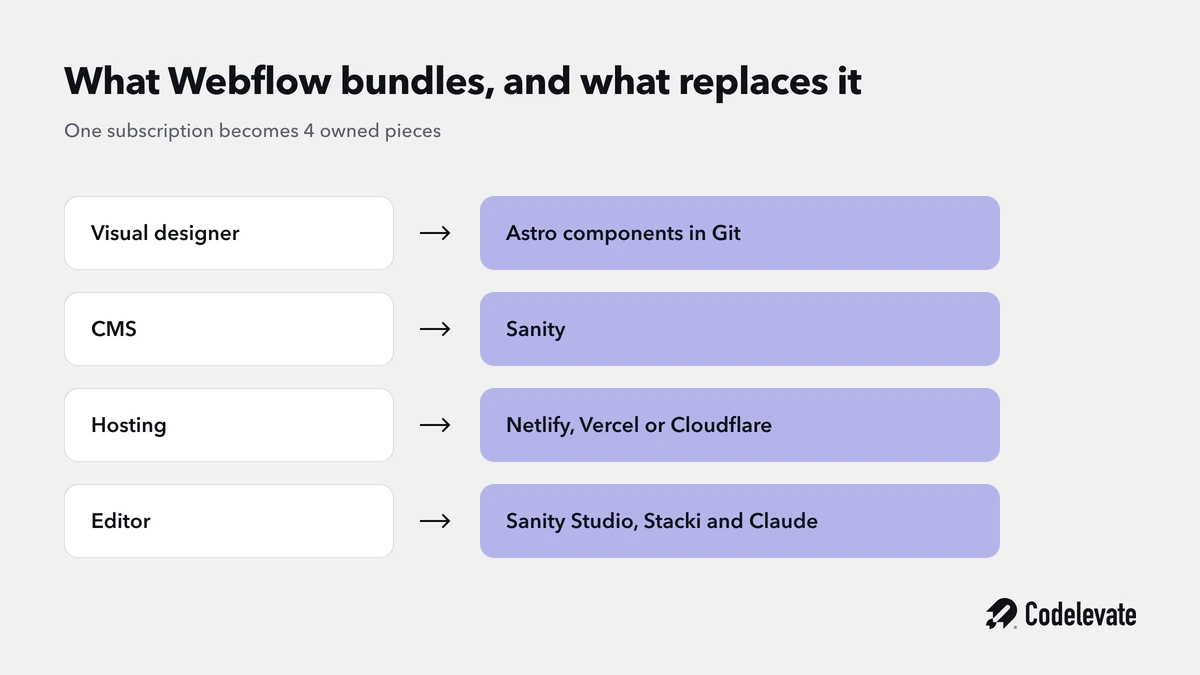
Migrating from Webflow to Astro and Sanity means replacing one bundled product with three specialised ones. Webflow sells a visual designer, a CMS, a hosting platform, and an editor interface as a single subscription. Astro, Sanity, and a static host unbundle that, and each piece becomes something you own and version.
It helps to be precise about what replaces what, because most migration plans quietly lose one of these four jobs and only notice after launch.
Webflow's visual designer becomes Astro components, written as code and stored in Git. Webflow's CMS becomes Sanity, a headless content platform with a structured schema and its own Studio. Webflow's hosting becomes a static host such as Netlify, Vercel, or Cloudflare Pages. Webflow's Editor, the thing your marketing team logs into, becomes Sanity Studio plus, optionally, a visual layout tool like Stacki.
The fourth one is where migrations go wrong. Teams plan the first three carefully and treat the editing experience as an afterthought, then discover in week 6 that their content team has no way to change a hero headline without filing a ticket.
Astro is worth understanding on its own terms. It ships zero JavaScript to the browser by default and renders to static HTML, adding interactivity only where you explicitly ask for it through its islands model. That is why Astro sites tend to score well on Core Web Vitals without much tuning. It is a rendering framework, though, and nothing more. It has no CMS, no editor, and no opinion about where your content lives.
Sanity fills that gap. Content is stored as structured documents, queried with GROQ, and edited in a Studio you configure in code and deploy alongside your site. Rich text is stored as Portable Text, a structured array rather than an HTML blob, which is what makes content portable across whatever you render it with next.
Should you migrate from Webflow to Astro at all?
Migrate when your constraints are structural and your team is engineering-led. Stay on Webflow when your marketing team edits layouts visually every week and your bills are sane. That is the honest version, and it is worth saying plainly because Codelevate is a Webflow Certified Professional Partner and builds on Webflow every week. We are not arguing that Webflow is bad. We are arguing that it is a specific tool with a specific shape.
When migrating is the right call
The signals that justify a migration are concrete, not aesthetic:
• You are hitting hard platform limits. Webflow caps CMS collections and items per site, and the Designer gets noticeably slower on very large collections. If your content roadmap runs past those caps, you are going to hit a wall regardless of budget.
• Your costs scale against you. Webflow prices per site, per seat, and per bandwidth tier. A content operation that grows in all three directions at once produces a bill that grows faster than the value it creates.
• You need a real deployment pipeline. Branch previews, pull request reviews, automated tests, staged rollouts, and CI checks are standard practice in software and unavailable in Webflow.
• Your site is a product surface, not a brochure. Once your marketing site needs authenticated areas, dynamic pricing logic, deep app integration, or programmatic page generation at scale, you are fighting the tool.
• Your team already works in code. If the people who change the site most are engineers, every visual abstraction between them and the output is friction rather than help.
When you should stay on Webflow
The strongest argument for staying is organisational, not technical. Webflow's Editor is genuinely good, and a marketing team that ships landing pages independently is a real competitive advantage. Replacing that with a ticket queue is a downgrade no Lighthouse score compensates for.
Stay if your content team changes layouts, not just copy, on a weekly basis. Stay if you have no in-house engineering capacity and no plan to acquire it, because an Astro and Sanity site needs an owner. Stay if your site is under 20 pages and your total Webflow spend is a rounding error. And stay if you are mid-way through a rebrand or a funding round, because a replatform is a bad thing to run concurrently with anything else that matters.
One more honest caveat. The AI coding agent argument, that Claude can now rebuild a site quickly, is real but frequently oversold. Agents accelerate the rebuild considerably. They do not remove the need for someone who can tell when the output is wrong, and the last stretch of any migration is judgment work: spacing that is almost right, an animation that feels off, a redirect that silently 302s instead of 301s.
What Webflow actually hands you on the way out
Webflow gives you three export paths, and picking the wrong one costs weeks. The HTML export produces a static snapshot of your published pages with Webflow's own CSS. It looks like a head start and is not one.
The HTML export drops your CMS content entirely, since collection pages export as a single template, not as data. It loses component definitions, variants, and every piece of designer intent behind them. It carries Webflow's generated class names, which encode visual decisions rather than semantic structure. Treat it as a visual reference for rebuilding, the same way you would treat a screenshot, and nothing more.
The paths that actually matter are the CMS ones. Each collection can be exported as CSV directly from the Webflow Designer, which is often enough and has the advantage of being easy to audit by eye. For larger or more relational sites, the Webflow Data API gives you the same content programmatically, which makes the export repeatable when you need to re-run it after a content freeze.
Two traps are worth knowing before you start. Webflow reference and multi-reference fields export as opaque item IDs, so you cannot join collections on names or slugs and expect it to hold. And rich text fields come out as HTML strings, sometimes carrying Webflow-specific markup, which means rich text conversion is a real task rather than a copy and paste.
There is a fourth thing Webflow does not hand you at all: your component inventory. Which components exist, which variants they have, and which pages use them is visible only in the Designer. Write that inventory down manually before you cancel anything, because it is not recoverable from any export and it is the input you need when designing your Sanity page builder.
A migration cutover has the same failure modes as any site launch, only with more URLs at stake. Our free 70-point Webflow launch checklist is the pre-launch process we run before any client site goes live, and most of it applies directly to the steps below.
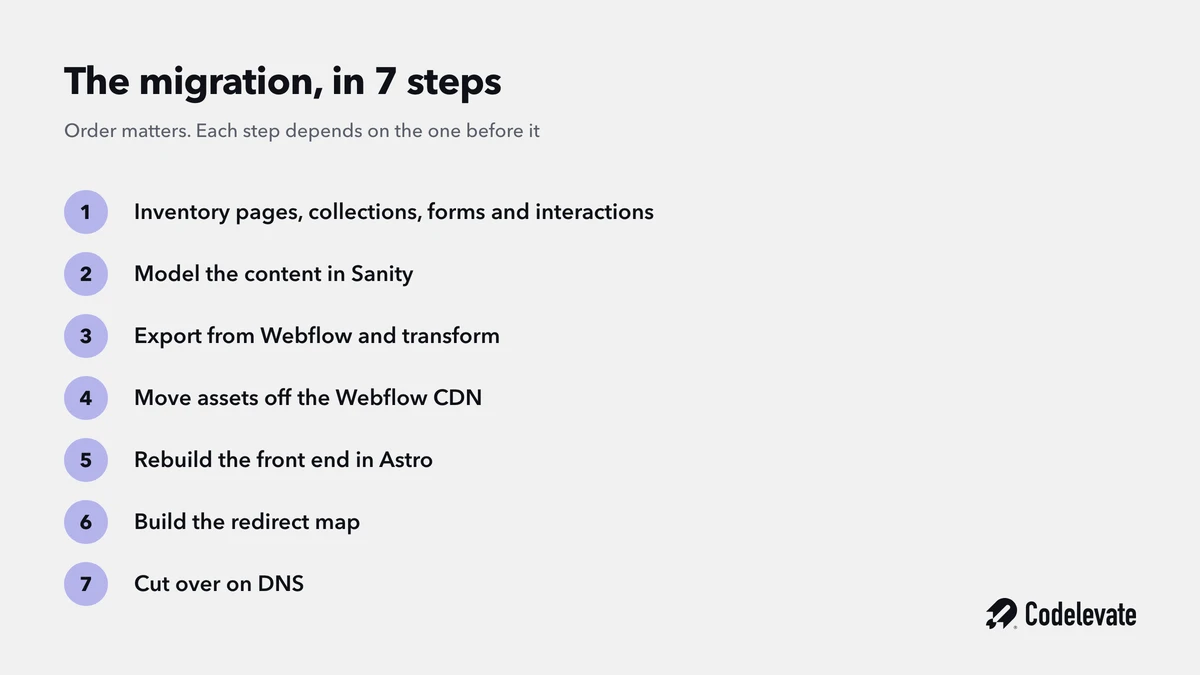
Step 1: Inventory everything before you touch anything
Start with a full inventory, mapped against traffic data, not against your sitemap alone. You are trying to answer two questions: what exists, and what deserves to survive.
Pull every indexed URL from Google Search Console and every route from your sitemap, then join that against analytics. On most sites a meaningful share of pages turn out to be consolidation candidates or dead weight: old campaign landing pages, duplicate service pages, orphaned CMS items nobody has opened in two years. Deciding what to retire now is much cheaper than rebuilding it and deciding later.
Your inventory needs to cover more than pages. Catalogue every CMS collection with its item count and field list, every form and where its submissions go, every third-party embed and script, every Webflow Interaction that carries real meaning rather than decoration, and every gated or password-protected area. Note your top 50 pages by organic traffic separately, because those are the ones where a redirect mistake is expensive.
Step 2: Model the content in Sanity, do not copy your collections across
This is the step that separates a migration from a transplant, and it is the one most guides skip in a sentence. Model what your content is, not how Webflow rendered it.
Webflow collections usually become Sanity document types, and that mapping is often clean. But a Webflow collection frequently encodes compromises: a field that exists because the Designer needed it, a taxonomy stored as free text because Webflow reference fields were awkward, three near-identical collections that should have been one with a type field. Carrying those across means paying for old decisions twice.
The distinction that matters most in Sanity is documents versus objects. Use documents for things that are reusable or independently managed, such as an author, a case study, or a service. Use objects for content owned by exactly one parent document, such as a hero section or a testimonial that never appears anywhere else. Getting this wrong in either direction is the most common modelling mistake: everything as documents produces an unmanageable Studio, everything as objects makes reuse impossible.
Your static Webflow pages need a decision too. A homepage or pricing page that has no siblings should become a singleton document with a fixed ID, not an entry in a collection of one. Pages built from repeating, rearrangeable sections should become documents with a page builder array, where each section is an object type.
To design those section types, use the component inventory from step 1 alongside the exported HTML. Group visually similar structures, note where variants genuinely differ in meaning rather than in styling, and name the results semantically. A section is a featureGrid, not a section-wrapper-dark-2. Webflow class names describe appearance, and appearance is the frontend's job.
Add variant fields only when the variation is an editorial choice that will stay stable, things like tone, emphasis, or layoutIntent. Do not create a variant field for every visual permutation that exists today.
Step 3: Export from Webflow and transform the content
Snapshot first, transform second. Pull the raw CSV or API output to disk and commit it before writing a single line of transformation code. Migrations get re-run, usually more than once, and you want the ability to re-run the transform without re-hitting Webflow.
Give every document a deterministic ID derived from its Webflow item ID or slug, rather than a random one. This single decision is what makes the whole migration idempotent. Combined with createOrReplace or createIfNotExists, it means running the import twice converges on the same result instead of duplicating your entire content library.
Import order follows dependencies. Leaf collections go first, the ones nothing else points at but that everything references: categories, tags, authors, locations. Then build a lookup map from Webflow item IDs to Sanity document IDs, and import the dependent collections using it. Because your IDs are deterministic, you can create references to documents that do not exist yet and let them resolve as the import proceeds.
Rich text is its own job. Webflow hands you HTML, and Sanity expects Portable Text, which is a structured array of blocks rather than a string. Do not shortcut this by storing the raw HTML in a text field. It works on day one and then blocks every future change: you cannot restyle it, you cannot render it in a different frontend, and you cannot query inside it. Convert explicitly, and handle inline images, links, embeds, and lists as deliberate cases rather than hoping the converter guesses right.
Normalise as you go. Real CSV exports contain empty columns, boolean-ish strings, inconsistent taxonomy spellings, and the occasional duplicate slug. Fix those in the transform, not by editing the live Webflow CMS, which only makes the source harder to re-export.
Step 4: Move the assets off the Webflow CDN
Migrate every asset into Sanity before you import the documents that reference them, then replace the Webflow CDN URLs. Leaving production content pointed at Webflow's CDN is the quiet failure mode of half-finished migrations: everything looks fine at launch, then the Webflow site plan lapses months later and images disappear across the site.
Assets hide in more places than the obvious image fields. Collect URLs from CSV image columns, from inside rich text HTML, from static page HTML, from your CSS backgrounds, and from Open Graph and Twitter card metadata. That last category is easy to miss and shows up as broken previews when your content is shared.
Once assets live in Sanity, you get its image pipeline as a bonus: on-the-fly transforms, format negotiation, and hotspot and crop metadata that editors can set per image and every template respects.
Step 5: Rebuild the front end in Astro
Rebuild in components, not in converted HTML. The temptation is to paste exported markup into Astro files and move on, which produces a codebase that is technically in Astro and practically still Webflow, complete with its class names and its structural quirks.
Sanity's official Astro integration handles the connection. The @sanity/astro package wires up a configured client, exposes it to your components, and supports mounting Sanity Studio as a route inside the same project. It also supports the Presentation tool and visual editing overlays against a server-rendered Astro frontend, which matters a great deal for step 7.
Three parts of the rebuild consistently take longer than teams estimate.
Interactions are first. Webflow Interactions do not export in any usable form, so anything beyond a CSS hover state needs rebuilding, usually in GSAP or with native browser APIs. Audit these honestly during inventory, because most sites have a handful that matter and a long tail that nobody would notice if it disappeared.
Forms are second. Webflow handles submission, storage, spam filtering, and notification as one built-in feature. On Astro you assemble that from a form handler, whatever your host provides or a dedicated service, plus your CRM integration and a spam strategy.
Search is third, if you have it. Webflow's site search goes away, and the usual replacement on a static site is an index built at build time, with Pagefind being the common choice.
Step 6: Protect the SEO before you launch, not after
Build the redirect map before you build pages. Missing or wrong 301 redirects, not the platform change itself, is the single largest cause of traffic loss in replatforms, and it is entirely preventable.
Crawl every old URL, including CMS item pages, category pages, and paginated routes, and map each one to its destination. Where slugs stay the same, keep them the same, since URL parity is free and every change you avoid is a risk you avoid. Where pages are consolidated or retired, point them at the closest genuine equivalent rather than defaulting everything to the homepage, which search engines treat as a soft 404.
Beyond redirects, four things need to carry across intact. Metadata, meaning titles, descriptions, and canonical tags, page by page rather than templated into sameness. Structured data, rebuilt to match what you had, since Webflow sites often carry schema injected through custom code that is easy to forget. Open Graph images, which break silently and only show up when someone shares a link. And your sitemap, generated by Astro's sitemap integration and resubmitted in Search Console on launch day.
Then watch it. Keep the old URL list and crawl it against production after cutover to catch redirect chains and accidental 302s. Expect some ranking movement in the first fortnight and monitor for at least 30 days before drawing conclusions.
Step 7: Cut over without downtime
Build everything on a preview URL and leave DNS until last. Your Webflow site keeps serving traffic normally the entire time, which removes deadline pressure and means a cutover can be postponed by a day without anybody noticing.
The sequence that works is straightforward. Deploy the Astro site to a staging domain and validate it against the inventory from step 1, page by page for the top pages and by sampling for the long tail. Announce a content freeze in Webflow, short, usually 24 to 48 hours. Re-run the export and import to pick up anything published during the build, which is painless precisely because your IDs are deterministic. Point DNS at the new host. Submit the new sitemap. Crawl the old URL list against production and fix anything that does not resolve.
Keep the Webflow site plan alive for a billing cycle after cutover. It is cheap insurance, it gives you a reference for anything you discover you missed, and it means a rollback is a DNS change rather than an emergency.
Who edits the site after you leave Webflow?
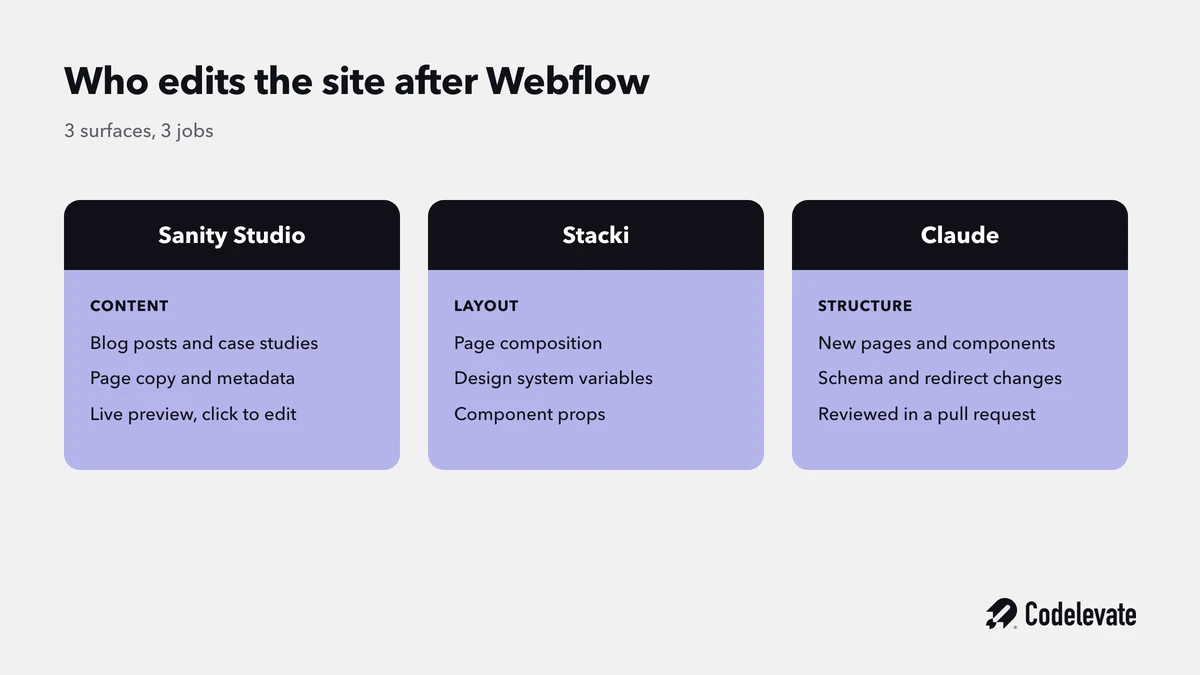
This is the question that decides whether the migration was worth it, and it has three answers working together.
Sanity Studio handles content. Every structured field your editors touch, blog posts, case studies, service pages, team members, lives in a Studio you configure and deploy with the site. With the Presentation tool configured, editors get a side-by-side preview of the real page with click-to-edit overlays, which is close to the Webflow Editor experience for content changes. Draft mode means they see unpublished work in context before anything goes live.
Stacki handles layout. It is a free, open source, MIT-licensed visual builder that runs locally against an Astro project you already have, and it writes real files rather than generating a separate export. You point it at your project folder and lay out pages, adjust design system variables, manage content collections, and configure component props visually. For teams whose main fear is losing visual control, this is the piece that answers it. It is a young tool and worth evaluating against your own project before committing to it as the primary editing path.
Claude handles everything else, and this is where the operating model genuinely changes rather than just moving. A new landing page, a schema field, a component variant, a redirect rule, a copy change across 40 pages: these become natural language requests against a repository, executed, reviewed in a pull request, and deployed.
How Claude changes the operating model, not just the rebuild
Most coverage of AI in migrations stops at the rebuild, as if the value were a one-time speed boost. The durable change is what happens in month 7.
On Webflow, the ceiling on site changes is the Designer and who has a seat in it. On an Astro and Sanity codebase, the ceiling is how clearly someone can describe what they want. Claude can read the whole repository, understand your component library and your Sanity schema, and make consistent changes across both. The work arrives as a pull request with a preview deployment, which means it gets reviewed like code rather than published like a guess.
We are not speculating about this. Codelevate runs Claude against Webflow through the MCP connector already, and we have written up how we manage Webflow sites with AI. The useful comparison is direct: the connector is genuinely good for content operations and bulk CMS work, and it is limited for structural change, because there is only so far an API can reach into a visual builder. Against a codebase, that ceiling largely disappears. That difference, more than hosting cost or Lighthouse scores, is the strongest current argument for the migration.
Two honest caveats. An agent working in a codebase needs the guardrails that make any codebase safe: pull request review, preview deployments, type checking, and someone competent reading the diff. And roughly the last portion of any agent-assisted rebuild is manual refinement, the visual judgment that agents still get subtly wrong.
What a Webflow to Astro and Sanity migration costs and how long it takes
Budget 4 to 8 weeks and a five-figure project cost for a typical 50 to 100 page marketing site with a few CMS collections. Small sites under 20 pages with clean content can land in about 2 weeks. Sites with large, relational content models and heavy interactions run past 8 weeks, and a site with more than a couple of thousand CMS items across many collections should be scoped on its own terms.
The cost drivers are not where people expect. Page count matters far less than content model complexity, because 200 pages from one clean template is a smaller job than 30 pages with bespoke layouts. The genuinely expensive items are the number of distinct page section patterns, the number of Webflow Interactions that carry real meaning, reference-heavy content models, and anything gated or authenticated.
Running costs afterwards drop substantially for most teams, though not to zero. Static hosting for a marketing site is usually free or close to it. Sanity has a free tier that covers small teams and per-seat pricing above it. Against that, you now own maintenance, and the honest accounting includes whoever keeps dependencies current and the site deploying.
Where teams get the arithmetic wrong is by comparing the Webflow subscription against hosting alone. The right comparison includes the engineering time your setup requires, and for a marketing-led team with no in-house engineers that number is high enough to make staying on Webflow the cheaper option.
How Codelevate approaches this migration
We treat the content model as the deliverable and the frontend as the consequence. In practice that means we spend the first phase on inventory and Sanity schema design, with the component inventory reviewed by a human before any schema is finalised, because a page builder designed from exported HTML alone bakes in Webflow's visual decisions permanently.
We build extraction and import as scripts with deterministic IDs rather than as one-off operations, so the whole migration can be re-run after a content freeze without fear. We validate before cutover against a fixed checklist: row counts matched against Webflow collection counts, every reference field resolving, rich text spot-checked for links and images and embeds, every Webflow CDN URL replaced, and every old URL crawled against the new site.
And we are straight with clients about the editing model before anything is signed, because that is where post-launch regret comes from. If a marketing team is going to lose more than it gains, we say so, and we have kept plenty of clients happily on Webflow for exactly that reason. You can see the shape of our engagements on our website development page.
Conclusion
Migrating from Webflow to Astro and Sanity is worth it when your constraints are structural and your team is set up to operate a codebase. The technical work is well understood: export through the Data API rather than the HTML export, model content semantically in Sanity rather than copying collections across, move assets off the Webflow CDN, build the redirect map before you build pages, and cut over on DNS with the old site still standing.
What you are really buying is a different operating model. A website that lives in a repository can be changed by anyone who can describe the change clearly, reviewed like software, and deployed safely. That is the transformation, and it is also the test: if your team will not work that way, the migration will not pay for itself no matter how clean the build is.
Before any cutover, run the launch basics properly. Our free 70-point Webflow launch checklist covers the SEO, performance, and redirect checks that decide whether a replatform holds its rankings, and it applies whichever stack you land on.
If you are weighing this decision and want a straight answer about whether it makes sense for your site, book a free call with our team. We build on both stacks and we will tell you honestly which one you should be on.


.svg)
.svg)


