
AI agent monitoring in 2026: who owns your agent after it goes live
The agent went live in March. Everyone celebrated, the dashboard turned green, and the project moved off the weekly agenda. It is now August, the dashboard is still green, and nobody in the company can tell you how many customers the agent handled badly last week. Not because the answer is bad. Because nobody is looking.
This is the quiet failure mode of AI in 2026, and it has almost nothing to do with model quality. AI agent monitoring gets treated as a tool you buy rather than a job somebody does, so launch becomes the finish line. Months later the team discovers the agent has been drifting, escalating too little, or burning through budget on runs that never completed. The tool was never the missing piece. The missing piece was a person whose job it is to care on a Tuesday afternoon.
This article is written for the founder, CTO, or operations leader who already has an agent doing real work, or is about to switch one on. If you are an engineer choosing between tracing SDKs, there are better articles for that. This one is about the operating model around the agent: what to watch, who watches it, what number triggers action, and what happens at 2pm when the agent starts doing something strange.
In this article you will learn what AI agent monitoring actually means and how it differs from ordinary application monitoring, why agents fail silently instead of loudly, the 4 layers you need to cover and who should own each one, the 9 signals worth alerting on, how to set thresholds when you have no historical baseline, what drift looks like in month 2 and beyond, and how to build a short incident runbook before you need one.
Key takeaways
• AI agent monitoring is the continuous practice of watching an agent's decisions, costs, and outcomes in production, not just whether the service responded.
• Agents fail quietly. A confidently wrong answer, a skipped step, or an unnecessary escalation returns HTTP 200 and never triggers an alert.
• Gartner predicts that over 40% of agentic AI projects will be canceled by the end of 2027, citing escalating costs, unclear business value, and inadequate risk controls. All 3 are things monitoring surfaces early.
• Buying an observability platform does not fix this. The most common gap is not missing data, it is that no named person reads it on a fixed schedule.
• Cover 4 layers: infrastructure, trajectory, outcome quality, and business impact. Each answers a different question and needs a different owner.
• The 3 signals to instrument first are tool call failure rate, human override rate, and cost per completed task. They catch most real problems.
• Set thresholds during a 2 week baseline window and write them down before launch, so "is this bad" is never a debate held during an incident.
• Every agent needs a 1 page runbook naming who gets called, how to turn the agent off, and what to tell affected customers.
What is AI agent monitoring?
AI agent monitoring is the continuous observation of a production AI agent's behavior, cost, and outcomes, covering the full sequence of decisions and tool calls behind each result rather than only whether the system responded.
That is a longer definition than it needs to be, so here is the shorter version. Traditional monitoring answers "is the service up". Agent monitoring answers "is the agent still doing the right thing". Those are completely different questions, and the first one gives you almost no information about the second.
Think about what a normal application monitoring setup actually watches. Request rate, error rate, latency, CPU, memory. Every one of those can look perfect while an agent tells 400 customers that their refund was processed when it was not. The request succeeded. The latency was fine. The error rate was zero. The outcome was a disaster.
There is also a middle layer people confuse with agent monitoring: LLM logging. Capturing every prompt and completion is useful, and most teams start there. But a single prompt and response pair tells you very little about an agent, because an agent is not one call. It is a chain: read the request, retrieve context, call a tool, interpret the result, decide whether to call another tool, sometimes change its plan, then answer. When something goes wrong at the end of that chain, the cause is usually somewhere in the middle. Logging the last message is like reading the final sentence of a police report and trying to work out what happened.
The unit of monitoring for an agent is the run, sometimes called the trace or the trajectory: everything the agent did between receiving a task and finishing it. If your setup cannot show you one complete run and let you follow it step by step, you do not have agent monitoring yet. You have logs.
Why agents fail quietly instead of loudly
Conventional software fails in ways that are easy to notice. A service crashes, a queue backs up, a page returns a 500, and something pages someone. The failure announces itself. This is the entire design assumption behind modern alerting, and it is why teams feel safe when the dashboard is green.
AI agents break that assumption completely. Almost every meaningful agent failure returns a successful response. The agent answers. The answer is fluent, well formatted, and wrong. Or the agent takes an action it should have escalated. Or it escalates a case it could easily have handled, which costs you money in human time and shows up nowhere. From the infrastructure's point of view, all 3 of those were a good day.
Five failure patterns account for most of what goes wrong in production, and none of them page anyone by default:
• Confidently wrong output, where the agent produces a plausible answer grounded in nothing, and the customer has no way to tell.
• Silent tool degradation, where an API the agent depends on starts returning partial or stale data and the agent works around it instead of complaining.
• Looping, where the agent retries variations of the same step 20 times, eventually returns something, and quietly costs 15 times what a normal run costs.
• Escalation drift, where the rate at which the agent hands off to a human moves sharply in either direction, and neither direction is good news.
• Scope creep by prompt, where someone edits an instruction to fix one edge case and changes behavior across thousands of runs nobody re-tested.
The common thread is that the system worked exactly as designed. Nothing was down. This is why so many teams learn about agent problems from a customer complaint, a finance question about the AI line on the invoice, or a support lead who mentions in passing that the AI has been "a bit weird lately". By the time a human notices informally, the agent has usually been misbehaving for weeks.
The ownership gap that no tool closes
Here is the part most articles on this topic skip, because it does not sell software. The most common cause of unmonitored agents is not a missing platform. It is that nobody owns the agent after the project that built it ended.
The pattern is consistent enough to be predictable. An agent is built as a project, with a project team, a deadline, and a launch. Projects end. The engineers move to the next thing, the sponsor moves on to the next initiative, and the agent keeps running, now with no owner, no review cadence, and no budget line for the work of watching it. The monitoring tool, if one was bought, becomes a dashboard nobody opens.
Gartner predicts that over 40% of agentic AI projects will be canceled by the end of 2027, and the reasons it gives are escalating costs, unclear business value, and inadequate risk controls. Read those 3 again as an operations problem rather than a technology problem. Costs escalate when nobody watches spend per run. Value stays unclear when nobody measures outcomes. Risk controls stay inadequate when nobody reviews what the agent actually did. Every one of those is a monitoring and ownership failure long before it becomes a cancellation decision.
So before evaluating any tool, answer 3 questions in writing:
• Who is the named person, not the team, who is accountable for this agent's behavior in production?
• On what fixed schedule do they look, and what specifically do they look at?
• What number, agreed in advance, means the agent gets turned off or throttled without a debate?
If you cannot answer all 3 today, buying a platform will not help, because the output of that platform has no reader. Teams that can answer all 3 often get 80% of the value from surprisingly modest tooling, because the thinking has already been done.
One caution on the first question. The named owner should not automatically be the engineer who built the agent. Behavior questions are usually business questions: should the agent have refunded that, was that tone acceptable, should this case have gone to a human. The best owner is normally the person who owns the process the agent is doing, with an engineer supporting them on the technical layers.
If you are setting this up for the first time, our SaaS AI Blueprint covers the build, integration, and operating decisions founders get wrong before shipping AI into a product, including the parts that only bite after launch. It is free to download.
The 4 layers of AI agent monitoring
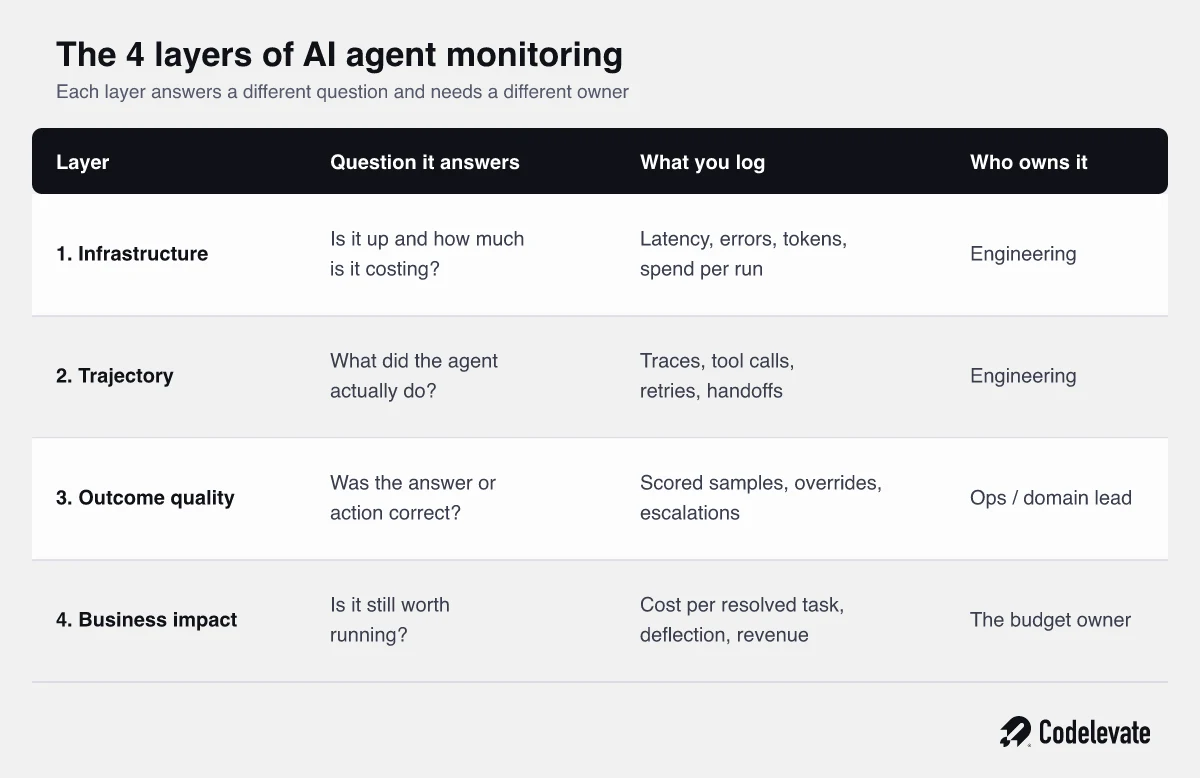
A complete monitoring setup covers 4 layers. Most teams do the first one well, do the second one partially, and skip the last 2 entirely, which is exactly backwards, because the last 2 are where the money and the reputation live.
Layer 1: infrastructure and cost
This is the familiar layer: latency, error rates, token usage, and spend. It is worth doing properly because it is cheap and it catches the crude failures fast. The one addition agents demand is spend per run rather than spend per month. A monthly total hides the fact that your average run tripled in cost two weeks ago, which is often the first visible symptom of looping or a retrieval change.
Layer 2: trajectory and tool calls
This layer records what the agent actually did: each step, each tool call, the arguments, what came back, how long it took, and whether it retried. This is the layer that makes debugging possible. Without it, an incident investigation becomes guesswork, and you will find yourself trying to reproduce a failure by asking the agent the same question and hoping it misbehaves again.
Trajectory data is also where you catch problems that look fine at the output level. An agent that answers correctly but calls an expensive tool 6 times to do it is a problem you will only ever see here.
Layer 3: outcome quality
This layer asks whether the answer or action was actually right, which no amount of infrastructure telemetry can tell you. In practice it comes from 3 sources: automated scoring on a sample of runs, human review of a smaller sample, and the implicit signals your workflow already produces, such as how often a human overrode the agent, how often a case came back, and how often a customer asked again.
Those implicit signals are underrated and free. If a support agent silently rewrites the AI's draft 40% of the time, that is a quality metric, and it already exists in your tooling. Most teams have never counted it.
Layer 4: business impact
The last layer connects the agent to the reason it exists: cost per resolved task, deflection rate, cycle time, revenue influenced, hours returned to the team. This is the layer that decides renewal, expansion, or cancellation, and it is the one that is almost never instrumented, which is why so many agent programs cannot defend themselves when a budget review arrives.
You do not need a data warehouse project for this. One honest number, reviewed monthly, beats a perfect model that never ships. Cost per resolved task is usually the strongest single metric, because it captures both the spend and the failures: runs that did not resolve anything still count in the denominator of your costs.
9 signals worth alerting on
Instrument these first. They are ordered by how often they catch a real problem before a customer does, not by how sophisticated they are.
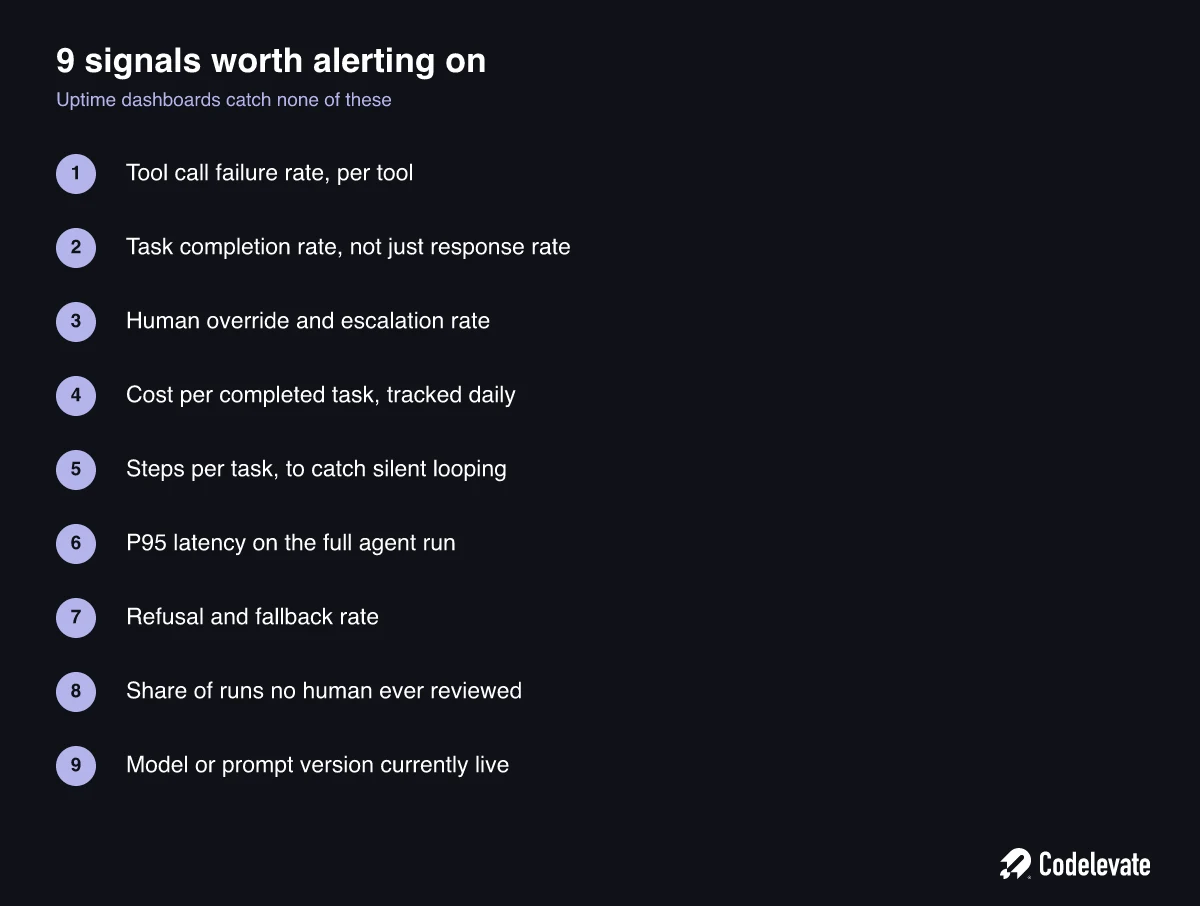
If you only ever set up 3 of these, make them tool call failure rate, human override rate, and cost per completed task. Between them they cover the technical layer, the quality layer, and the economics layer, and they will catch the large majority of real incidents.
Two of the 9 deserve a note because teams consistently misread them. Steps per task is the cheapest possible looping detector: a run that normally takes 4 steps and suddenly takes 30 is broken even if it eventually returns something sensible. And the share of runs no human ever reviewed matters because it tells you how exposed you are. An agent handling 200 cases a day where 3 get reviewed is not a monitored agent, it is a bet with a small sample.
Resist the urge to alert on all 9 on day one. Alerts that fire constantly get muted, and a muted alert is worse than no alert because it creates a false sense of coverage. Start with 3, tune them until they are trustworthy, then add.
How to set thresholds when you have no baseline
The most common objection at this point is reasonable: how do you know that a 7% override rate is bad, when the agent is new and there is nothing to compare it to?
You run a baseline window. For the first 2 weeks after launch, do not alert on absolute numbers at all. Collect. At the end of the window you have a distribution for each of your 9 signals, and you set thresholds from your own data rather than from a blog post's opinion of what good looks like.
Until that window closes, alert on rate of change instead of level. A metric that doubles in a day is worth looking at whatever its absolute value. This works from day one, needs no history, and catches most of the sharp failures, which are the ones that do real damage quickly.
Three rules make thresholds hold up over time. Write them down before launch, in the same document as the runbook, so that during an incident nobody is negotiating about whether the number is actually bad. Set 2 levels for each signal, one that means look at this today and one that means stop the agent now, because a single threshold forces every problem into the same response. And review the thresholds monthly for the first quarter, because your first guesses will be wrong and the point is to converge, not to be right immediately.
One threshold should be non-negotiable from day one: a hard spend ceiling per run and per day, enforced in code rather than watched on a dashboard. Every team that has been surprised by an AI invoice learned this the same way.
What drift actually looks like after month 2
Agents degrade, and they rarely degrade because the model got worse. They degrade because everything around the model moved while the agent stayed still.
Four kinds of drift show up in practice. Input drift: customers start asking about a product you launched after the agent was built, and it has no idea. Tool drift: an internal API adds a field, changes a status code, or gets slower, and the agent's handling of it silently degrades. Policy drift: the business changes its refund rule in April and the agent keeps applying the January rule, confidently, for months. Model drift: the provider updates the underlying model and behavior shifts subtly in ways your prompt was implicitly relying on.
A concrete version of this, because the abstract list understates how ordinary it feels. A logistics client runs an agent that answers delivery questions and issues small goodwill credits inside a fixed limit. In month 3, finance changes the limit. The change goes into the policy document and the team's handbook. Nobody thinks of the agent as a colleague who needs telling. The agent keeps issuing the old limit for 6 weeks. Nothing alerts, because every one of those runs completed successfully and looked exactly like the thousands before it. It surfaces during a quarterly reconciliation, as a number.
The only defense that reliably works is not technical. It is a standing rule that any change to the process the agent performs triggers a review of the agent, in the same way that changing a policy triggers updating the handbook. Teams that treat the agent as a system component miss this. Teams that treat it as a team member who cannot read the company chat catch it.
Alongside that, keep a small regression set of 30 to 50 real cases with known correct outcomes and run it weekly. It takes an afternoon to build and it catches model and prompt drift the week it happens rather than the quarter it happens.
Your agent incident runbook
Write this before you need it. It fits on one page, and the value is entirely in having agreed it while everyone was calm.
• The kill switch: exactly how to disable or throttle the agent, who can do it, and how long it takes. Test this like a fire drill, because a kill switch nobody has ever used is a hypothesis.
• The fallback: what happens to the work when the agent is off. A queue for humans, a holding message, a degraded but safe path. If the answer is "the process stops", say so explicitly so leadership knows the exposure.
• The first 3 checks: which dashboard, which recent deploy or prompt change, and which upstream tool. Most incidents are one of those 3, and naming them saves 20 minutes of flailing.
• The blast radius question: how many runs since the suspected start, and how do you list the affected customers. This is a query you should write in advance, not during the incident.
• The communication line: who tells customers, who tells leadership, and what the holding statement is.
• The write-up: what changed, what it cost, what signal would have caught it sooner, and which threshold or test you added as a result. This last step is what turns one bad afternoon into a monitoring setup that gets better.
The blast radius question is the one teams most often cannot answer, and it is the one that matters most commercially. Knowing an agent misbehaved is uncomfortable. Not being able to say whether it affected 9 customers or 900 is what turns an incident into a crisis of confidence.
Build your own monitoring or buy a platform
Both are defensible. The decision usually comes down to how many agents you are running, how strict your data rules are, and how much engineering time you can spare for something that is not your product.
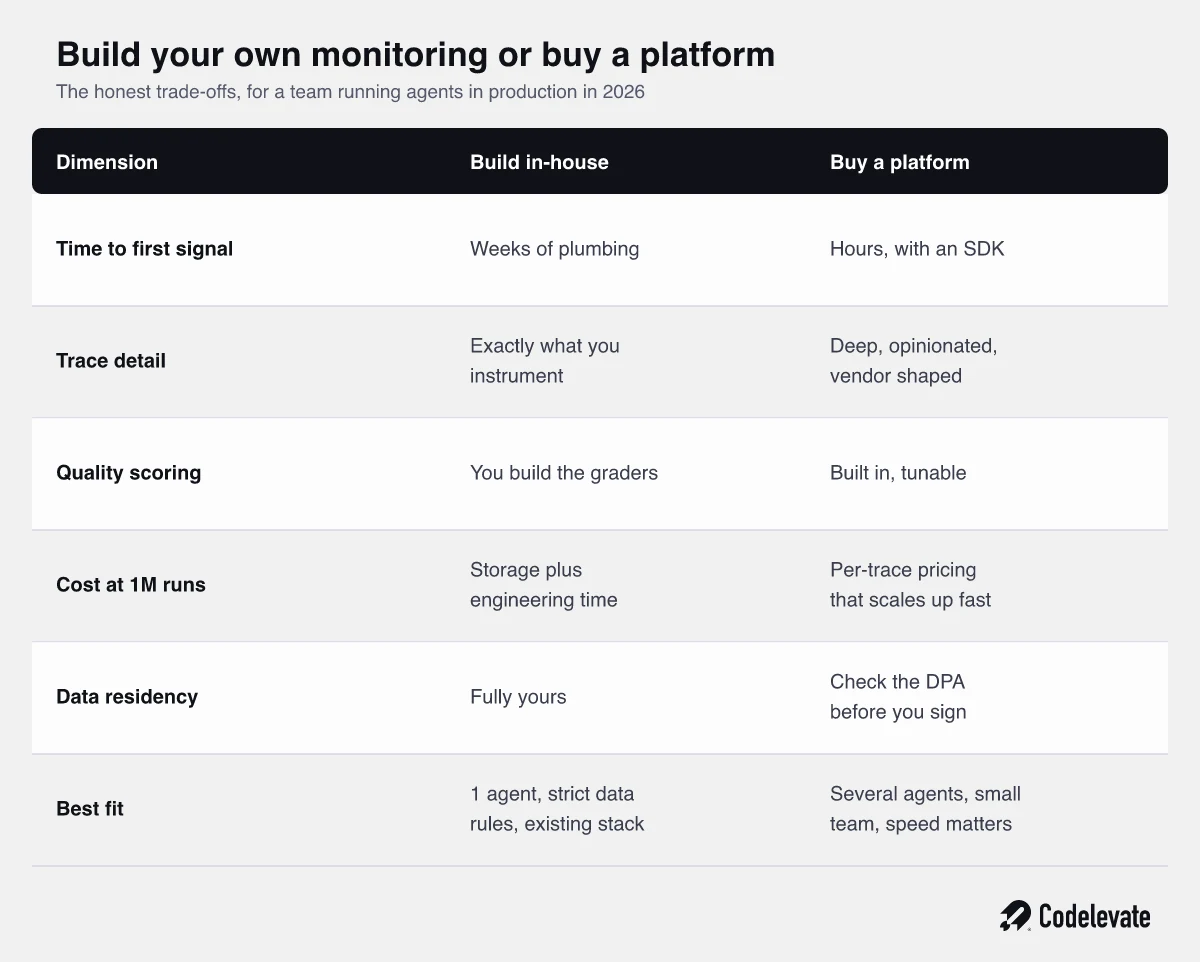
The practical advice for most teams: buy for speed at the start, but instrument using an open standard so the decision stays reversible. OpenTelemetry's semantic conventions for generative AI now include agent spans and tool call attributes, which means you can emit vendor-neutral traces and change platforms later without re-instrumenting your codebase. That single choice removes most of the lock-in risk from a decision teams otherwise agonize over for weeks.
What no platform gives you, whichever way you go, is the quality layer that depends on your business. A vendor can tell you that a response was slow, expensive, or flagged by a generic hallucination check. It cannot tell you that offering that particular customer that particular discount was against policy. Someone in your company has to define what good looks like, and that work is the same whether you build or buy.
How Codelevate approaches AI agent monitoring
We treat monitoring as part of the build, not a phase after it. Before an agent handles real traffic we agree, in writing with the client, who the named owner is, which signals get instrumented, what the 2 threshold levels are for each, and what the kill switch and fallback look like. It takes a couple of hours of conversation and it is consistently the cheapest insurance in the project.
The pairing that matters is between pre-launch and post-launch. Evaluation tells you whether an agent is safe to switch on, and our guide on AI agent evaluation before production covers that side in detail. Monitoring tells you whether it is still the agent you approved 3 months later. Teams that do the first and skip the second get a clean launch and a slow, invisible decline. For teams weighing whether to build this capability internally or bring in a partner, our AI development services page explains how we structure that work, with the operating layer included rather than sold as an add-on.
We also push clients toward a boring monthly ritual: one person, 30 minutes, 10 sampled runs read end to end, and 1 number reported to the business. It is unglamorous and it catches more real problems than most dashboards do, because a human reading actual transcripts notices things no metric was designed to measure.
The transformation this buys you
The difference between a team that monitors its agents and one that does not is not that the first team has fewer incidents. It is that they find out on their own terms. They hear about a problem from a metric on Tuesday morning instead of from a customer on Friday afternoon, they can say precisely who was affected, and they can show a finance director what the agent cost and what it returned. That is what makes an AI program survive its second year.
The work to get there is smaller than it sounds: name an owner, instrument 3 signals, agree 2 thresholds, write a 1 page runbook, and read 10 runs a month. None of that requires a platform decision or a reorganization. It requires deciding that the agent is a system somebody runs, not a project that finished.
If you want a structured starting point, the SaaS AI Blueprint walks through the decisions behind shipping and running AI in a product, including the operating questions above. And if you have an agent already live and cannot confidently answer who owns it or what would catch it failing, book a free call with our team and we will go through it with you.

.svg)
.svg)


