
Automating workflows with AI: beyond n8n and Make
You have tried n8n or Make already, or you are about to. Good. For moving data between tools they are excellent, and they are often the fastest first step in AI process automation. The real question is not which tool you pick. It is which step of your process you rent, and which step you need to own.
There is a line. A flow that forwards a mail to a spreadsheet is a different thing from a flow that produces a calculation your customer pays for. The first can stumble now and then. The second cannot. Workflow automation with AI is less about tools and more about where a mistake costs money.
This article is for the owner or operations lead of a Dutch B2B service company with 10 to 200 people. Think subsidy advisors, vehicle tax (BPM) and customs specialists, certification and training providers, administration offices and inspection firms. You have an expert process that runs by hand, priced per unit or per hour, with volume. You have no technical team, and growth still means hiring.
It is not for you if you have an idea with no paying customers yet, build a consumer app, compare hourly rates, want exactly 1 Zapier flow, or run a 6 month enterprise tender.
In this article you will learn what n8n and Make are good at, the 5 signs a flow has crossed the line, how the per step pricing trap works, what an owned automation includes, how to combine the 2, and a worked example with monthly numbers.
Key takeaways
• Start with n8n or Make. For moving data between tools they are fast, cheap and fine.
• The line sits where a flow writes to your system of record, runs at volume, a wrong output costs money or a customer, the rules change every year, or the logic is the expertise you sell.
• Past that line you need an owned automation: in your own repository and accounts, with logging, tests and a named engineer when it breaks.
• Pricing per step or per run grows with your volume. What costs nothing at 50 files is a budget line at 400.
• You do not have to choose. Let n8n do the wiring and move only the consequential step into your own code.
• AI belongs in a workflow where the input is messy: mails, PDFs, free text. Where the rule is fixed, a plain rule is cheaper and more predictable.
• Where a mistake is expensive, a person approves. Not because AI is bad, but because you sign for the outcome.
Start with n8n or Make, honestly
This is not an article against no code tools. We recommend them ourselves, and often they are our first advice. A flow that puts a website form into your CRM, sends an invoice to your bookkeeping or posts an alert in Teams takes an afternoon. You do not need to hire an engineer for that.
n8n and Make were made to connect systems. They have hundreds of ready connectors, you see your flow as a diagram, and you change it yourself. Add an AI step and a mail gets summarised or an attachment gets read. For many internal chores that is enough, and it stays enough.
The second benefit is learning. Build a flow yourself and you quickly find where the process really sticks. Which data is missing, which colleague does it differently, which exception comes back every week. That knowledge is worth a lot when you go further. A flow somebody built on a Sunday afternoon is often the best brief we get.
The trouble starts only when that flow slowly becomes the heart of your service. Then something important runs in a place that was not built for it, and nobody decided that on purpose.
The 5 lines where a rented flow stops
A flow has crossed the line as soon as 1 of these 5 things is true. It is not about company size or the number of steps. It is about the consequences of a mistake.
1. The flow writes to your system of record
Reading is harmless. Writing is not. As soon as a flow changes data in Exact, AFAS, your case system or the sector tool, a mistake becomes a mistake in your records. A double booking, an overwritten customer number or a wrong amount then spreads through everything that depends on it.
2. The flow runs at volume
At 20 files a month you still spot an error. At 400 you do not. Then you need logging that shows per file what happened, and a way to rerun 1 file without touching the rest. A tool's default run history was not built for that.
3. A wrong output costs money or a customer
A wrong summary in your own inbox costs nothing. A wrong calculation on an application, a tax return or a quote costs money, sometimes a fine, and sometimes a customer who does not come back. Roughly right is not good enough there. This is where a person approves before anything leaves the building.
4. The rules change every year
Subsidy schemes, vehicle tax tables, certification standards: they change on 1 January, sometimes in between. When those rules are spread over 14 nodes in a flow, after a year nobody knows which version is running. Rules that change belong in 1 place, with a version and a test that proves the old cases still come out right.
5. The logic is the expertise you sell
This is the big one. If the flow does what your customers pay you to do, your core knowledge lives in a tool account, or worse, in the account of whoever built the flow for you. That is knowledge you cannot take with you, cannot test, and cannot later sell to your customers as a product.
Recognise 1 of these 5? Then it is time to handle that one step differently. Recognise 3? Then your company already runs on something nobody signs for.
Want to put this on paper for your own process, step by step with the cost of a mistake next to each? Use the free AI product requirements template. It makes you write down per step what goes in, what must come out, and what a mistake costs.
The rented pricing trap: costs that climb with your volume
Most tools charge per step or per run. That is fair at low use and treacherous as you grow. Make, for example, counts every module action as 1 credit: reading a row, updating a record, processing an item in a loop. It says so on the Make pricing page. n8n's cloud plans charge per full workflow execution, whatever the number of steps, and there is a free version you host yourself.
Run the numbers for a flow with 12 modules per file. At 400 files a month that is 4,800 credits. Add a loop that processes 30 lines per file and it becomes 16,800. Add an AI step that calls a model per page, and you also pay the model provider per token. Every increase in volume is an increase in cost, and you get nothing extra for it.
Hosting n8n yourself removes the licence cost, but now you run a server. Someone has to apply updates, check backups and notice when it hangs at 03:00. That is fine, as long as you know who that someone is.
Then there is the rented flow from an automation shop. Small business automation shops are everywhere, with entry prices from 1,500 to 5,000 euro. For a simple flow that is a fair price. But look at what you buy. Often the flow sits in the builder's account, the per step tool costs are passed on to you, and there is no agreement on who picks up when it stops. You are not only renting the tool. You are renting back your own process.
The question to ask every provider is short: what does it cost per month to run at 2 times my current volume, and in whose account does it live? If the answer is vague, you know enough.
AI process automation you own: what comes with it
An owned automation is code that lives in your repository, runs in your cloud account and is built for 1 job: your process, with your rules. It sounds heavier than it is. The difference with a flow is not the amount of code. It is 6 agreements.
• Ownership: the code sits in your repository from the first commit and runs in your accounts. If the builder leaves, everything stays.
• A person approves: where a mistake is expensive, the system prepares a proposal and a colleague clicks approve. Where a mistake is cheap, it runs through.
• Logging: per file you see what came in, what the model proposed, which rule applied and who approved it.
• Tests: the old cases run automatically with every change. New rules for 1 January go live only when the tests pass, first on a staging copy.
• Cost per unit measured and capped: you know what 1 file costs in AI, and there is a ceiling so a bug in a loop cannot eat your monthly budget.
• A named engineer: when it breaks, you know who picks up. Not a ticket system, a person.
This is exactly what we do under AI automation. Not a tool you rent, but a process that is yours and keeps running.
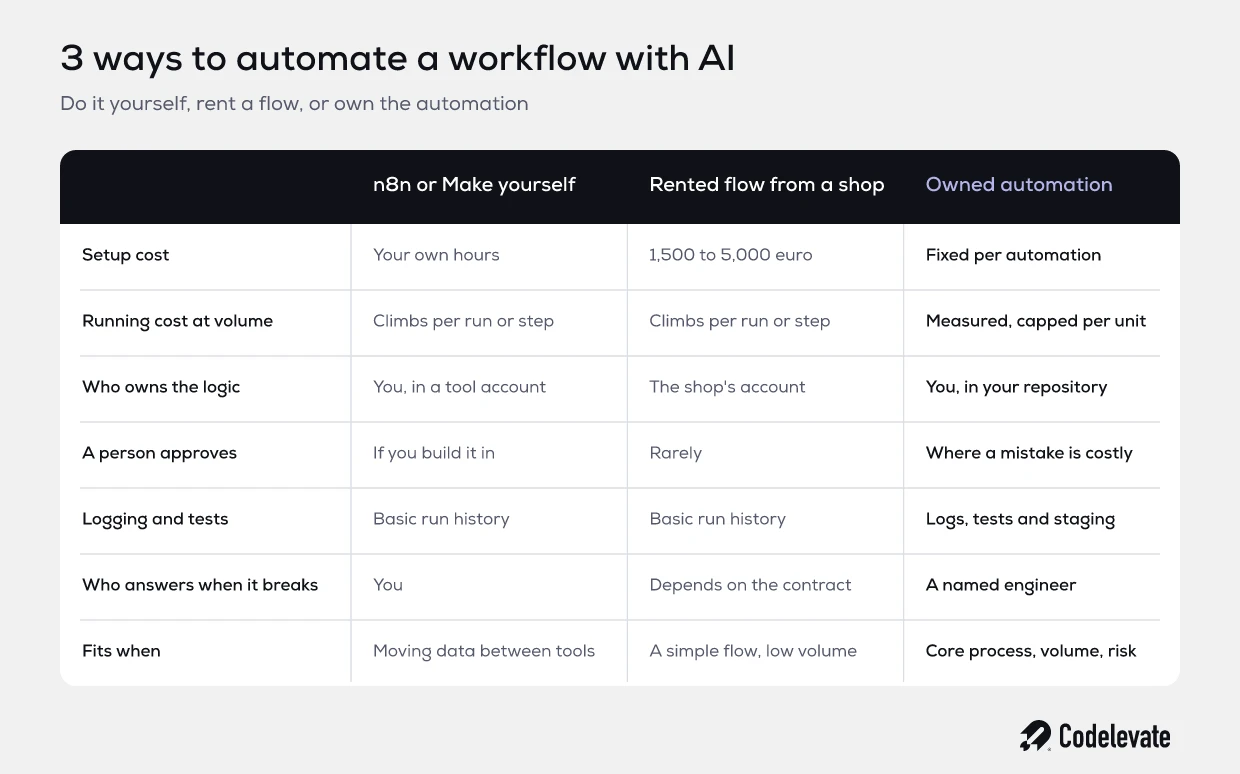
The 3 routes side by side
The table above puts the 3 routes next to each other. The story behind it is simpler than it looks. Building it yourself in n8n or Make costs mostly your own hours, and fits as long as you are moving data between tools. A rented flow from a provider costs 1,500 to 5,000 euro to set up and fits a simple flow with low volume.
An owned automation costs more to build. With us it is a fixed price per automation, 18,000 to 45,000 euro per major process. In return the cost per unit is measured and capped, the logic is yours, and a named engineer picks up. It fits your core process, volume and risk.
None of the 3 is always best. An owner who wants incoming invoices sorted into a folder gains nothing from a repository. An owner who sends 400 calculations a month out the door gains nothing from a flow nobody can test.
Want to go deeper into the difference between classic process automation and AI? Read AI automation vs RPA in 2026: how to decide.
The split: n8n for the wiring, the consequential step in your own code
The most sensible setup is often a split. You keep n8n or Make for what it does well: fetch a mail, pass on an attachment, send a notification, update a status in your CRM. Only the step with consequences comes out and moves into your own code.
In practice it looks like this. The flow receives a request and sends the attachments to a service of your own in your cloud account. That service reads the documents, applies the rules, makes the calculation and prepares a proposal. A colleague approves it in a simple screen. Then the flow picks it up again and sends the result.
That way you pay for your own code only where it matters. The wiring stays cheap and your own people can still change it. And the core, the step that holds your expertise, lives in your repository, with tests, logging and a version per rule year.
There is a bonus. The service in the middle later becomes the base of a platform your customers use themselves. You cannot sell a flow inside a tool. You can sell a tested piece of software with your rules in it.
When AI belongs in a workflow, and when plain rules are better
Not every step needs AI. Most steps do not. A good rule of thumb: AI where the input is messy, plain rules where the outcome is fixed.
AI belongs in a workflow when:
• the input is unstructured: mails, scanned PDFs, free text in a form, photos of documents;
• you need to recognise or classify something: which type of request, which scheme fits, which vehicle it is;
• you need a first draft of a text that a person then checks, such as a motivation or a summary.
Plain rules are better when:
• the calculation is fixed in a table or formula, such as a rate, a depreciation or a threshold;
• the outcome must be explainable to a customer, an accountant or a regulator;
• it has to be cheap and fast, thousands of times a day, with no cost per token.
The strongest pattern combines the 2. AI pulls the data out of the messy document. Plain code does the maths. A person approves where it is expensive. Asking a model to calculate something that sits in a table is like asking a colleague to add up an invoice in their head: it usually goes fine.
Worked example: a vehicle tax office with 400 files a month
An example, not a client. Take an office of 14 people that calculates Dutch vehicle tax (BPM) for car dealers who import vehicles. Each file brings documents: a purchase invoice, a foreign registration certificate, sometimes a valuation report. An employee reads it all, looks up the data, picks the right method, calculates and enters the result in the return.
That takes 45 minutes per file on average. At 400 files a month that is 300 hours. At 55 euro an hour fully loaded, that is 16,500 euro a month of manual work, and every rise in volume means another hire.
The office first built a flow in n8n. Mails with attachments come in, an AI step reads the PDFs, and the data lands in a spreadsheet. That already saved 10 minutes per file. Good work, and exactly what such a tool is for.
Then they wanted to automate the calculation too, and that is where it started to grind. The tables change every year. A wrong choice of method costs the customer money. Nobody could see why the flow gave a different amount on a particular file. And the calculation is exactly what the office sells.
The split looks like this:
• n8n keeps fetching the mails, passing on attachments and sending the customer a confirmation.
• A service of their own, in the office's cloud account, reads the documents with AI, applies that year's vehicle tax rules as plain code, and prepares a proposal with the source for every field.
• An employee checks the proposal in a screen and clicks approve. That takes 8 minutes instead of 45.
• Every file has a log, and every rule change first runs against 200 old files as a test.
The numbers, in this example. From 300 hours to 53 hours a month, so 247 hours less. That is about 13,600 euro a month of hours the team can spend on new customers. The AI cost is measured at about 0.15 euro per file, with a cap of 0.40 euro. At 400 files that is 60 euro a month.
Against that: the automation itself, at a fixed price of say 30,000 euro, and operations at 1,250 euro a month. The payback is then around 2.5 months. If volume doubles, the AI cost grows by 60 euro, not by another employee.
For comparison, from our own anonymised work: at a vehicle tax file processor, handling went from 4 to 8 hours per file to under 5 minutes. At a subsidy matching engine, hours of expert searching came down to seconds. The example above is deliberately more conservative.
Who works on it, what happens after launch, and what if month 1 disappoints
These are the 3 questions every owner asks, and rightly so.
Who works on it. With us, 2 engineers by name, whom you meet before you sign. They map the process, build the automation and stay on it after launch. No handover to another team once it is live.
What happens after launch. From the first automation that runs, operations start: monitoring, a named engineer on the alert, the AI cost per unit capped, a 1 page monthly report, and updates to models and rules. The planning value is 1,250 euro a month per automation. The response time is set in the Blueprint. For more on who is accountable after launch, read who owns your AI agent after launch.
What if month 1 disappoints. Exit after month 1: pay for what is delivered, keep everything. The code is already in your repository, so you can carry on with someone else or in house.
How to approach it in 5 steps
• Step 1. Write down your process as it really runs, including who does it differently and which tools are involved.
• Step 2. Mark per step what a mistake costs. Everything cheap can stay in n8n or Make.
• Step 3. Pick the 1 step with the most hours and an expensive mistake. That is your first owned automation.
• Step 4. Agree up front where the code lives, what it may cost per unit and who picks up when it breaks.
• Step 5. Measure after 3 months: hours per file, errors, cost per unit. Only then choose the next step.
That mapping is also what the Blueprint does: in 10 to 20 working days, the process as it runs, the bottlenecks priced in hours and euro, the AI opportunities ranked, a roadmap with fixed prices per milestone, and a first rough prototype in your own repository. The price is 2,500 to 10,000 euro, depending on the number of processes. It is yours to keep, and you may build it in house if you prefer.
Conclusion: rent the wiring, own the core
n8n and Make are good tools, and you should simply start with them. The line sits where a flow writes to your system of record, runs at volume, costs money when it is wrong, gets new rules every year or holds your expertise. Past that line you want an automation that is yours, with a person who approves, logging, tests, a capped cost per unit and a named engineer.
The smartest route is usually the split. Keep the wiring in the tool and move only the consequential step into your own code. Then your volume grows without your team or your per step bill growing with it.
Codelevate turns Dutch B2B service companies into software companies: we map the expert process you run by hand, automate it so the same team handles the volume, and build the platform your customers pay for, with 2 engineers by name from the blueprint to year 2.
Want to line up your own process first? Download the free AI product requirements template and fill it in for the step that costs you the most time.
Send us what you have. 1 of the 2 engineers reads it with you in 20 minutes, and you get 1 of 3 answers in writing the same day: do it in house, hire, or the Blueprint.

.svg)
.svg)


