AI document processing: automate the file, not the field
Every vendor of document software quotes the same number: 99% accurate. It sounds finished. But a file at a service firm easily has 40 fields. At 99% per field, 1 in 3 files has at least 1 error. You do not know which ones. So your specialist still checks every file, and you have gained very little.
Search for "AI document processing" and you mostly find guides about invoices and OCR: read the document, pull out the fields, push them into your accounting system. For a single invoice that works. For a file with 9 documents, 3 sets of rules and a piece of advice at the end, it works differently. That is what this article is about.
It is written for the owner, managing partner or operations lead of a Dutch B2B service company with 10 to 200 people. You process client files by hand: subsidy applications, vehicle tax (BPM) returns, customs files, certifications, inspections, insurance applications or annual accounts. You charge per file or per hour, there is volume, and your growth stops at the number of specialists you can find.
It is not for you if all you want is to read in purchase invoices. There are good off the shelf tools for that, and this article will be too heavy. It is also not for you if you want the AI to decide on its own where a mistake costs real money.
In this article you will learn why accuracy per field is the wrong number, where the hours in a file really go, which 6 steps every file runs through and what AI does at each step, how the arithmetic works out for a firm with 2,400 files a year, and when to buy a tool or have something built.
Key takeaways
• At a service firm the unit is the file, not the document. Automate the file, not the field.
• 99% per field is 67% error free files at 40 fields. The number that counts is the share of files that pass review without a correction.
• Reading the documents is usually only a quarter of the time. The hours are in completing the file, comparing documents, applying rules and writing the advice.
• Let the AI read, let fixed code apply the rules, and let a person sign. Never let the model do the calculation itself.
• An exceptions queue with an owner matters more than a higher accuracy score. What the AI is unsure about has to go somewhere.
• In our worked example over 5,600 hours a year come free. That is not a round of layoffs but capacity: the same team can handle more than twice the files.
• A tool fits 1 document type with a fixed layout. Once the file has rules, exceptions and a link to your sector system, custom work pays off.
An invoice is not a file
Almost everything you read about document processing is about invoices, receipts and orders. That makes sense. Every company receives them, they look alike, and the outcome is simple: 1 document, 1 booking. If a field is wrong, your bookkeeper spots it at reconciliation.
A client file at a service firm works differently. Take a BPM return for an imported car. In comes a foreign registration certificate, a purchase invoice, a valuation report, photos, sometimes a damage report, and a mail from the client with extra details. Those documents have to agree with each other. The chassis number on the invoice must match the registration. The date of first registration sets the depreciation. The damage in the photos has to appear in the valuation report.
Only when all of that checks out does the real work start: applying the rules, making the calculation and drafting the return. And at the end, someone signs. If it goes wrong, the client pays too much tax, or your firm gets a correction with a fine.
You see the same pattern in a subsidy application (budget, quotes, annual accounts, project plan), a certification (procedures, records, audit reports) or an insurance application. Many documents that together carry 1 decision.
It also explains part of the gap that CBS, the Dutch statistics office, measures: in 2025, 27% of Dutch firms with 10 to 50 people used AI, against 66% of firms with 250 or more. Large firms have people who write the process down first. At a firm of 25, that process lives in the heads of the specialists.
So the question is not whether AI can read this document. It can, and has done so fairly well for a few years. The question is whether AI can prepare this file to the point where your specialist only has to check and sign.
The arithmetic every vendor skips
Say a system reads 99% of fields correctly. That sounds close to perfect. But your specialist does not work with fields. Your specialist works with files, and a file is only right when every field is right.
If errors occur independently, the chance of an error free file is 0.99 to the power of the number of fields. At 10 fields that is 90%. At 40 fields it is 67%. At 80 fields, 45%. In other words, with an 80 field file more than half of all files contain at least 1 error, while the system is "99% accurate".
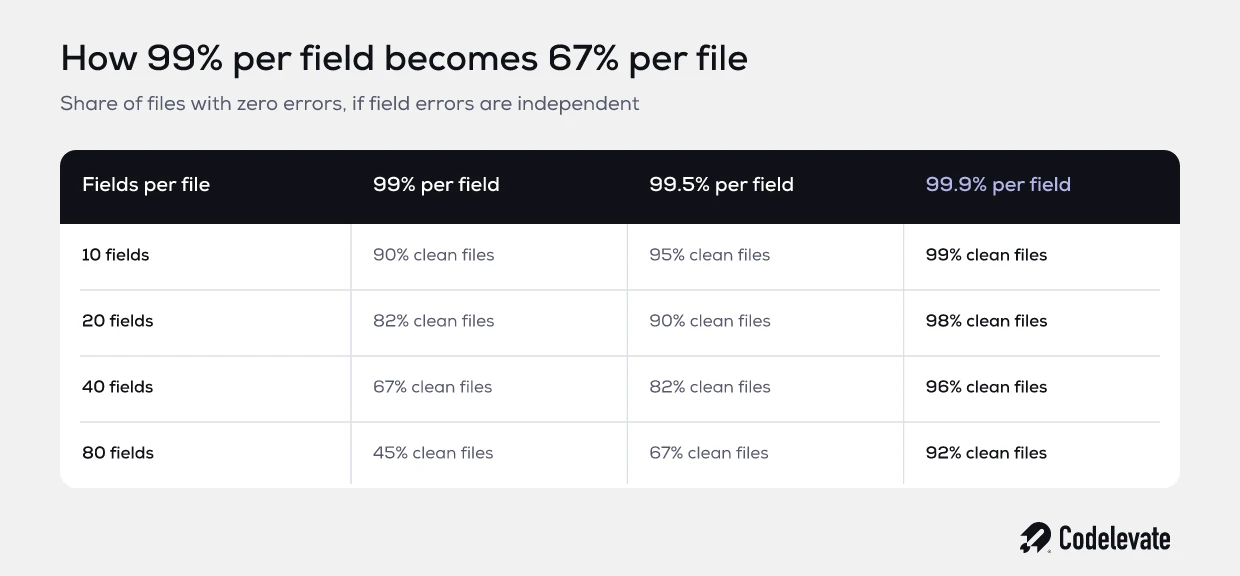
In real life errors are not fully independent. A bad scan produces several errors at once, and a clean document produces almost none. So the table is a simplification. The lesson holds: a small error rate per field becomes a large error rate per file.
What does that mean in practice? If you do not know which files are wrong, someone has to check all of them. You have swapped typing for checking, and checking takes nearly as long as doing it yourself. This is why so many document projects stall after the pilot. The demo was good, the hours did not go down.
There are 2 numbers that do matter. The first is the share of files that pass review without a correction. The second is how long that review takes. A system that delivers 60% of files error free, and points to exactly what it is unsure about in the rest, is worth far more than a system with a higher score per field that points to nothing.
So do not ask a vendor about accuracy. Ask: of my last 50 files, how many passed without a correction, and how did my specialist know where to look in the rest?
Where the hours in a file really go
Before you automate anything, you need to know where the time goes. At nearly every firm we speak to, the owner estimates that most of the work is typing. When we measure it, that is rarely true.
Take a file that costs 3 hours in total. This is how that time splits at a typical firm, as an example:
• Completing the file and chasing missing documents: 25 minutes.
• Sorting, naming and filing the documents: 15 minutes.
• Reading and typing over: 40 minutes.
• Comparing documents and checking with the client: 35 minutes.
• Applying the rules and making the calculation: 30 minutes.
• Drafting the advice, application or return: 25 minutes.
• Final check and sending: 10 minutes.
Reading the documents, the part document software is about, is 40 of the 180 minutes. That is 22%. Even if you automate it away completely, 78% of the time remains. If you only buy the reading, you buy the smallest piece.
The big blocks sit at the edges. At the front: is the file complete, and what is missing? Every missing document is a mail, a wait, and opening the file a second time. In the middle: do the documents agree with each other? At the back: which rule applies, what is the outcome, and how do you write it down?
AI can help with all of that, but not in the same way everywhere. Which brings us to the steps.
The 6 steps of a file and what AI does at each one
Every file we have seen so far fits the same 6 steps. How the work splits between AI, fixed code and a person differs per step. That split is the core of a good design.
1. Receiving and completing
The AI reads what comes in, works out which file it belongs to, and checks it against a list of what should be there. If something is missing, it drafts the mail to the client stating exactly what is missing. A person only has to send it, or the system sends it when the text is fixed. This is often the fastest gain, because waiting time leaves the process.
2. Sorting and naming
Which document is the invoice, which is the valuation report, which photo belongs where? AI is good at this, and a mistake here costs little. A misnamed document stands out on its own in the next step.
3. Reading
Here the AI pulls the fields out of the documents. What matters is not only the value, but also how sure the model is and where in the document the value sits. That last part makes review fast later on: your specialist clicks a field and sees the spot in the original.
4. Comparing documents
Does the chassis number match everywhere? Is the amount on the quote the same as in the budget? Does the date fall inside the scheme? These are checks you write down in advance and that fixed code runs, not the model. The model supplies the values, the code compares them. A difference goes to the exceptions queue with a clear reason.
5. Applying rules and calculating
This is where home built setups with loose AI tools often go wrong. Someone asks the model to calculate the BPM, or to decide whether a cost item qualifies for a subsidy. The model gives an answer that sounds like an expert, and sometimes it is wrong. Rules and calculations belong in fixed code you can test, with this year's tables in it. The model may explain, the code calculates.
6. Drafting and approving
The AI prepares the advice, application or return from the outcome of the earlier steps, in your template. A specialist reads it, sees on 1 screen what the AI was sure of and what not, and signs. Where a mistake is expensive, a person approves. Always.
In short: the AI reads, fixed code decides by your rules, and a person signs. How far you let the AI work on its own is a choice per step. We wrote a separate piece on that: how much autonomy your AI agent should have.
Worked example: a firm with 2,400 files a year
An example with round numbers. It is not a client, but a realistic firm of the kind we speak to often.
A tax specialist with 25 people processes 2,400 files a year. Each file takes 3 hours on average. That is 7,200 hours. At a cost of 75 euro an hour, that is 540,000 euro a year of file work. A vacancy for an extra specialist has been open for 5 months.
After automation it looks like this. The AI prepares every file up to and including step 6. Of all files, 60% pass review without a correction. A specialist spends 15 minutes on each and signs. The other 40% have at least 1 exception. Those take 75 minutes on average, because the specialist sees exactly where to look and the rest is already prepared.
• 1,440 files without a correction, 15 minutes each: 360 hours.
• 960 files with an exception, 75 minutes each: 1,200 hours.
• Total: 1,560 hours, against 7,200 hours today.
Over 5,600 hours come free. At around 1,600 billable hours per specialist a year, that is the capacity of 3 to 4 people. The vacancy no longer needs filling, and the same team can handle more than twice as many files.
What does it cost? At Codelevate the path would look like this. First the Blueprint, 2,500 to 10,000 euro, in which we measure the process as it runs today and write down the exceptions. Then the automation itself, a fixed price per automation between 18,000 and 45,000 euro for a major process. Then the running cost: the AI usage per file, with a cap, and operations. As an example we assume 1 euro of AI cost per file, so 2,400 euro a year, plus a planning value of 1,250 euro a month for operations.
Even at the top of those ranges, the first year pays for itself several times over. But watch which number carries everything: that 60% without a correction. At 30% almost 5,000 hours still come free, but it is a different story than at 80%. You do not guess that number, you measure it. In the Blueprint we run a first rough version on 30 to 50 of your own finished files, and then you know.
For comparison, a number from practice: at a BPM file processor, handling time went from 4 to 8 hours per file to under 5 minutes. That is a file type with a lot of fixed structure. Not every process gets there, and you only know where yours sits after measuring.
Want to put this on paper for your own process? Use our free AI product requirements template. You write down per step what comes in, which rules apply and where a person has to sign. It is also exactly what a vendor needs to give you a quote you can compare.
5 mistakes we see often
Most document projects do not get stuck on the technology. They get stuck on 1 of these 5 things.
Starting with the tool
Someone sees a demo of a tool that reads an invoice in 2 seconds and buys it. Then it turns out the file has 9 document types, 4 of which do not fit the tool. Start with the file: which documents, which rules, which exceptions. Only then choose how to build it.
Measuring per field
See above. A report saying "97.8% accuracy" tells you nothing about your team's hours. Measure per file, on your own files, and measure the review time.
Letting the model calculate
A language model is good at reading and writing. It is not reliable at applying a table of rates and thresholds the same way every time. A calculation that comes out differently 1 time in 50 is, in your line of work, a correction with a fine. Put rules in code, with tests, and let the model only supply the input.
No owner for the exceptions
Every system has files it is unsure about. If they land in a shared inbox, they will still be there in 3 weeks. An exceptions queue has an owner, a reason per file and a deadline. And this month's exceptions are next month's rules: what keeps coming back, you write down.
Building on knowledge that is written nowhere
If 5 specialists assess a file in 5 ways, the AI learns an average of 5. Before you automate, the rules have to sit in 1 place, with a version per year. That sounds like extra work. It is work you should have done anyway, and it makes onboarding new people faster too.
Buy, rent or have it built
There are roughly 3 ways to set up document processing with AI. Each fits a different kind of work.
An off the shelf document tool is bought per month or per page. It fits 1 document type with a fixed layout and a simple outcome: purchase invoices, receipts, standard forms. You are up and running quickly and the vendor maintains the model. It stops where your rules begin, because the tool does not know them.
A rented automation in n8n or Make, set up by an automation shop, often starts at 1,500 to 5,000 euro. It works for a simple chain: mail in, read the document, data into a spreadsheet. For a file with comparisons between documents, an exceptions queue and a link to your sector system, such a flow quickly becomes hard to follow. And the question of who maintains the flow when it stops at 02:00 often has no answer.
Custom work is what you have built when the file is the core of your service. Your rules sit in code you can test, the link with Exact, AFAS or your sector system is real, and the code lives in your own environment. It costs more up front. It pays off when there is volume, when the rules are your expertise, and when in 2 years you want to give your clients access themselves.
A simple rule of thumb: the more your file looks like an invoice, the sooner you buy a tool. The more it looks like advice, the sooner you have it built. Unsure where your process falls? Read our comparison of AI automation and RPA, which works with the same questions.
Who builds it, what happens after launch, and what if it disappoints
3 questions every owner asks, even when they are not asked out loud.
Who works on it? At Codelevate, 2 engineers, by name, from the Blueprint to year 2. No rotating team and no project manager between you and the people writing the code. Codelevate, Amsterdam and Sofia, since 2019.
What happens after launch? A file process is never finished. On 1 January the rates change, a government body updates a form, a new document type appears. So operations run underneath: monitoring, a named engineer on the alert, the AI cost per file with a cap, a 1 page monthly report, and model and rule updates. The response time is set in the Blueprint.
And if month 1 disappoints? Exit after month 1: pay for what is delivered, keep everything. The code sits in your environment from day 1.
How to start this month
You do not need a vendor to find out whether this works for you. Start with 4 things.
• Pick 1 file type with the most volume. Not the hardest, the most common.
• Take 30 finished files and write down for each how much time every step took. An estimate per step is enough.
• Write down the rules your specialists apply, including the exceptions only your most experienced colleague knows.
• Decide what share of files must pass without a correction to make it worth it. That is your yardstick.
With those 4 things you know where your hours are and what to ask of any system. Want to look wider? Read how to map the AI opportunities in your workflow.
Codelevate turns Dutch B2B service companies into software companies: we map the expert process you run by hand, automate it so the same team handles the volume, and build the platform your customers pay for, with 2 engineers by name from the blueprint to year 2.
Prefer to write out your process yourself first? The free AI product requirements template helps you get the steps, rules and exceptions on paper.
Send us what you have
A list of your file types, 1 anonymised file, or just a mail saying how many files you handle a year. 1 of the 2 engineers reads it with you in 20 minutes, and you get 1 of 3 answers in writing the same day: do it in house, hire, or the Blueprint. Send us what you have.