
AI knowledge base for service firms: what your AI has to read first
You already have a knowledge base. It lives in the heads of 3 people, in 5 folders on the shared drive and in a few emails nobody can find anymore. Search for "AI knowledge base" and you mostly get lists of tools. The real work is somewhere else: writing your knowledge down so an AI can act on it, not just search it.
That difference decides whether your AI prepares a file the way your best advisor would, or the way an average of 5 advisors would, each doing it their own way.
This article is for the owner, managing partner or operations lead of a Dutch B2B service company with 10 to 200 people. You run a repeatable expert process by hand, you charge per unit or per hour, there is volume, and the knowledge behind that process sits with a few people. Think of subsidy advisors, vehicle tax and customs specialists, certification bodies, compliance consultancies, accountancy offices and inspection firms.
It is not for you if you want a helpdesk chatbot for customer questions, if you are still at the idea stage, or if you are looking for a smarter search box over your SharePoint. There are good off the shelf tools for that, and they do not need this article.
In this article you will learn why a knowledge base for people is different from a knowledge base for AI, the 6 layers of an AI knowledge base, how to set one up in 6 steps, how that works out for a subsidy advisory firm of 18 people, and where it usually goes wrong.
Key takeaways
• A knowledge base for people helps them search. An AI knowledge base has to help the AI decide: rules, exceptions and examples, not just documents.
• AI on a messy shared drive repeats the mess. If 5 advisors do it 5 ways, the AI reads 5 versions and picks 1, without telling you which.
• An AI knowledge base has 6 layers: sources with a version date, your own decision rules, worked cases, exceptions, templates, and an owner per rule.
• Most of the value sits in the layer almost nobody writes down: the exceptions only your most experienced colleague knows.
• 40 to 50 past files with the outcome recorded are your test. Without that set you do not know whether the AI is right, you only have an impression.
• The tool is the least important choice. The format, the owner and the location (your accounts, exportable, EU) decide whether it still works in 2 years.
• A knowledge base is not a project with an end date. Rules change every year, so someone keeps it up to date, with a name and a date.
A knowledge base for people is not a knowledge base for AI
Almost every guide to an AI knowledge base describes the same thing: collect your documents, put them in a tool, and let staff or customers ask it questions. That is a search engine with a chat window. For a helpdesk it works fine. A person reads the answer, thinks for a second and applies it.
For an expert process that is not enough. Say your AI has to prepare a subsidy application, check a vehicle tax calculation or assess a certification file. The AI is not looking for a document. It has to make a decision: does this client fit the scheme, which costs count, how likely is a rejection.
A document tells you what the scheme says. A decision asks what your firm does with it. Those 2 are further apart than you think. The scheme says costs must be "directly attributable". Your people know that 1 funding body is strict about it, that 1 type of advisory cost never gets through in practice, and that for a young company you always ask for the annual accounts first.
That knowledge is written down nowhere. It sits in your senior's head. So a knowledge base for AI does not start with uploading documents. It starts with writing down what your firm does with those documents.
Why AI on a messy shared drive repeats the mess
We saw it at a subsidy advisory: 5 advisors worked 5 ways in 5 tools. Everyone had their own template, their own checklist and their own folder of "good examples". All defensible. No 2 the same.
Put an AI on top of that and something unpleasant happens. The model reads all 5 versions and turns them into 1 answer. Sometimes it takes the strictest reading, sometimes the loosest, sometimes a mix nobody would choose. It does not say which version it used. The answer sounds as confident as ever.
That is not a fault of the model. It does exactly what you ask: answer based on what it reads. If what it reads contradicts itself, you get an average. And in an expert process, an average of 5 good advisors is often worse than any 1 of them.
There is a second problem: old versions. Almost every shared drive holds 3 versions of the same scheme, from 2024, 2025 and 2026. A person sees from the folder name which one applies. An AI sees 3 texts that say almost the same thing, and sometimes picks the wrong one. Without a version date it does not even know there is a wrong one.
This is also why so many companies stay stuck at loose AI tools. According to Statistics Netherlands (CBS), 27% of Dutch companies with 10 to 50 people used AI in 2025, against 66% of companies with 250 or more. Much of that use is personal: someone having an email rewritten. The step to a process the AI carries needs knowledge that lives in 1 place, and only once.
The 6 layers of an AI knowledge base
A knowledge base an AI can work from has 6 layers. You do not need all of them on day 1, but you need to know which ones you are missing.
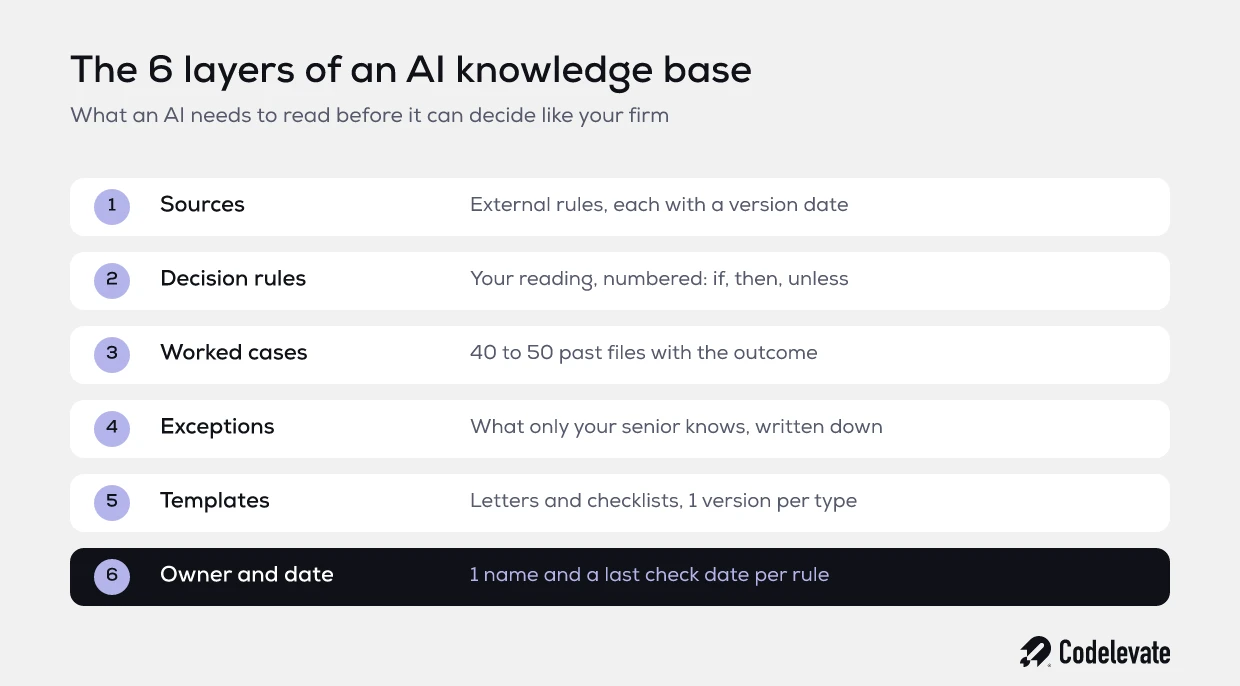
1. Sources, with a version date
The external rules your process runs on: the text of the scheme, the law, the tariff table, the standard. Every source gets the date from which it applies and the date someone last checked it. Old versions go to an archive the AI does not read.
2. Your decision rules
How your firm applies the sources, written as rules and not as a story. "If the client has existed for less than 3 years, we first ask for the annual accounts, unless there is an auditor's statement." Every rule gets a number, so later you can see which rule the AI used.
This is the layer where most of the discussion happens, and that is good. When 2 advisors disagree about a rule, you just found a difference your clients already notice.
3. Worked cases
40 to 50 real past files with the input, the decision and the outcome. Was the application granted, rejected or amended? Why? This set has 2 jobs. The AI learns from it how your firm thinks, and you use it as a test to measure whether the AI gets it right.
Pick the difficult files too, not only the clean ones. The 5 files everybody hesitated over show where the line is.
4. Exceptions
Everything that starts with "except when". The funding body that always asks for an extra attachment. The sector where the standard calculation is wrong. The client who has been rejected 3 times. This layer nearly always comes from 1 or 2 heads, and it is the layer worth the most.
5. Templates and fixed wording
The letters, reports, checklists and fixed sentences in your house style, 1 version per type. When the AI writes a draft application, it should look like your firm wrote it, not like a model did.
6. Owner and date
Every rule, source and exception gets 1 name and the date of its last check. Not "the team", a person. Without an owner a knowledge base goes stale in about a year, and a stale knowledge base is more dangerous than none, because the AI keeps believing it.
Want to work this out in 1 place?
The free AI product requirements template helps you put your process, your rules and your volumes in 1 place before you have anything built. It is a good starting point for layers 1 to 3, and you can hold every quote against it.
How to set up an AI knowledge base in 6 steps
You do not need to map your whole company. Start with 1 process and finish it. That goes faster than you expect, and it tells you more than a plan for everything.
Step 1: pick 1 process with volume
Pick the process that comes back most often and has a price on it: the application, the calculation, the file. The more often it runs, the faster the knowledge base pays for itself, and the more past files you have to test against.
Step 2: collect every version in use today
Ask each person who runs the process for the templates, checklists and examples they really use. Not the official version in the folder, the one on their desktop. Put them side by side. The differences are your first work list.
Step 3: write out the rules with your most experienced colleague
Plan 3 to 5 sessions of 2 hours with the person who knows the process best. Walk through 10 files together and ask at every step: why do you do this, and when do you do it differently? Write each answer down as a rule or an exception. Someone else takes notes, so your senior can keep talking.
Step 4: collect 40 to 50 files with their outcome
Pull past files where you know how it ended. Anonymise the client data. Note for each file the outcome and 1 sentence with the reason. If the outcome was never recorded, this takes 2 afternoons with the advisor. Those afternoons are the most valuable part of the whole exercise.
Step 5: let the AI assess the files, and count
Give an AI only the knowledge base and let it assess the 40 to 50 files without seeing the outcome. Compare its answer with what really happened. Count the errors and look at why each one happened: a missing rule, an exception nobody wrote down, or 2 rules that contradict each other. Every error is a gap in your knowledge base, not in the AI.
Step 6: assign owners and set a rhythm
Every rule gets an owner. Agree when you check: at every change of the scheme, and at least every quarter. Then run the test from step 5 again. If the score drops, something changed that is not in the knowledge base yet.
A worked example: a subsidy advisory firm of 18 people
An example, not a client. Take a firm of 18 people, 6 of them advisors. They submit 300 applications a year across 3 schemes. An application takes 8 hours on average. An advisor costs about 80 euro an hour, everything included.
Of those 8 hours, about 1.5 go to searching and checking: which version of the scheme applies, how did we do this last time, where is the right template, and a quick walk to the senior's desk. That is 450 hours a year, or 36,000 euro. On top of that, 1 in 5 applications goes back internally for a second round because something does not match how a colleague would do it. Another 60 hours, or 4,800 euro.
Together, about 40,800 euro a year sits in knowledge that is not written down. And that is before a single rule is automated.
Setting up the knowledge base for those 3 schemes mostly costs internal time: 50 hours of the senior advisor, 20 hours each from 2 other advisors, and 10 hours of the office manager to collect files. 100 hours in total, or 8,000 euro. After 6 weeks there is a knowledge base with 120 rules, 45 worked cases, 14 exceptions, 9 templates and an owner per scheme.
Then the test. In the first round the AI assesses 31 of the 45 files correctly. 9 errors come from exceptions nobody had written down yet, 5 from rules that contradicted each other. After 2 afternoons of fixes it gets 41 of the 45 right. The last 4 are genuine judgement calls, and from now on an advisor always looks at those.
What does it return? Even without automation the search time drops, because the advisors have an assistant that searches 1 source. Say 1.5 hours per application becomes 0.5: that saves 300 hours, or 24,000 euro a year. The internal investment of 8,000 euro comes back in about 4 months. Beyond that it is a foundation: the automation of the draft application that comes next reads exactly this knowledge base.
The reverse is true as well. If your firm does 40 applications a year with 1 advisor, a good work instruction in 1 document is enough. A knowledge base with 6 layers is then too much tooling for too little work.
Where it usually goes wrong
We see the same 6 mistakes again and again. Each of them costs months, and each of them is avoidable.
• Uploading everything. Putting the whole shared drive in a tool gives the AI more contradiction, not more knowledge. Fewer sources that are correct beat everything you have.
• No version date. The AI does not know which scheme applies, and you do not know which one it used.
• Rules as a story. A 12 page work instruction in prose is harder for an AI to apply than 40 numbered rules with exceptions.
• No test set. Without past files and their outcome you judge the AI on feel, and every discussion becomes an opinion against an opinion.
• No owner. After 1 year 3 schemes have changed and nobody knows which rules still hold.
• The knowledge base in a tool you cannot export. Then your most important asset depends on a supplier's pricing policy.
Which tool, and where your knowledge base should live
The question people ask first is the least important one. A knowledge base in well ordered documents plus 1 spreadsheet of rules works better than an expensive tool full of clutter. Start with the format, then pick the tooling.
For a first test, a project in ChatGPT or Claude is fine. Put in your rules, exceptions and 20 files and ask your own questions. Within an afternoon you see where the gaps are. For a process that really runs, you need more.
An AI that reads a knowledge base usually works with a technique called retrieval: for every question the system first looks up the relevant rules and files, and hands those to the model. The model then decides based on your text, not on what it once read on the internet. The better your rules are ordered and numbered, the better that lookup works. For why that matters so much, read our piece on context engineering for AI agents.
Whatever you choose, set 4 requirements:
• The knowledge base lives in your accounts, not the builder's.
• You can export everything as plain files, at any moment.
• The data stays in the EU and is not used to train models.
• Client files and rules are kept apart. The knowledge base holds rules and anonymised examples. Client data stays in your file system, with the access rights that already apply there.
That last requirement makes the GDPR story a lot simpler. The AI reads your firm's knowledge, and per file it only gets the data of that 1 client.
From knowledge base to automation
A knowledge base is not a goal in itself. It is the layer every automation after it reads. If you go straight to an AI that prepares applications, you build that knowledge base anyway, only hidden in prompts and code, where your senior cannot read or check it.
That is why we keep it separate and put it first. When the knowledge base is good, the automation gets smaller, cheaper and easier to test. When a scheme changes, you edit 1 rule instead of a piece of software. And you have something that stays when an experienced colleague leaves.
Whether your data is ready for an AI that acts on its own, you check per process. Our article on data readiness for AI agents gives 7 checks for that.
Do it in house, hire, or have it built
A large part of this article you can do yourself. Steps 1 to 4 mostly take time from your own people, not an engineer. If you have an office manager or advisor who likes structure, start there.
Hiring rarely pays off for the knowledge base alone. A senior developer in the Netherlands costs 85,000 to 125,000 euro a year fully loaded, and finding one takes 2 to 4 months. For a foundation of 6 to 8 weeks that is too much. If it becomes a series of automations and later a platform, it can make sense.
If you have it built, ask the 3 questions every sensible company asks.
Who works on it? With us, 2 engineers by name, together with your most experienced colleague, because they know the rules.
What happens after launch? Every rule has an owner on your side. The engineer keeps track of how the AI reads the knowledge base and adjusts that when models change. The response time and running cost agreements for Month 4: set in the Blueprint.
What if month 1 disappoints? Then you stop. Exit after month 1: pay for what is delivered, keep everything.
How we approach it
Codelevate turns Dutch B2B service companies into software companies: we map the expert process you run by hand, automate it so the same team handles the volume, and build the platform your customers pay for, with 2 engineers by name from the blueprint to year 2.
With us the knowledge base is the Foundation: 1 source of truth your company and your AI run on, in your accounts. It follows the Blueprint, in which we map your process as it really runs in 10 to 20 working days, price the bottlenecks in hours and euro, and draw up a roadmap with fixed prices per milestone. The Blueprint costs 2,500 to 10,000 euro, depending on the number of processes. The Foundation takes 4 to 8 weeks, at a fixed price from the Blueprint.
An example of where that leads: a subsidy matching engine where an expert used to search for hours now finds the fitting schemes in seconds. That only works because the rules were in 1 place first.
What you can do this month
• Pick 1 process with volume and a price per unit.
• Ask 3 colleagues for the template and checklist they really use, and put them side by side.
• Plan 2 sessions with your most experienced colleague and write out 20 rules and 5 exceptions.
• Find 20 past files where you know the outcome.
• Put it all in an AI project and let it assess the 20 files. Count the errors.
After that month you know how big the gap is between what sits in heads and what is on paper. That number is the best starting point for any conversation about AI in your company.
Want your process, rules and volumes lined up first? Use the free AI product requirements template.
Send us what you have
A work instruction, a checklist, a folder of templates or a spreadsheet with your volumes: send us what you have. 1 of the 2 engineers reads it with you in 20 minutes, and you get 1 of 3 answers in writing the same day: do it in house, hire, or the Blueprint.

.svg)
.svg)


