
What is AI PDLC and how does it work?
In this article you will learn what AI PDLC actually means, how it works one stage at a time, where it tends to break, and how to run it so it produces software that ships instead of demos that stall. If you are a founder, a CTO, or a product lead trying to work out whether "AI product development lifecycle" is a real shift or just a new label, this is written for you.
Most explanations of AI PDLC give you the same diagram: take the classic lifecycle, drop an AI tool into every box, call it modern. That misses the point. The interesting change is not that AI touches each stage. It is that AI collapses the slowest stage, building, and quietly moves the hard part of the work somewhere else. Understand that shift and the rest of the lifecycle starts to make sense.
What is AI PDLC?
AI PDLC stands for AI-assisted product development lifecycle. It is the end to end process of taking a software product from idea to live, paying product, where AI tools and AI agents do a meaningful share of the work at every stage: research, specification, design, building, testing, deployment, and ongoing improvement.
The Product Development Life Cycle itself is not new. Teams have always moved through discovery, design, build, test, launch, and iterate. What "AI" adds in front of it is a change in speed and a change in where the effort sits. When a coding agent can produce a working screen in minutes, the bottleneck is no longer typing the code. It becomes deciding what to build, describing it precisely, and checking that the result is correct and safe.
So a useful one line definition: AI PDLC is the product lifecycle run as a fast, AI-assisted loop, where the constraint shifts from building the software to specifying and validating it.
Why the AI PDLC is a loop, not a line
The traditional lifecycle is often drawn as a line. You gather requirements, you design, you build, you test, you ship, and somewhere far on the right you maintain. Each handoff is heavy, so teams try to get each stage "right" before moving on. That made sense when building was expensive and slow.
When building is cheap and fast, the economics flip. It is now cheaper to build a rough version and learn from it than to argue about a document. The lifecycle becomes a tight loop you run many times, not a line you walk once. Each turn of the loop is short, and the goal of each turn is to reduce uncertainty about what the product should do.
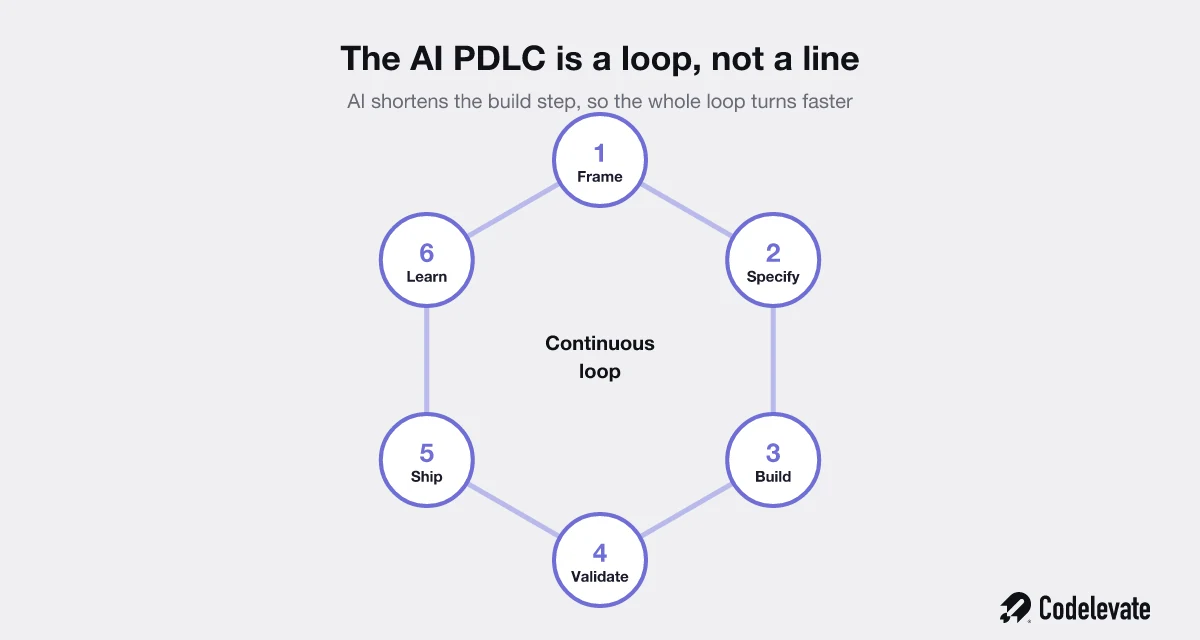
That is the mental model to hold for the rest of this guide. Six stages, run continuously: frame, specify, build, validate, ship, learn. AI makes the build step dramatically shorter, which lets you spin the whole loop faster. The teams that win are not the ones with the fanciest model. They are the ones who turn the loop more times per month, with discipline at the stages AI does not solve for them.
AI PDLC vs SDLC: what is the difference?
People often use AI PDLC and AI SDLC as if they mean the same thing. They do not. The software development life cycle, SDLC, is about building the software itself: the path from requirements to code to a deployed system. The product development life cycle, PDLC, is wider. It starts before any code, with deciding what is worth building and for whom, and it continues after launch, with measuring whether the product actually worked and feeding that back into the next round.
An AI SDLC speeds up the building. An AI PDLC speeds up the whole product loop, including the parts that have nothing to do with writing code: research, positioning, validation, and learning. If you only apply AI to the SDLC, you build the wrong thing faster. The point of treating the full PDLC as one AI-assisted loop is to make sure speed is pointed at the right target.
How the AI PDLC works, stage by stage
Here is what each stage looks like in practice, and what AI actually does at each one.
1. Frame the problem
Before anything is built, someone has to decide which problem is worth solving and for whom. AI helps here by compressing research. You can summarize hundreds of support tickets, cluster user interviews, scan a market, and pressure test an idea in an afternoon instead of a fortnight.
What AI does not do is choose. It will happily generate ten plausible directions. Picking the one that matches your strategy, your customers, and your runway is a judgment call that stays with you. Garbage framing produces garbage downstream, only faster now.
2. Specify the solution
This is the stage that quietly becomes the most important in an AI PDLC. When an agent builds from your description, the description is the product. Vague input gives you a vague, confidently wrong result. Clear input gives you something close to what you meant.
Good specification means describing the user, the job to be done, the rules, the edge cases, and what "done" looks like. AI can help you draft and tidy a spec, but you own the intent. This is why a strong product strategy practice matters more in an AI lifecycle, not less. If you want a head start, our AI product requirements template gives you a structure that AI tools can build from cleanly.
3. Build with AI
This is the stage everyone talks about, and it is genuinely transformed. Coding agents and tools like Cursor, v0, Lovable, and Claude can scaffold features, write components, generate tests, and wire up integrations at a pace that was not possible two years ago. McKinsey found that developers using generative AI tools completed common tasks up to twice as fast in some cases, according to its research on developer productivity and generative AI.
The catch is that fast scaffolding is not the same as production software. A prototype that looks finished can hide weak architecture, missing error handling, security holes, and code no one fully understands. The build stage gets faster, but the bar for what counts as "shippable" does not move. Someone still has to own the system. That is the gap between a working demo and a product real customers depend on, and it is where a lot of AI-built projects quietly fail.
4. Validate
Because building is cheap, you will produce more output, which means you need more checking, not less. Validation in an AI PDLC covers three layers: does it work (tests, QA), is it correct (does it match the spec and the real user need), and is it safe (security, privacy, and for AI features, does the model behave).
AI helps generate test cases, catch obvious bugs, and review code. It cannot tell you whether the thing you built is the right thing. That requires a human looking at it against the original intent, and ideally a real user touching it. Validation is the counterweight that keeps speed from turning into mess.
5. Ship
Deployment is the most automated stage already. Cloud-native pipelines, infrastructure as code, and one-click rollouts mean shipping is rarely the bottleneck. AI adds predictive checks, anomaly detection, and smarter rollbacks, but the core practice of continuous delivery predates the current wave.
The thing to protect here is the boring discipline: staging environments, feature flags, monitoring, and a clear path to roll back. A faster loop ships more often, so the cost of a bad deploy goes up if you have not invested in safe release practices.
6. Learn
Once the feature is live, the loop is not over. You watch how people use it, measure whether it moved the metric you cared about, and feed that back into the next round of framing. AI shines at this stage too: it can read product analytics, surface patterns in behavior, and even draft hypotheses for the next experiment.
This is what makes the AI PDLC a loop. The output of "learn" becomes the input to the next "frame". Teams that close this loop tightly compound their advantage. Teams that ship and look away are just building faster in the dark.
What actually changes in an AI PDLC
If you take one idea from this article, take this one. AI does not remove the work. It moves the work. The constraint shifts from the act of building to the acts of deciding, specifying, and validating.
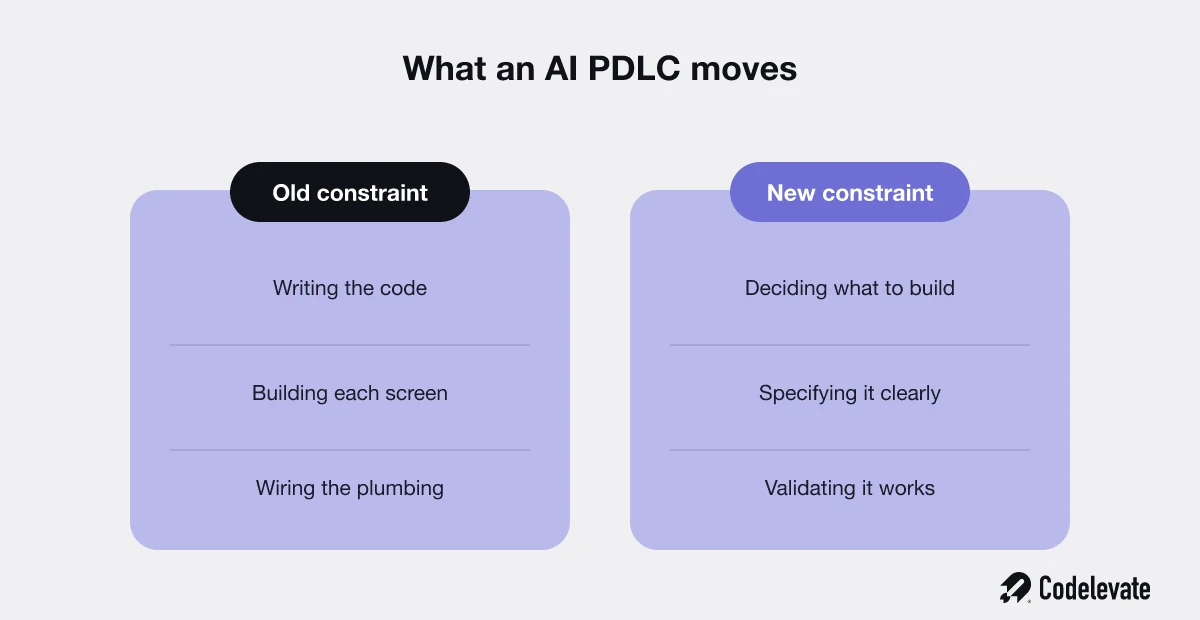
In the old lifecycle, your scarce resource was engineering hours. You protected them, you queued work behind them, and your roadmap was shaped by how much your team could physically build. In the AI lifecycle, building stops being the scarce resource. The new scarce resources are clarity and judgment: knowing what to build, describing it well enough for an agent to execute, and being rigorous about whether the result is actually good.
Where the AI PDLC breaks, and how to prevent it
A few failure patterns show up again and again when teams adopt an AI lifecycle without adjusting how they work.
The prototype trap. A founder builds an impressive demo with an AI tool, shows it to users, gets excited, then tries to turn it into a real product and hits a wall. The prototype was never built to scale, handle errors, or stay secure. The fix is to treat AI-built prototypes as disposable learning tools, and to rebuild on a solid foundation once the idea is validated. We wrote more about that handoff from prototype to production in our work on SaaS development.
Spec drift. The agent builds something slightly different from what you meant, you patch it, it drifts further, and after a dozen rounds you have a tangle no one designed. The fix is to invest in the spec up front and to re-anchor to it every loop, rather than steering blind.
Review debt. Code arrives faster than anyone reviews it, so unreviewed AI output piles up. Six months later you have a codebase no human fully understands. The fix is to make review keep pace with generation, even if that means generating less.
No owner. Everyone assumes the AI handled it, so no single person owns the system, its quality, or its security. The fix is clear ownership. AI changes how the work gets done, not who is accountable for it.
Prevent these and the AI PDLC delivers what it promises: more learning per month, at lower cost, without trading away quality.
Who should run an AI PDLC, and who should wait
This is not for everyone right now, and being honest about that saves a lot of wasted effort.
An AI PDLC pays off most when you are building digital products where iteration speed is a real advantage: SaaS tools, internal platforms, customer-facing apps, AI features. If you are a founder racing to find product-market fit, a CTO trying to ship more with a small team, or an operations leader automating workflows, the loop maps directly onto your problem.
It pays off least when your constraint is not building. If your real bottleneck is regulatory approval, hardware, deep research, or selling, then making the build loop faster will not move your business much. And if you do not yet have the discipline to specify clearly and review honestly, adopting AI tooling will amplify that weakness rather than fix it. In that case, fix the fundamentals first, then add the speed.
The honest answer for most software teams in 2026 is that some version of this is already happening, with or without a plan. The choice is whether to run it deliberately or let it happen by accident.
How to start your own AI PDLC this quarter
You do not need a reorganization to begin. You need one loop run well. After 2 or 3 loops you will see your own version of the constraint shift, and you will know exactly which stage needs the most attention in your team. That is worth more than any generic framework.
If you would rather not learn this the expensive way, this is the work we do. As an AI development company, Codelevate helps founders and product teams design the loop, build the agents, and run the lifecycle in production, with the engineering rigor that keeps speed from turning into technical debt.
Want to go deeper before you talk to anyone? Our free guide, The SaaS Founder's AI Blueprint, walks through how to build and integrate AI into a real product without the usual mistakes. And when you are ready for a second opinion on your own lifecycle, you can book a free call with our team.

.svg)
.svg)


