
AI unit economics: what it really costs to run an AI agent in 2026
Most teams price their AI feature before they know what it costs to run. That is the wrong order, and it is why so many AI products look profitable in a pitch deck and quietly lose money per customer in production.
Here is the part that gets missed. AI unit economics, the cost of serving one unit of AI work, is not really set by your model provider's price list. It is set by decisions your engineers make during the build: how many model calls one task triggers, how much context gets resent on every call, whether repeat work is cached, and whether anything stops a loop that has gone sideways. Change those and the same feature costs 5 times more or 5 times less, with no visible difference to the user.
This article is written for founders, CTOs, and product leaders who already have an AI feature live or close to launch, and who need the run cost to be a number they control rather than a surprise on the monthly invoice. If you are still deciding whether to try AI at all, this will be more detail than you need right now.
You will learn what belongs in AI unit economics, where the money actually goes inside a production agent, why one customer can cost 5 times another on the same plan, the 6 build decisions that set your cost per task, and a simple way to model all of it before anyone writes code.
Key takeaways
• AI unit economics is the cost to serve one unit of AI work, usually one resolved task, measured against what you charge for it.
• Tokens are only 1 of 6 cost lines. Retrieval, tool calls, retries, human review, and infrastructure fill in the rest.
• Gartner expects more than 40% of agentic AI projects to be cancelled by the end of 2027, with escalating cost named as a leading reason.
• ICONIQ puts average gross margin on AI products at 45% in 2025 and a projected 53% in 2026, well below the 80% that mature SaaS teams expect.
• Seat pricing hides the damage. A heavy user on a 50 euro plan can consume more AI cost than the seat brings in.
• Architecture, not the rate card, sets your cost per task. Model routing, context discipline, caching, and hard ceilings move it the most.
• Model your cost per task before you build, then measure it per customer so you find loss-making accounts in week 1 rather than quarter 3.
What are AI unit economics?
AI unit economics is the cost of serving one unit of AI work compared with the revenue that unit brings in. For most products the useful unit is one resolved task: a support ticket answered, an invoice processed, a report drafted, a lead qualified.
Pick the unit your customer would recognise as a job done, not a technical event. Cost per API call tells you almost nothing, because one resolved task might take 3 calls or 40 depending on how the agent is built. Cost per resolved task is the number that connects an engineering decision to the profit and loss statement, and it is the number an investor or an acquirer will eventually ask you about.
Classic SaaS never needed this discipline. Once the software was written, serving the 10,000th user cost almost nothing, so gross margins in the 80s were normal and pricing could be a pure strategy exercise. AI removed that assumption. Every request now carries a real marginal cost, which means the shape of your product sets your margin, and the shape is decided during the build rather than in a pricing meeting.
Why the run cost, not the build cost, decides whether your AI feature survives
The build cost is a one-time number you can plan for, scope, and finance. We covered that side in our guide to what it costs to build an AI agent in 2026. The run cost behaves differently. It compounds with adoption, and it arrives every month whether or not the feature is winning you customers.
Gartner expects more than 40% of agentic AI projects to be cancelled before the end of 2027, and names escalating costs at the top of the reasons, alongside unclear business value and weak risk controls, in its June 2025 prediction on agentic AI. Those cancellations are rarely triggered by a model that stopped working. They are triggered by a finance review that discovers the feature is being subsidised by the rest of the business.
The market data says the same thing in a calmer voice. ICONIQ's 2026 State of AI report puts average gross margin on AI products at 45% in 2025 and a projected 53% in 2026. That is a real improvement, and it is still a long way from the 80% that traditional software trained everyone to expect. The teams pulling that average up did not negotiate a better rate card. They re-engineered how much work each request actually does.
There is a second reason to care early. Cost per task is a design property, not a setting. Once an agent is live, changing how it retrieves context or how many steps it may take means touching the part of the system your customers depend on. Teams that leave it until the invoice hurts end up rebuilding the feature they just shipped.
Where the money actually goes in a production AI agent
Model calls are the obvious cost line and the one every budget includes. The other 5 are where estimates fall apart, and together they routinely add up to more than the tokens.
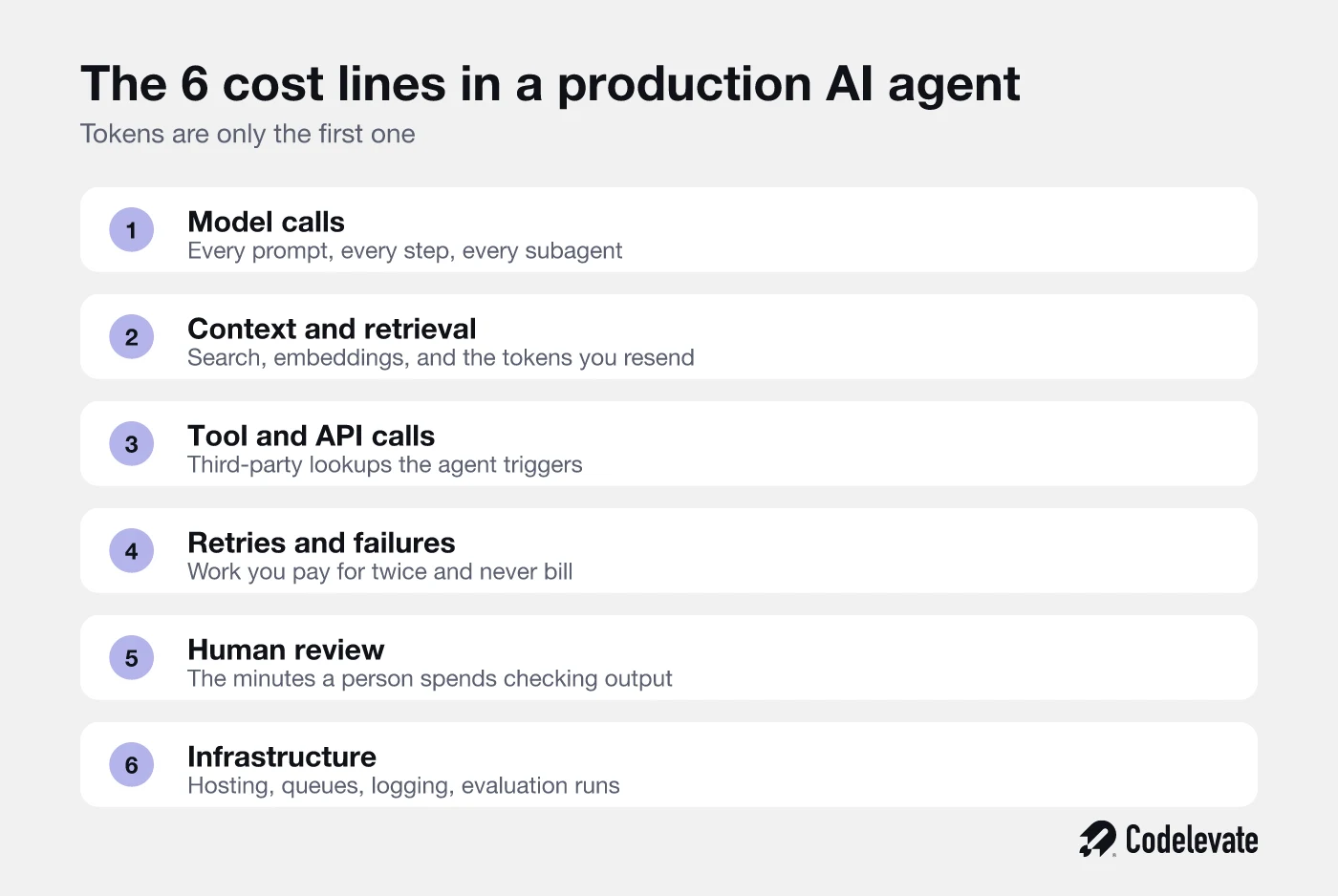
Context and retrieval is the quiet one. Every search, every embedding refresh, and above all every token you resend on the next step has a price. Agents that carry a growing conversation forward pay for the same history again on each call, so a task that looks like 6 short steps can cost far more than 6 short prompts.
Retries deserve special attention because they are invisible in a specification and painful in an invoice. When a step fails validation, most agents simply try again. If the cause is structural, such as a tool that returns a shape the model cannot parse, the agent can burn through several full attempts before giving up. Work you never bill is still work you buy.
Human review is the line finance understands instantly and engineering usually forgets. If a person spends 2 minutes checking every generated output, that is a genuine cost per task, and at any serious volume it dwarfs the token spend. It is also the line that should shrink as the agent matures, which makes it a useful proxy for whether the system is actually getting better or just getting used more.
Infrastructure is the smallest of the 5 in most builds, and the easiest to forget entirely: queues, storage, logging, and the evaluation runs you need to prove the agent still works after a model update. None of it is expensive on its own. All of it is permanent.
The customer who costs more than they pay
Averages hide the accounts that hurt you. In an AI product the spread between your lightest and heaviest customer is not 20% and it is not 2 times. It can be 10 times or more, and it lands entirely on your side of the invoice.
Take a single plan at 50 euros per seat and put 2 customers on it. One triggers 200 AI tasks a month. The other triggers 900, because someone wired your product into a workflow you never anticipated. At 9 cents per resolved task, the first customer leaves 32 euros before any other cost is counted. The second costs 81 euros to serve and turns a paying account into a loss.
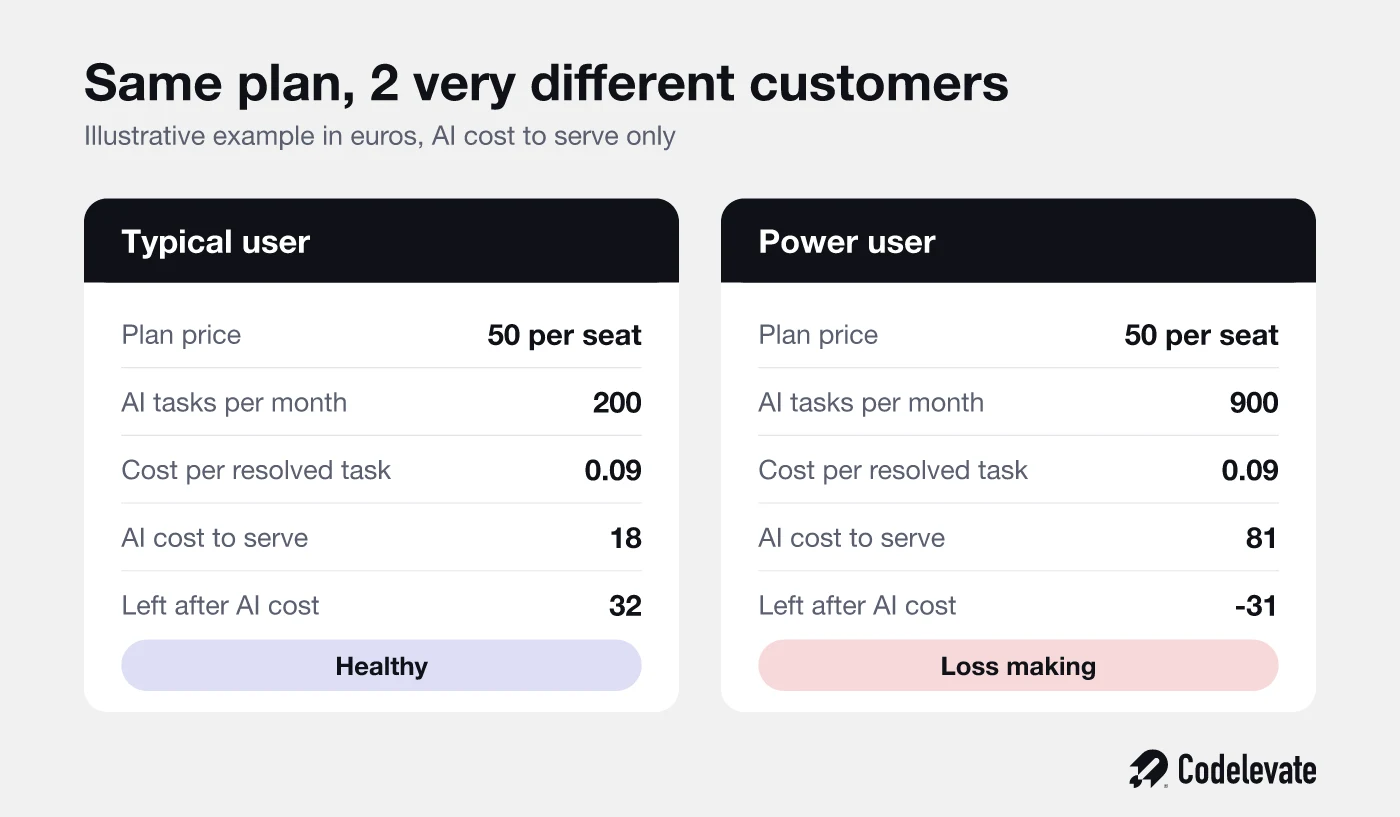
Neither customer is doing anything wrong. This is simply what happens when a fixed price meets a variable cost. In classic SaaS the heavy user was your best case study, because they proved the product was sticky and cost you nothing extra. In an AI product the heavy user can be your worst account, and you will not know which is which until you measure cost by customer rather than in total.
There are only 3 honest responses to that spread.
• Cap it, with usage limits or fair-use rules written into the plan.
• Charge for it, with credits, usage tiers, or outcome pricing that moves with consumption.
• Make it cheap enough not to matter, by rebuilding the task so it costs a fraction of what it costs today.
Most teams reach for the first 2 because they are commercial decisions and can be made in an afternoon. The third is the engineering answer, and it is the only one that improves your position rather than transferring the problem to your customer. It is also the one that lets you keep a simple price while a competitor is busy explaining their credit system.
If you are working through this for a product you are about to ship, our SaaS AI Blueprint walks through the same decisions in a build context, including how to scope an AI feature so the run cost stays predictable. It is free and takes about 20 minutes to read.
6 build decisions that set your AI cost to serve
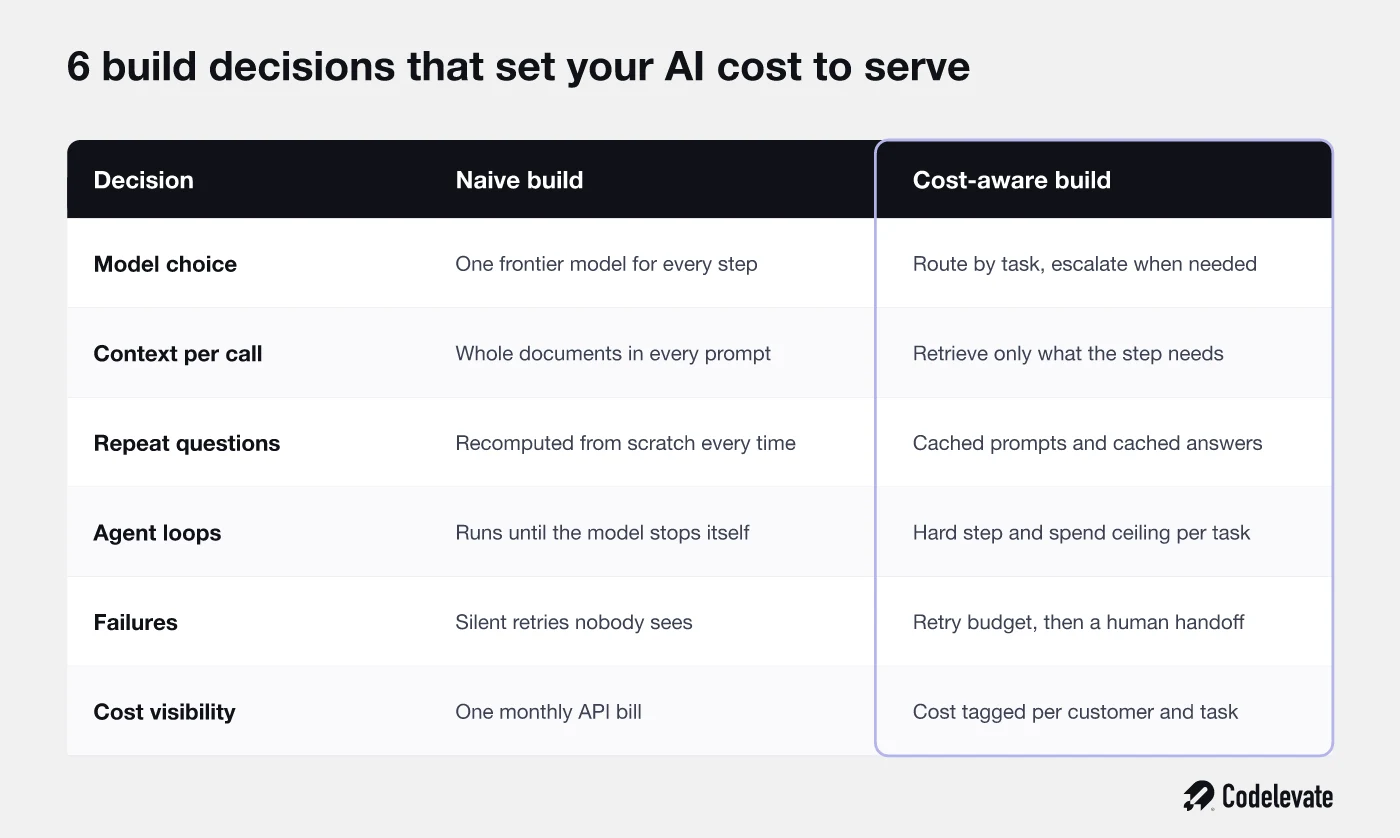
Every number in the example above is downstream of a handful of architectural choices. Here is how a cost-aware build differs from the default one, decision by decision.
1. Route work to the smallest model that can do it
Most agent workflows are a mix of easy steps and hard ones. Classification, extraction, routing, and formatting are easy. Judgement, synthesis, and anything customer-facing is not. Sending all of it to one frontier model is the single most expensive habit in production AI, and it is usually a leftover from the prototype where using one model kept things simple.
The fix is a routing layer that sends each step to the cheapest model that clears your quality bar, and escalates only when confidence is low or the stakes are high. This is also the lever ICONIQ credits for much of the margin improvement across their sample. Done well it is invisible to users and cuts a large share of model spend.
2. Send less context, not more
When answers are weak, the instinct is to give the model more to work with. That instinct is expensive. Pasting whole documents into every prompt raises cost on each call and often lowers accuracy, because the useful sentence is buried among thousands of irrelevant ones.
Retrieval that returns the 3 relevant paragraphs instead of the 30 page manual is cheaper and usually more accurate at the same time. Treat context as a budget the agent has to spend wisely rather than a safety net you fill to the top.
3. Cache the work you keep repeating
Real usage is far more repetitive than test usage. The same policy question, the same product lookup, the same document summarised by 4 people in the same week. Caching at the prompt level, at the retrieval level, and at the answer level removes a meaningful share of calls that produce output you already have.
The engineering question is not whether to cache, it is what may safely be cached and for how long. That is a product decision about freshness, and it is worth making deliberately instead of defaulting to recomputing everything.
4. Put a hard ceiling on every task
An agent that decides for itself when to stop will occasionally decide very late. Give every task a maximum number of steps and a maximum spend, and make exceeding either one a handled event rather than a silent overrun. A ceiling turns your worst case from unbounded into known, which is what makes the whole model forecastable.
5. Turn silent retries into an escalation policy
Retries are fine. Unlimited retries are a billing problem pretending to be resilience. Set a retry budget per task, and when it runs out, hand the task to a person or return an honest failure. A handoff costs a few minutes of someone's time. A retry loop can cost far more and still fail.
6. Measure cost per customer from day 1
You cannot manage a number you see once a month in aggregate. Tag every model call, tool call, and retry with the customer, the feature, and the task, so cost per resolved task and cost per account are dashboards rather than investigations. Teams that instrument this early find their 3 loss-making accounts in the first weeks. Teams that do not find them during a board meeting.
How to model your AI unit economics before you build
You do not need a finance background for this. A single spreadsheet built in an afternoon will get you close enough to make good decisions, and being roughly right early beats being precisely right after launch.
• Define the unit. Name the task your customer would call a job done, and describe what finished looks like.
• Count the steps. Walk through one task and list every model call, retrieval, and tool call it triggers, including the failure paths.
• Price the steps. Apply current provider pricing to realistic input and output sizes for each step, not to your best case demo.
• Add the invisible lines. Include a retry allowance, expected human review minutes, and a flat infrastructure share per task.
• Test the extremes. Run the model for a light user, a typical user, and the heaviest user you can imagine, then check that all 3 still work against your price.
The output you want is one number and one sentence: cost per resolved task, and what has to be true for it to fall as volume grows. If cost per task stays flat as you scale, you have a services business with a software interface. If it falls, you have a software business, and the market will value it accordingly.
One practical warning. Provider prices change often and usually downward, which tempts teams to plan on future discounts. Model with today's prices. Falling prices should be upside, never the assumption holding your business case together.
What good looks like in 2026
There is no universal benchmark, because a legal research agent and a support deflection agent do genuinely different amounts of work. There are still 3 useful reference points.
The first is direction. AI product margins are climbing, from 45% in 2025 to a projected 53% in 2026 in ICONIQ's data, and the improvement comes from engineering rather than pricing power. If your cost per task has not moved in 6 months, you are drifting against the market.
The second is proportion. As a working rule, keep cost to serve under 30% of the revenue that unit of work supports, and treat anything above 50% as a design problem to solve before you scale distribution. Above that line, every new customer makes the shortfall bigger.
The third is spread. Healthy AI products have a narrow gap between their median and their 95th percentile cost per customer. A wide gap means your ceilings are missing or your pricing does not follow consumption, and it will show up as a small number of accounts that quietly consume the margin from everyone else.
How we approach AI cost to serve at Codelevate
When we scope an AI build, cost per task is part of the specification, next to accuracy and latency. It gets a target before the first line of code, because it is far cheaper to design a routing layer than to retrofit one into a live agent.
In practice that means naming the unit of work, mapping the steps a task really takes, choosing which of them need a frontier model and which do not, deciding what may be cached, and setting the step and spend ceilings up front. We instrument cost per task and per customer from the first release, so the number is visible while the product is still small and easy to change. It is the same discipline behind our AI development work, where the goal is a system that stays affordable at 100 times the volume, not only one that demos well.
None of this makes an AI product cheap. It makes it predictable, which is what lets you price with confidence, promise a margin to a board, and keep the simple pricing your customers prefer.
Conclusion
AI unit economics is not a finance exercise you do after launch. It is a design constraint you set before the build, and the teams treating it that way are the ones whose margins improved in 2026 while everyone else was renegotiating with their model provider.
Start with one number. Pick the unit of work, cost it end to end including retries and human review, and check it against what you charge. If it holds for your heaviest customer, you have a business. If it only holds on average, you have a problem waiting for a growth spurt to expose it.
If you want a structured starting point, the SaaS AI Blueprint covers how to scope and build an AI feature so the run cost is designed in rather than discovered. And if you would rather work through your own numbers with someone who has built these systems, book a free call with our team and bring your cost per task, or the fact that you do not have one yet.


.svg)
.svg)


