
Webflow vs Claude: which is better for your website in 2026?
Webflow vs Claude is the wrong fight, and the search results are a year behind reality. Since the Claude + Webflow connector launched in February 2026, Claude does not compete with Webflow, it works inside it. So the real question in 2026 is not "Webflow or Claude," it is "a vibe-coded stack, or Webflow with Claude." This article answers that, honestly, from a team that uses the Claude + Webflow connector every day (including to draft articles like this one). It is written for founders, marketing leaders, and CTOs deciding how to build and run a serious website.
Key takeaways
The short version, before the detail:
• Claude is an AI model that writes and edits; Webflow is a platform that builds, hosts, and runs a website. They are not the same category.
• The Claude + Webflow connector (February 2026) lets Claude read and write your Webflow CMS, pages, styles, and metadata directly, with your approval.
• The real 2026 comparison is a vibe-coded stack (Cursor, Bolt, v0) versus Webflow + Claude. Webflow + Claude stays editable, on-brand, and maintainable.
• You can automate CMS operations, SEO and AEO work, and design tasks with Claude, but each needs proper setup, not a magic prompt.
• Webflow AEO (April 2026) adds LLM-visibility tracking, so you can see and improve how AI answer engines cite your site.
• Enterprise governance is built in: branching, publishing gates, and roles mean AI never touches your live site without approval.
• Expert setup and human judgment are still non-negotiable. Claude amplifies the expertise you bring, or the lack of it.
What is Webflow?
Webflow is a visual platform that bundles the design tool, a structured CMS, hosting, forms, and a global CDN into one product. A team designs in the browser, marketers edit content visually, and Webflow runs the live site. You get a professional, maintainable website without owning or hosting a codebase.
What is Claude as a web tool?
Claude is Anthropic's AI model. On its own it generates and edits code and content extremely well, but it has no CMS, no hosting, and no visual editor. Point it at a blank project and it will build fast; the output is a codebase that someone then has to host, manage, and maintain.
What is the Claude + Webflow connector?
This is the piece that changes the comparison. The connector, launched in February 2026, is a first-party integration (see Webflow's Anthropic Claude integration) that gives Claude direct, permissioned access to your Webflow project: the CMS, pages, styles, Designer, and metadata. Claude can read and write inside Webflow through the API, so instead of generating a separate codebase, it works within the platform your team already uses. That is a fundamentally different setup from pointing an AI tool at an empty repo.
What you can actually do with Claude + Webflow
With the connector in place, and proper setup, Claude can take on real work inside Webflow.
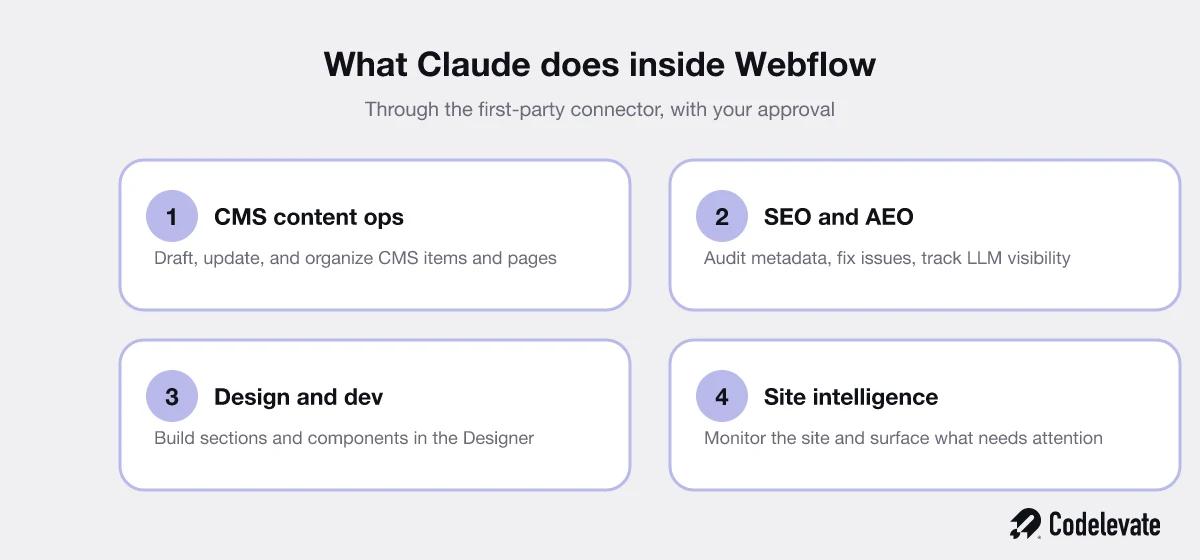
• CMS content operations. Draft, update, restructure, and organize CMS items and pages at a pace no manual process matches, for example spinning up a whole blog collection or reworking every product entry in one pass.
• SEO and AEO work. Audit metadata, fix issues at scale across hundreds of pages, and, with Webflow AEO, track and improve how AI answer engines see and cite your site.
• Design and development. Build sections and components in the Designer, following your existing design system rather than inventing a new one that breaks your brand.
• Site intelligence. Monitor the site and surface what needs attention, from broken links to thin pages, so problems get caught early instead of accumulating.
The important word in all of that is setup. None of it is a magic prompt, and that is exactly where most people go wrong.
How to connect Claude to Webflow
At a high level the setup is straightforward, though doing it well takes care.
• Install the Webflow connector (the MCP server) so Claude can reach your project through the API.
• Authorize it against the specific site, and set permissions for exactly what it may read and write.
• Give Claude context: your components, brand, content model, and rules, so it works to your standard, not a generic one.
• Work on a branch and keep publishing behind a human gate.
The connection itself takes minutes. The context and the guardrails are what separate a useful setup from an expensive one.
Vibe-coded stack vs Webflow + Claude
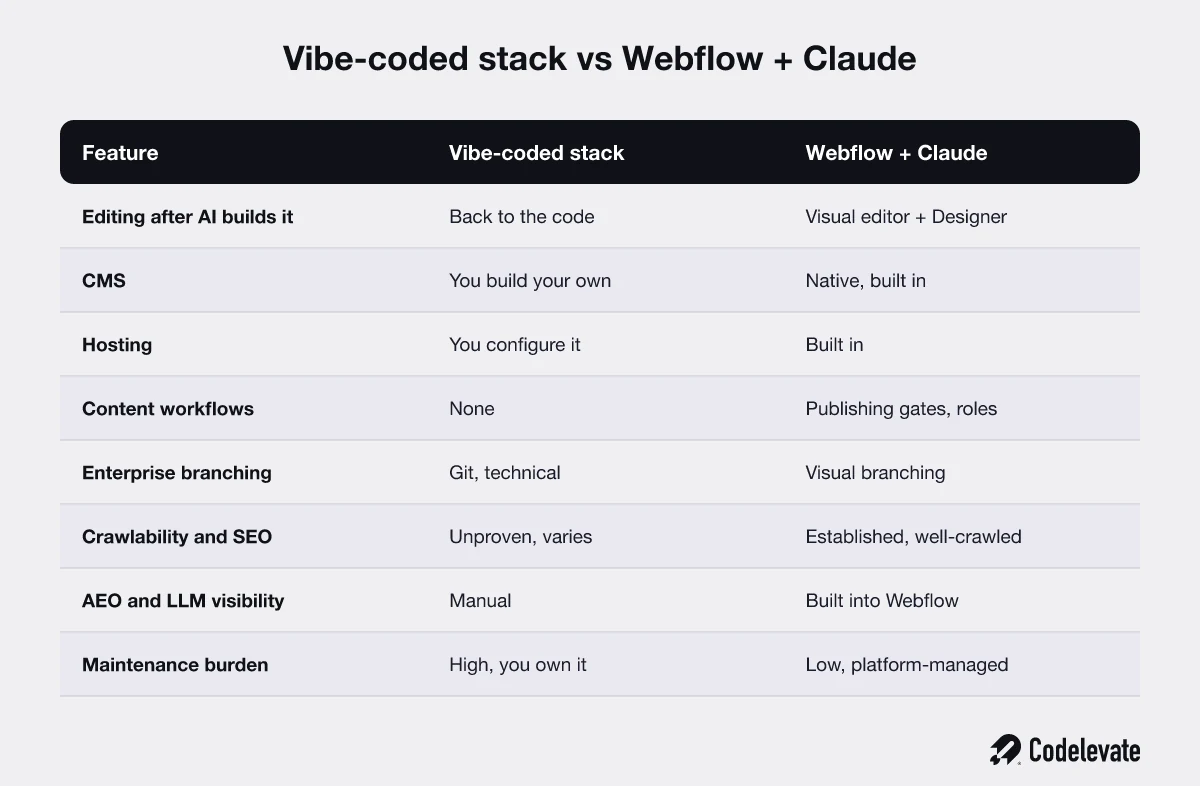
The honest comparison in 2026 is not Webflow against Claude. It is a vibe-coded stack (Claude or similar tools generating a raw codebase in Cursor, Bolt, or v0) against Webflow with Claude working inside it. The table above lays it out; here is the plain reading.
• Editability after generation. A vibe-coded site sends you back to the code for every change, so a copy tweak becomes a developer task. Webflow + Claude keeps a visual editor and Designer, so your marketing team can keep editing without engineering.
• The full stack. A vibe-coded stack means you build your own CMS, configure your own hosting, and wire up your own publishing workflows, each a separate project. Webflow + Claude includes all of it in one platform, so there is nothing to assemble or separately maintain.
• Crawlability and governance. A vibe-coded site's SEO is unproven and varies wildly, and it has no built-in publishing controls. Webflow is established and well-crawled, with branching, gates, and roles built in.
• Maintenance. A vibe-coded stack is high-maintenance because you own everything. Webflow + Claude is low-maintenance because the platform manages it.
Free download: before you commit to any stack, grab our 70-point Webflow launch checklist. It is the exact pre-launch process we run for client sites, and it works whichever route you choose.
Speed of development
Speed is where the hype lives, so be precise about it.
• Claude is faster in the first hour. From a blank start, it produces working output almost immediately.
• Webflow is faster in every hour after that. Each later task uses infrastructure that already exists, so you are not rebuilding the plumbing every time.
If you are building something once and never touching it again, raw Claude is faster. If you are building something that has to live, grow, and change, Webflow becomes faster from the second task onward, and Claude inside Webflow makes that even quicker.
CMS and content management
This is the clearest gap. Webflow's CMS is a structured content database: defined fields, references between collections, and granular control over who can edit what. Claude on its own has no CMS, so a vibe-coded site stores content in code or a separately configured headless CMS you have to run. With the connector, Claude operates Webflow's CMS directly, which gives you AI speed on top of a real content system, not instead of one.
Maintainability
A vibe-coded codebase is software you now own and must maintain: dependencies, security patches, and a developer who understands it. A Webflow site is platform-managed, so the maintenance burden stays low even as the site grows. Adding Claude does not add a maintenance tax here, because the output lives in Webflow, not in a codebase you have to keep alive.
Design control
Raw code has no design ceiling, which sounds like a win until every change becomes engineering work. Webflow gives your team a visual design system they can extend without a developer, and Claude can build within that system through the Designer. You get most of the flexibility of code with none of the "file a ticket to move a button" tax.
SEO and AEO
Both being found by Google and being cited by AI answer engines matter now.
• SEO. Webflow produces clean, fast, well-crawled sites with titles, meta, alt text, redirects, sitemaps, and schema exposed. A vibe-coded site can rank, but its crawlability is unproven and depends entirely on how it was built.
• AEO. Webflow AEO, launched in April 2026, adds LLM-visibility tracking directly into the platform, so you can measure and improve how ChatGPT, Claude, Gemini, and Perplexity cite you. That is a capability a raw codebase simply does not have out of the box, and Claude can act on what it surfaces.
Enterprise governance and safety
For any serious company, "letting AI edit the website" only works with guardrails, and this is where Webflow + Claude is built for the enterprise.
• Branching. Changes happen on a branch in the Designer, not on the live site.
• Publishing gates. Nothing goes live without a human approving the publish.
• Roles and permissions. You control exactly what Claude and each person can touch.
The result is that AI never touches your live site without approval. A vibe-coded stack can achieve some of this with Git, but that is a technical workflow your marketing team cannot run.
Why you still need experts, even with AI
This is the part the hype skips, and it is the most important section for anyone about to spend money.
• The AI slop problem. Point Claude at a site with no design system, no content model, and no strategy, and you get generic, off-brand, sometimes harmful output, fast. AI amplifies whatever setup it is given.
• Setup is the real work. A site skill trained on your specific components, brand, and style guide is the difference between AI that is useful and AI that is expensive guessing.
• Judgment does not automate. Strategy, creative direction, and knowing what not to build stay human. Claude frees your experts to spend time there instead of on mechanical tasks.
Quality over speed is the right framing. The value of Claude is not that it ships faster, it is that it removes the busywork so real decisions get more attention.
Cost
Cost follows the same logic as everything else here.
• A vibe-coded stack has a large hidden cost: you pay to build, host, run a CMS, and maintain the codebase, plus a developer for every change.
• Webflow + Claude is a predictable platform cost, with the connector layered on top, and changes handled by your team rather than billed by the hour.
For a site that has to live and grow, the predictable platform cost almost always wins on total cost of ownership.
Who should use what
The honest guidance:
• Use Webflow + Claude for marketing sites, blogs, and content-driven sites that a team needs to run and update, which describes most business websites and nearly every case where marketing owns the site.
• Use a custom, AI-built stack when the thing you are building is really an application: a product, a logged-in tool, or complex custom logic that a visual platform cannot express and that engineers will own anyway.
• Use both when you have a product and a marketing site, with the marketing side on Webflow + Claude and the product on a custom stack. This is what we recommend to most enterprise clients, and it is how mature companies run.
How we combine them in practice
Because we run this stack daily, here is the workflow that actually works.
• Discovery and strategy first. We set the goals, the audience, and the content model before any AI touches anything.
• A proper site setup. We build the design system and a Claude setup trained on your specific components and brand, so the AI produces on-brand work, not slop.
• Claude handles the mechanical work. CMS operations, metadata, section building, and audits, all inside Webflow, all on a branch.
• Humans keep the judgment and the publish. Strategy, creative direction, and the final approval stay with people, never the model. As an AI-assisted Webflow team, that split is the whole point, and it is what lets us move fast without shipping AI slop to a live enterprise site.
A built site still has to convert
Whatever you build it with, the site only matters if it turns visitors into customers, and that is a separate skill from building it. Before you obsess over the stack, make sure the page earns the click and the call. This short breakdown covers the mistakes that quietly kill conversion on otherwise good sites.
Common myths, cleared up
A few things people get wrong about this:
• "Claude replaces Webflow." It does not. It works inside Webflow through the connector, and the platform still runs the site.
• "AI builds the whole site while you sleep." It can build a lot, fast, but without a real setup and human direction the result is generic and off-brand.
• "You have to be a developer." Not for content and design work inside Webflow. You do need someone who understands the setup.
• "It is not safe to let AI near a live site." With branching, publishing gates, and roles, AI never publishes without a human approval.
The bottom line
Webflow vs Claude is a false choice in 2026. Claude is not an alternative to Webflow, it is the fastest way to work inside it. Against a vibe-coded stack, Webflow + Claude wins for anything that has to live and grow: it stays editable, governed, well-crawled, and low-maintenance, while a raw codebase hands you a maintenance bill and a marketing team that cannot self-serve. The tools are only as good as the setup and the judgment behind them, which is exactly where an experienced team earns its place. Pick the stack that your team can still run a year from now, not the one that demos best today.
Free download: our 70-point Webflow launch checklist is the exact pre-launch process we run before any site goes live. And if you want the Claude + Webflow stack set up properly on your own site, you can book a free call and we will show you what good looks like, with no hard sell.


.svg)
.svg)


