
Building a website with AI vs Webflow: which should you choose?
In this article you will get an honest, side-by-side comparison of building a website with AI (tools like Claude, Lovable, Cursor, and v0, hosted on Vercel with a headless CMS such as Strapi or Sanity) versus building it in Webflow. We cover what each one gives you, what it does not, and the things that actually decide it: content updates, maintenance, adding sections, speed, SEO, and real cost. It is written for founders, marketing leaders, and CTOs weighing this exact choice.
Short version up front: AI is faster to build, Webflow is faster to run and update, and most companies end up using both. Here is how to know which parts of your site belong where.
Key takeaways
The whole comparison, up front:
• Build with AI when the site is really an app, you have engineers, and you want to own the code.
• Build with Webflow when a non-technical team needs to update a marketing site fast, without waiting on developers.
• AI is faster to the first launch; Webflow is faster to every change after it.
• The hidden cost of an AI build is ongoing maintenance and a separate headless CMS you have to run.
• Webflow looks less flexible but is predictable, because changes do not bill by the developer hour.
• Most companies use both: a custom, AI-built product and a Webflow marketing site.
• Decide with one question: who changes the site next month? That settles it more often than any feature list.
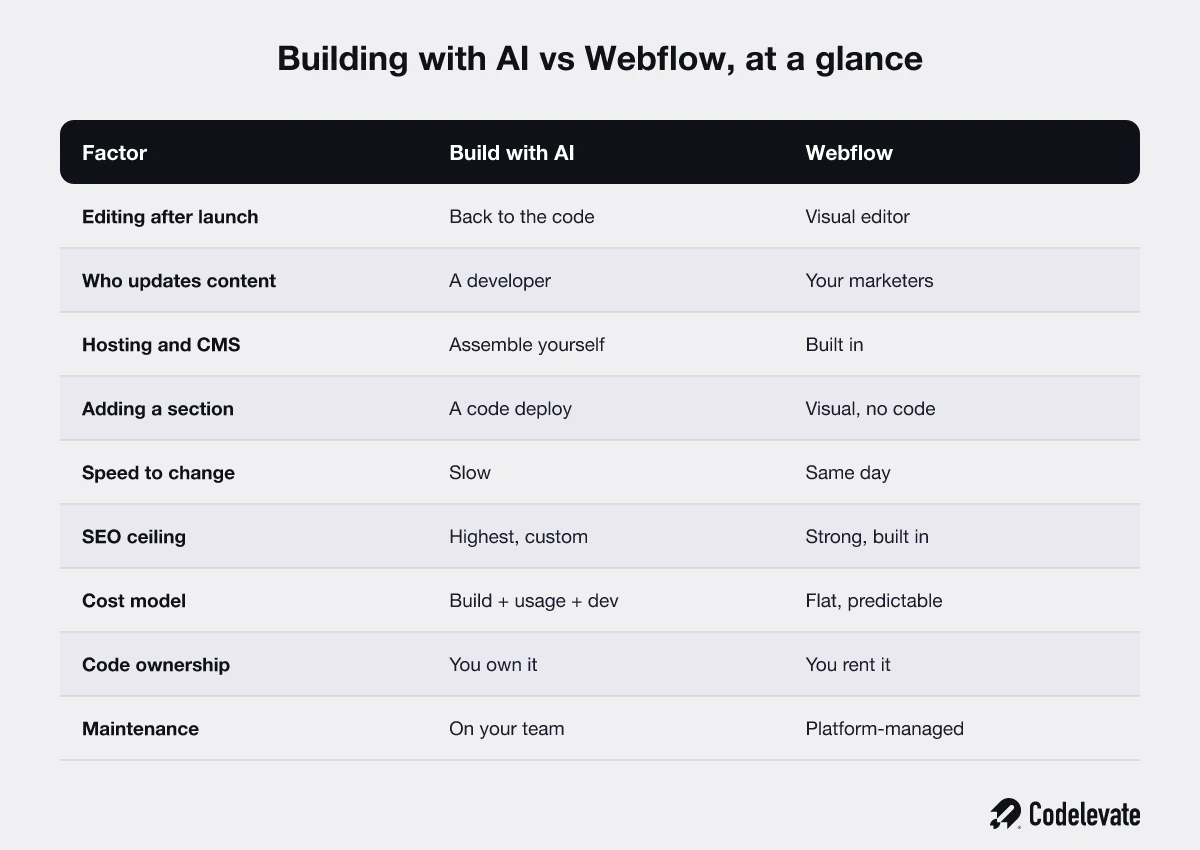
The two ways to build a website in 2026
There are two serious options for a business website today.
• Build with AI. An AI coding tool (Claude, Lovable, Cursor, v0) generates a real Next.js codebase, you host it on Vercel, and you manage content in a separate headless CMS like Strapi or Sanity. You own the code.
• Build with Webflow. A visual builder that bundles design, hosting, CMS, and forms in one platform. Your team edits visually. You rent the platform.
Both can produce an excellent site. The real question is not which one looks better, it is who maintains and updates it for the next three years.
What each approach gives you
Both have real strengths, so start there.
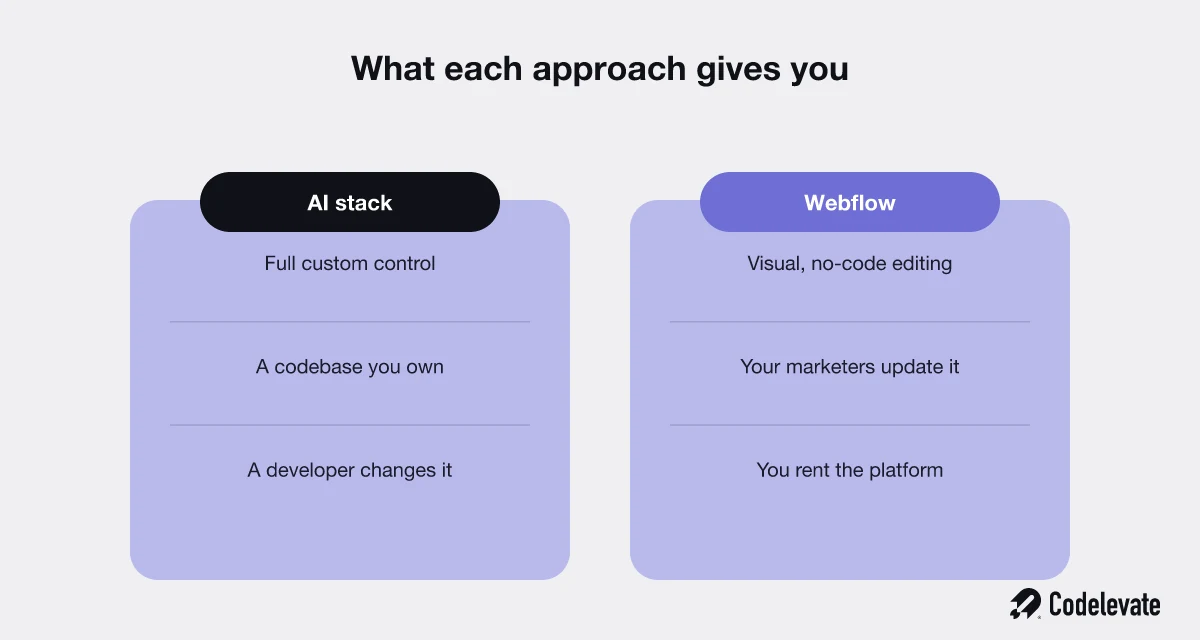
Building with AI gives you:
• Full control and a codebase you own, with no platform lock-in, so you can move to any developer or host later.
• Anything you can describe: custom interactions, unusual layouts, and deep integrations a visual tool cannot reach.
• The highest ceiling on performance and technical SEO, which matters most for large or speed-critical sites.
Webflow gives you:
• Visual, no-code editing your whole team can use, so a marketer ships a change in minutes, not a sprint.
• Hosting, CMS, forms, and a global CDN built in, with nothing to wire together or separately pay for.
• A polished, on-brand site live fast, and changed just as fast, without a developer in the loop.
What each approach does not give you
The weaknesses are usually what people discover too late.
The AI stack does not give you:
• Easy content edits for non-developers. Content lives in code or a CMS you have to configure, so a marketer usually cannot change a page alone.
• An all-in-one bundle. You assemble hosting, forms, and search from separate services, each with its own setup and bill.
• A maintenance-free life. A custom codebase is software, and software needs updates, security patches, and someone who understands it.
Webflow does not give you:
• The code. You rent the platform and cannot take the underlying build elsewhere.
• Unlimited customization. Most things are possible, but the most unusual or app-like builds eventually hit its ceiling.
• Freedom from platform risk. Your site lives on Webflow's terms, roadmap, and pricing.
Maintenance and content updates, the part that actually decides it
If you read one section, read this. For most companies the deciding factor is not how the site is built, it is who changes it every week. Ask one question: who updates the website day to day?
• With the AI stack: a copy change or a new page often means a developer edits code and redeploys. Even with a headless CMS wired in, structural changes route back to engineering. Fast to build, slow to hand over.
• With Webflow: marketing edits content, adds pages, builds new sections, and hits publish, with no developer and no deploy in the loop.
Play it forward. A team shipping ten web changes a week gets ten self-serve edits on Webflow, or ten engineering tickets on an AI-built site. That queue, not the initial build, is where the real cost and frustration live. It is why enterprise marketing teams keep the marketing site on Webflow even when the product is fully custom. Our own Webflow development work exists largely for that reason.
Free download: before you commit to either path, grab our 70-point Webflow launch checklist. It is the exact pre-launch process we run for client sites, and it maps out everything a site needs before it goes live, on any platform.
The headless CMS you will need with an AI build
This is the piece people forget when they build with AI. A codebase has no content editor, so you add a headless CMS. The common options:
• Strapi: open-source and self-hosted, flexible and free to license, but you run and maintain it yourself.
• Sanity: developer-friendly and real-time, with a generous free tier that scales into paid usage.
• Contentful: enterprise-grade and mature, powerful, and usually the priciest as you grow.
Whichever you pick, someone has to model the content, connect it to the site, and keep it running. That work is real, it is ongoing, and it is exactly what Webflow bundles by default. The CMS is not a footnote in this decision, for a content-driven site it often is the decision.
Speed of use: building versus changing
Speed cuts both ways, and conflating the two is the most common mistake.
• Building the first version: AI wins. A capable team can ship a deployed site in a day.
• Changing it forever after: Webflow wins. New sections, copy, landing pages, and campaigns are same-day, no-code edits.
The honest read: AI is faster to first launch, Webflow is faster to the hundredth change. For a real business the site changes constantly, so the second number usually matters more.
Sections and the customization ceiling
Adding sections shows the difference most clearly.
• AI-built: no design ceiling, but every new section is a code change, a review, and a deploy.
• Webflow: build new sections visually from your components, within a rich but bounded system. Very large or highly interactive app-like experiences can strain it.
For the vast majority of marketing sites, Webflow's ceiling is far above what the site actually needs.
The real cost, including the parts nobody quotes
Sticker price is the least useful number here. Total cost of ownership is what matters, and the two models are shaped very differently.
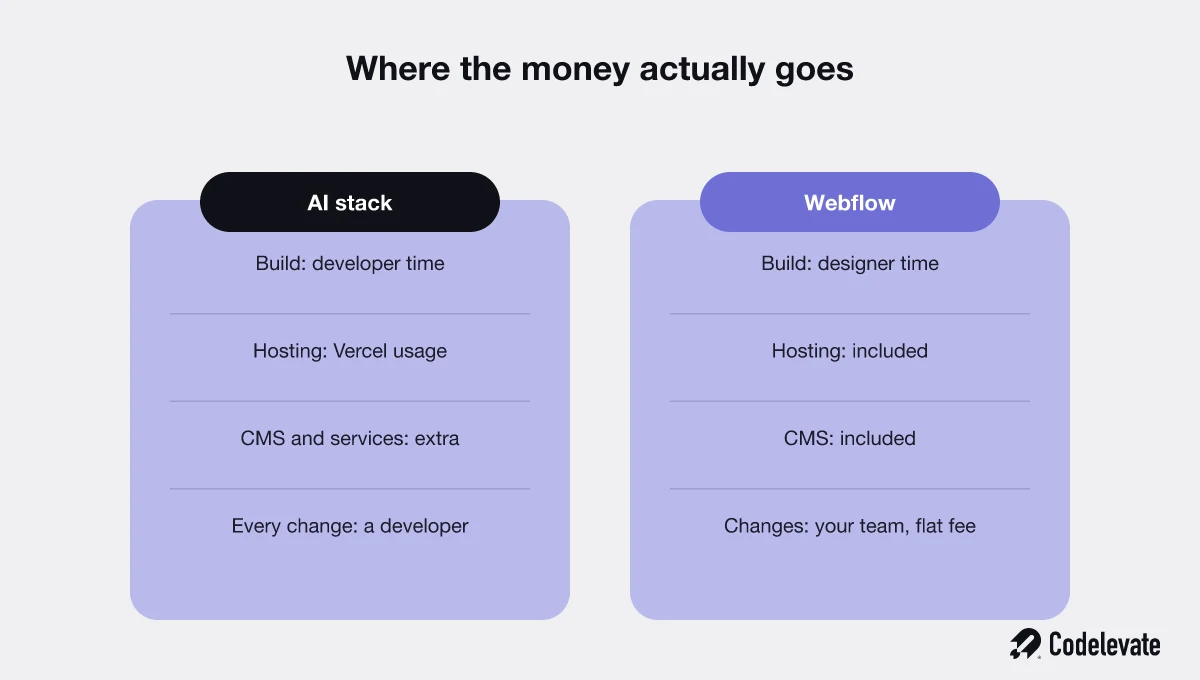
AI stack costs:
• Build: developer time. Senior review is not free, even when AI speeds it up.
• Hosting: Vercel is usage-based. Cheap at low traffic, unpredictable at scale.
• Services: a headless CMS, forms, sometimes search, each its own subscription.
• Every change: more developer time.
Webflow costs:
• A flat plan covering site, hosting, and CMS, with enterprise tiers.
• Predictable, and it bundles what the AI stack bills separately.
• You pay for the platform, not for each edit.
To make it concrete, the rough shape we see (numbers vary widely by scope):
• AI-built site: a larger one-time build, a small predictable hosting bill at low traffic, separate CMS and service subscriptions, and a recurring line item every time something changes.
• Webflow: a modest flat monthly plan for a site with a CMS, higher business and enterprise tiers as you scale, and no extra charge when your team makes changes.
Rule of thumb: the AI stack can win on cost if you have in-house engineers, while Webflow usually wins on predictable total cost for a marketing site. Even Webflow's own comparison against Vercel is worth reading, with a critical eye, since each platform frames the trade-off to its strengths.
What about SEO and performance?
Both can rank well. They get there differently.
• AI-built on Vercel: complete control of Core Web Vitals, the exact HTML, meta tags, and structured data. The highest technical ceiling.
• Webflow: clean, fast, SEO-friendly out of the box, with titles, meta descriptions, alt text, redirects, sitemaps, and schema exposed, and no developer needed.
For most marketing sites, content quality and site structure decide rankings far more than the platform, and both let you get those right.
Where do Framer, Wix, and WordPress fit?
Webflow and the AI stack are not the only options, so here is where the others land:
• Framer: closest to Webflow, faster for simple sites, weaker for complex, content-heavy ones.
• Wix and Squarespace: the easiest to use, but a low ceiling that growing and enterprise companies outgrow fast.
• WordPress: still common, but its maintenance and security burden often rivals a custom build.
For a serious business site in 2026, the real decision keeps coming back to a managed visual platform like Webflow versus a custom, AI-assisted build.
Where building with AI wins
Choose the AI stack when:
• The site is app-like or highly custom: dashboards, logged-in tools, complex logic.
• You have in-house engineers who will own the codebase anyway.
• Performance, a specific integration, or a bespoke experience is a hard requirement.
• You want to own the code outright, with no platform dependency.
Where Webflow wins
Choose Webflow when:
• It is a marketing site, blog, or campaign pages a non-technical team updates often.
• Speed to change matters more than owning a codebase.
• You do not want engineering to be the bottleneck for every piece of web content.
• Predictable cost and a bundled, low-maintenance platform beat maximum flexibility.
The honest answer for most companies: use both
The either-or framing is usually wrong. The mature pattern splits the decision by surface:
• Product, app, and anything behind the login: a custom stack, built fast with AI and owned in code, on Vercel.
• Marketing site, blog, and campaign pages: Webflow, so marketing owns it without an engineering queue.
Each surface lives where it performs best, and the two connect cleanly. This is how we advise most enterprise clients, and why we deliberately do both custom website and product development and Webflow.
Which one fits your situation?
A few common scenarios, and where each usually lands:
• A funded startup racing to launch: build fast, but if a non-technical team will run the site day to day, Webflow saves you months of developer tickets.
• An enterprise with separate marketing and product teams: Webflow for the marketing site, custom for the product. This is the default we recommend.
• A solo or technical founder: if you code and enjoy owning it, an AI build is cheap and yours; if you would rather never touch it again, Webflow.
• A content-heavy site with a large blog, resources, or multiple languages: Webflow's built-in CMS and visual editor pay off quickly.
Can you switch later?
Yes, but plan as if you cannot, because neither migration is trivial.
• Webflow to custom: a rebuild. You export what you can and recreate the rest in code.
• Custom to Webflow: also a rebuild. You recreate the design and content model in Webflow.
The good news is that because the two suit different surfaces, most companies never have to migrate. They run both from the start and switch nothing.
Common mistakes teams make
The predictable errors that cost time and money:
• Judging by the demo. The demo shows the build, not the two years of edits after it.
• Forgetting who edits the site. Engineering picks the AI stack, then marketing is stuck filing tickets for copy changes.
• Treating the whole website as one choice. Split the decision by surface, not by company.
• Underpricing maintenance. Count the running cost, not just the build.
How to decide for your business
Here is a simple way to make the call without a month of debate.
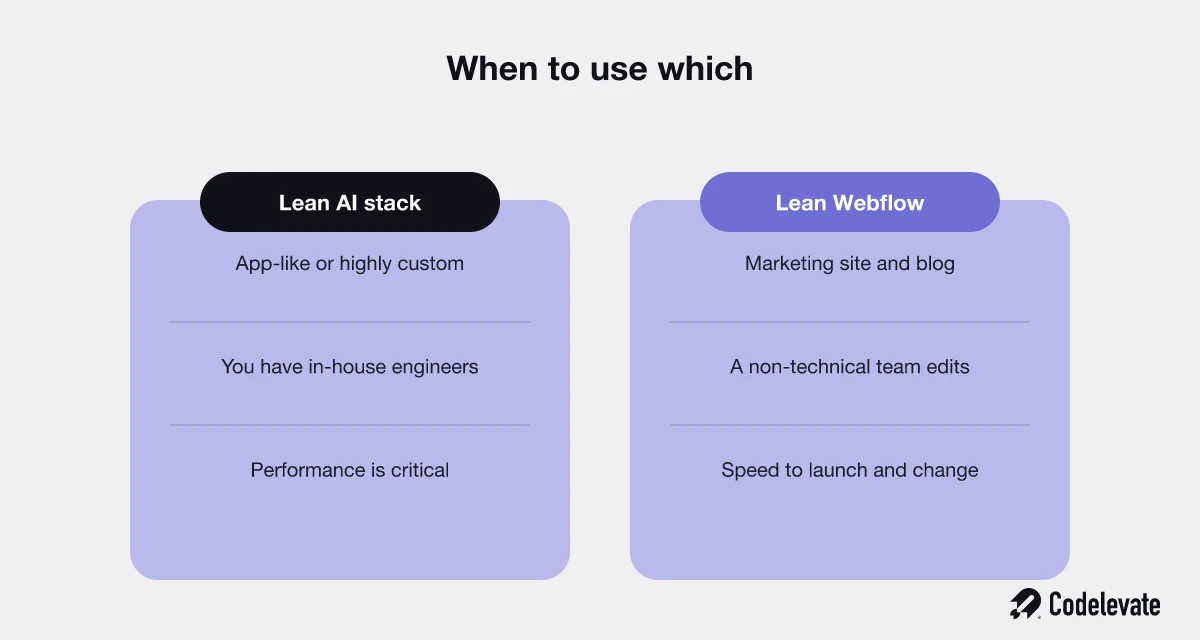
• Lean AI stack: the site is app-like or highly custom, you have in-house engineers, and performance is critical.
• Lean Webflow: it is a marketing site or blog, a non-technical team updates it often, and speed to change and predictable cost matter most.
Then cut through it with one question: who is going to change this website next month, and the month after? If the honest answer is a marketer, that points to Webflow. If it is an engineer who owns the codebase anyway, the AI stack is on the table. Most companies, once they answer honestly, want both, in the right places.
If you would rather not guess, this is the conversation we have with clients every week. As a team that builds custom, AI-assisted products and Webflow sites, we will tell you plainly which parts belong where, with no incentive to push you toward one tool.
Free download: our 70-point Webflow launch checklist is the exact pre-launch process we run before any site goes live, and it is useful whether you choose AI or Webflow.
And if you want a straight answer for your own site, you can book a free call and we will tell you honestly which parts should be Webflow, which should be custom, and why.

.svg)
.svg)


