
Webflow hosting explained: the complete 2026 guide
Yes, Webflow hosts your website. When you hit publish, Webflow compiles your project into clean HTML, CSS, and JavaScript and serves it from managed cloud infrastructure, so there is no separate host to buy, no server to configure, and no plugins to patch. That is the short answer, and most articles stop there. The useful answer is the one they skip: what you are actually getting, what you are quietly giving up, and whether Webflow's all-in-one hosting is the right call for what you are building in 2026.
We run this stack every day. Codelevate builds and hosts client marketing sites on Webflow, and we also build custom applications where Webflow hosting would be the wrong tool. So this guide is written from the inside, not from a feature page. It covers how Webflow hosting really works, the 2026 plans and what they cost, how it compares to traditional hosting, the limits nobody advertises, and a clear rule for when to use it and when not to.
It is written for founders, marketing leaders, and CTOs who have to make and defend this decision, not for someone looking for a one-line definition.
Key takeaways
The short version, before we earn it:
• Webflow is a fully managed host. Publishing deploys your site to Webflow's cloud, with hosting, CDN, SSL, and backups included. There is no separate hosting to buy.
• The infrastructure is AWS plus Fastly, not Cloudflare. Your site is compiled to static files and cached at Fastly's global edge, and the cache is purged automatically on every publish.
• The 2026 Site plans are Starter (free), Basic, Premium, and Enterprise, priced per published site and billed annually for the best rate.
• You trade server control for zero operations. No root access, no arbitrary backend, and real caps on bandwidth, CMS items, and pages. For a marketing site that trade is excellent. For a complex app it is not.
• A formal uptime SLA (99.99%) comes only with Enterprise. Other plans ride the same infrastructure without a contractual guarantee.
• Webflow Cloud (2026) is the answer for teams that need to host app logic and a marketing site under one roof.
• Hosting helps SEO through clean code and fast edge delivery, but it does not rank a weak page. Content and structure still decide.
What Webflow hosting actually is
Webflow hosting is managed cloud hosting that is bundled into the platform, so the same tool you design in also serves your live site. You do not connect an external host, you do not manage a server, and you do not install anything. When your site is ready, you publish, and Webflow handles delivery from there.
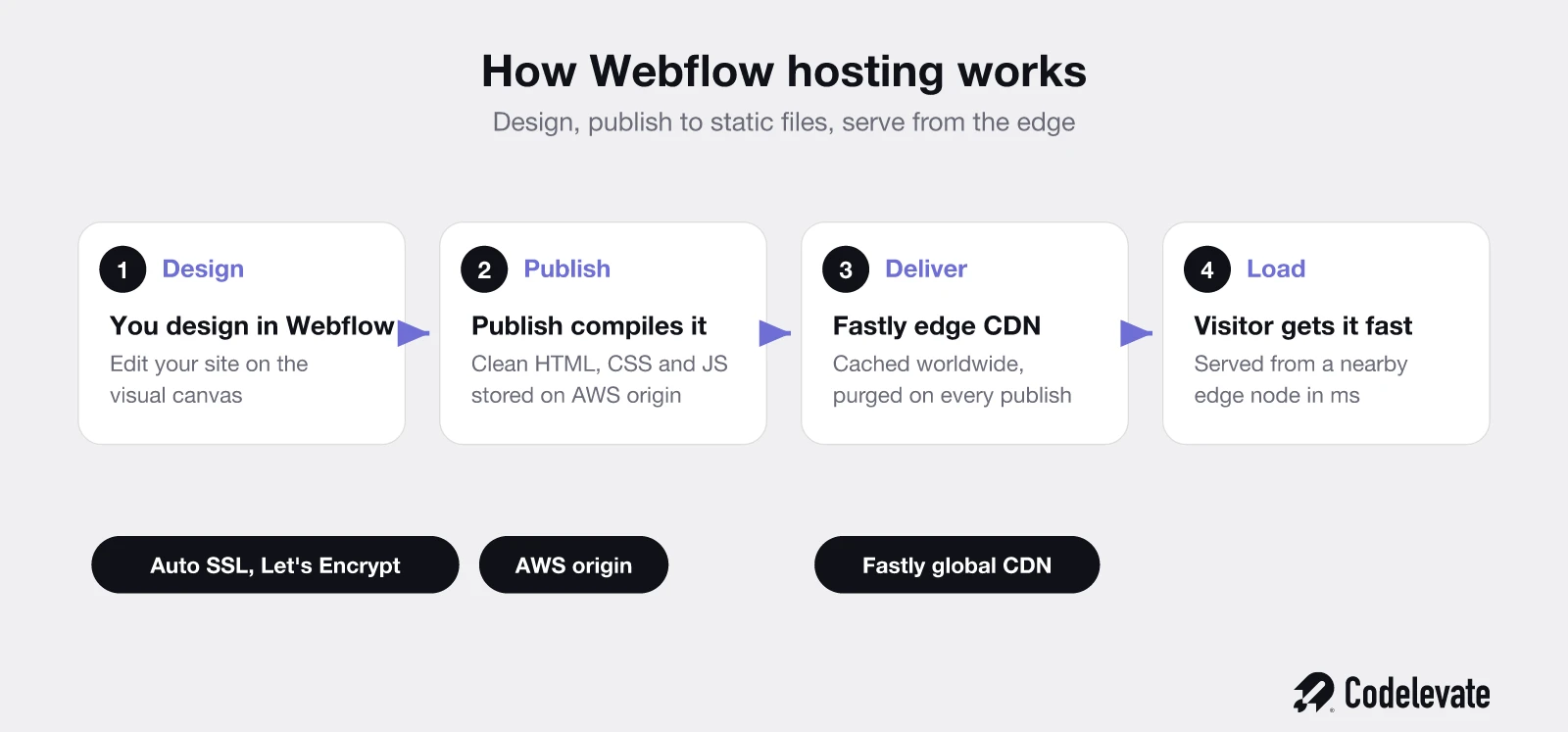
The mechanics matter, because they explain both the strengths and the limits. Webflow does not run your pages as live software on a server the way a WordPress host runs PHP on every request. Instead, at publish time it pre-builds your whole site into static HTML, CSS, and JavaScript. Those files are then pushed out to a global content delivery network and cached close to your visitors, so a page load is mostly a matter of handing over a file that is already sitting a few milliseconds away.
This is why Webflow sites feel fast by default and why they are hard to knock over. There is no database query and no server-side render on a normal page view, just cached files at the edge. It is also why some things are simply not possible on Webflow hosting, which we will get to honestly later. The model is the whole story, so it is worth holding onto: design in Webflow, publish to static files, serve from the edge.
How Webflow hosting works under the hood
Webflow hosts published sites on Amazon Web Services, with static assets delivered through Fastly, a major global CDN. This is the detail most competitor guides get wrong, and some even name Cloudflare. It is Fastly, and the difference is not pedantic, because Fastly's edge is what does the heavy lifting on speed and cache control.
Here is the flow in plain terms. Your project lives and is edited in Webflow. When you publish, Webflow compiles it and stores the output on its AWS-backed origin. That output is then distributed across Fastly's worldwide edge network, so the version a visitor in Amsterdam receives is served from a nearby edge node, not from a single origin server on another continent. Every time you publish again, Webflow automatically purges the Fastly cache, so visitors always get the latest version without anyone clearing anything by hand. For a team that updates a blog or product pages several times a day, that automatic cache invalidation removes a whole category of "why is the old version still showing" problems.
SSL is handled the same hands-off way. Webflow provisions and renews certificates automatically through Let's Encrypt for any custom domain on a paid plan, so HTTPS is on without you generating, installing, or renewing anything. Expired certificates are one of the most common causes of sudden downtime on self-managed stacks, and on Webflow that failure mode essentially disappears.
None of this requires configuration from you. There is no origin to size, no CDN to wire up, no cache rules to write. That is the point of managed hosting, and Webflow's version of it is genuinely well built. The catch, as always, is that "you do not configure it" and "you cannot configure it" are the same sentence.
What you get out of the box
A paid Webflow plan bundles the things you would otherwise buy, wire together, and maintain separately. In practice that means the following are simply handled:
• Managed hosting and a global CDN, with no server to provision or scale.
• Automatic SSL on your custom domain, provisioned and renewed for you.
• Automatic cache purging on every publish, so content is always current.
• Backups and versioning, so you can roll a site back to a previous state.
• Native forms with submission handling, so a contact form works without a backend.
• Security and infrastructure maintenance, patched quietly by Webflow.
The value here is not any single feature, it is that a non-technical team can run a professional, fast, secure website without an engineer on call for the hosting. A marketer publishes a page and it is live, fast, and encrypted, with a backup taken, and nobody had to think about a server. That is a real operational win, and it is the reason so many well-run marketing sites sit on Webflow.
Webflow hosting plans in 2026, explained
Webflow restructured and renamed its plans, and this is where stale guides will actively mislead you. The old Basic, CMS, and Business names are gone. In 2026 the Site plans, which are what you pay per published website, are Starter, Basic, Premium, and Enterprise. Prices below are the annual rate, which is meaningfully cheaper than paying monthly.
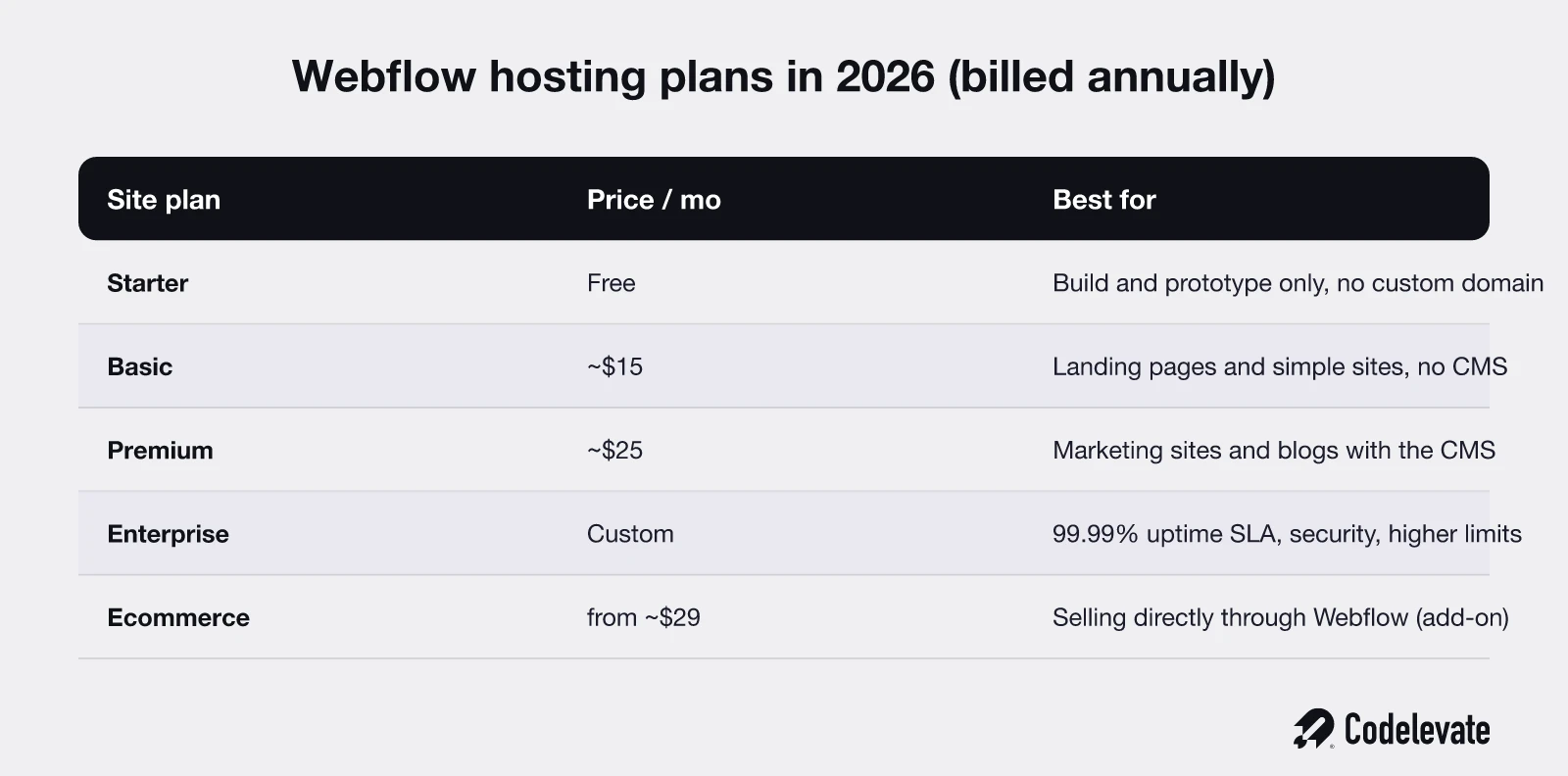
Starter is the free tier. It is a genuine build-and-prototype plan, useful for experimenting or previewing on a webflow.io subdomain, but it is not where a real business site lives, because it does not include a custom domain. Treat it as a workspace, not a home.
Basic is the entry paid Site plan, around 15 dollars a month billed annually. It gives you a custom domain, a large allowance of static pages, and everything the hosting layer provides, but no CMS. It is the right fit for a landing page, a portfolio, or a straightforward marketing site that does not need a content database. If you will never manage a blog or a collection of items, Basic is enough.
Premium is the plan most marketing teams actually want, around 25 dollars a month billed annually. It adds the CMS, which is the structured content system that lets a team run a real blog, case-study library, or product catalogue with typed fields and reusable templates. If content is part of how the site earns, this is the tier, and it is the one we put most client marketing sites on.
Enterprise is custom-priced and is where the guarantees live: a formal 99.99 percent uptime SLA, advanced security and compliance, higher limits, and dedicated support. It is aimed at organisations for whom a contractual uptime commitment and enterprise governance are non-negotiable.
Ecommerce is priced separately, layered on top of a Site plan, starting around 29 dollars a month for the Standard tier and rising with catalogue size and lower transaction fees on the higher tiers. If you are selling directly through Webflow rather than embedding a third-party checkout, budget for this as its own line.
One more cost that surprises people: Site plans pay for the site, but Workspace seats pay for the people building it. A solo site owner barely notices, but an agency or a team adding editors and designers pays for that separately. When you compare Webflow's price to a cheap shared host, compare the whole picture, seats included, not just the Site plan.
Webflow hosting vs traditional hosting
The honest way to frame this is not "which is faster" but "how much control do you want to trade for how little operational work." Traditional hosting, whether that is a shared cPanel host or a WordPress stack, hands you a server and the freedom to do anything on it, along with the responsibility to keep all of it running. Webflow hands you almost no server control and takes almost all of the responsibility off your plate.
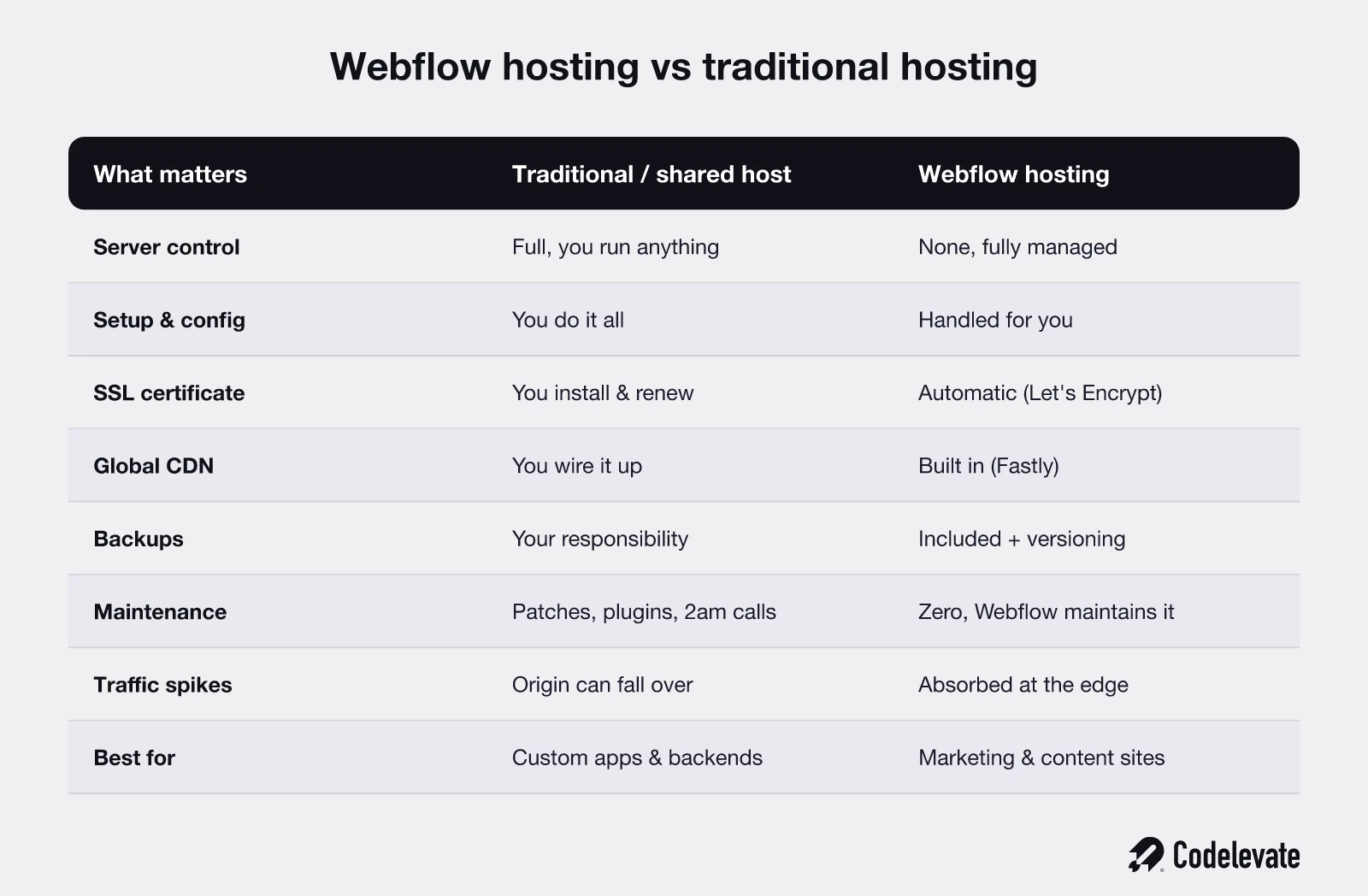
On a traditional host, you choose your stack, install what you like, run custom server-side code, and tune the machine. You also patch it, secure it, configure the CDN and SSL yourself, take your own backups, and get the 2 a.m. call when a plugin update breaks the site. The ceiling is high and so is the maintenance. For a genuinely custom application, that control is the point.
On Webflow, there is no server for you to touch, and that is the trade. You cannot run arbitrary backend code on the hosted site, you cannot install a database of your choosing, and you work within Webflow's limits. In return, hosting, CDN, SSL, backups, caching, and security are handled, and there is no maintenance tax and no plugin-update roulette. For a marketing site, a brochure site, a blog, or a campaign site, that trade is overwhelmingly worth it, because you were never going to use the server control, and the maintenance you avoid is real money and real risk.
So the comparison is not close once you name what the site is for. If the site is content and marketing, Webflow's managed model wins on total effort and reliability. If the site is really an application with custom logic, a traditional or cloud stack is the right home, and forcing it onto Webflow hosting alone would be a mistake. Most companies, in practice, end up wanting both, which is exactly what the Webflow Cloud section below is about.
Speed, uptime, and scalability
Webflow sites are fast for a structural reason, not a marketing one. Because pages are pre-compiled to static files and served from Fastly's edge, a typical page view skips the database query and the server render that slow down a traditional dynamic site. The file is cached near the visitor and handed over quickly. You still have to do your part, images and third-party scripts can wreck any site, but the baseline is genuinely quick.
Scalability works the same way. A traffic spike on a static, edge-cached site is far less dangerous than the same spike on a single origin server, because the edge absorbs most of the load and there is no database to overwhelm on a cache hit. A campaign that suddenly sends a large burst of visitors is the exact scenario where Webflow's model shines, and where a cheap shared host would fall over.
Uptime deserves an honest caveat, because this is where confident competitor guides overreach. The 99.99 percent uptime SLA is an Enterprise commitment. On the other plans you ride the same AWS and Fastly infrastructure, which is reliable in practice, but you do not have a contractual guarantee. For most marketing sites that distinction never matters. If a contractual SLA genuinely matters to your business, that is an argument for Enterprise, and you should not assume the guarantee applies to a Premium plan just because the infrastructure is the same.
Security and maintenance
Security on Webflow is mostly notable for what you no longer have to do. There is no server for you to harden, no CMS software with a stream of vulnerability patches, and no plugin ecosystem to keep updated, which removes the most common ways ordinary sites get compromised. SSL is automatic and always current. The static-file model itself reduces the attack surface, because there is far less live software running on a normal page request.
Fastly's edge also sits in front of your site, which brings CDN-level protection against traffic floods, and Webflow patches and maintains the underlying platform continuously without you scheduling a thing. Enterprise adds the heavier compliance and security posture that larger organisations need, but even on the standard plans the day-to-day security burden is close to zero. The trade-off, again, is control: you are trusting Webflow's security choices rather than making your own. For the vast majority of marketing sites, that is a trade worth making, because a specialist platform will out-secure a busy in-house team maintaining a self-hosted stack.
How hosting affects your SEO and Core Web Vitals
Hosting helps your SEO in the ways hosting can, and no further. Clean, semantic output, HTTPS by default, and fast edge delivery all feed directly into Core Web Vitals and into how easily search engines and AI answer engines crawl your pages. Webflow gives you the technical fundamentals, editable titles and meta descriptions, alt text, redirects, sitemaps, and clean markup, without a developer, and that is a solid foundation.
What hosting cannot do is rank a thin page. Fast delivery of a weak article still loses to a slightly slower delivery of the best answer on the query. We see this constantly: teams obsess over a hosting speed score while the page itself has nothing to say. Webflow removes the technical excuses, which is valuable, but the content, the structure, and the depth are still what win the position. Treat hosting as the floor you build on, not the thing that ranks you.
If you are planning a build or a migration, our free 70-point Webflow launch checklist is the exact pre-launch process we run before any client site goes live, covering hosting, redirects, SSL, performance, and the SEO basics that are easy to miss.
The limits nobody puts on the feature page
This is the section the marketing-style guides leave out, and it is the most useful part for anyone making a real decision. Webflow hosting is excellent within its lane, and you should know where the edges are before you commit.
• No server or root access. You cannot run custom server-side code, cron jobs, or your own backend services on the hosted site. What Webflow exposes is what you get.
• No database of your choosing. The CMS is the content model, and it is good, but it is Webflow's structure, not a general-purpose database you control.
• Real usage caps. Plans have limits on static pages, CMS items, bandwidth, and form submissions. High-volume content sites and very large catalogues can hit these ceilings, so check the numbers against your actual scale, not a guess.
• Form and email handling is basic. Native forms are fine for contact and lead capture, but complex logic, heavy volumes, or advanced workflows usually need an external service wired in.
• Data residency is limited. The origin is AWS and delivery is Fastly's global edge, which is great for speed, but if you have strict requirements about exactly where data lives, confirm that Webflow can meet them rather than assuming.
• Cost at scale is not always lower. For a simple site Webflow is cheap for what it does, but once you add ecommerce, multiple seats, and higher tiers, compare the full total against alternatives honestly.
None of these are reasons to avoid Webflow. They are reasons to use it for what it is superb at, a fast, low-maintenance, content-driven site, and to not force it to be an application platform it was never meant to be. Knowing the edge is how you avoid an expensive replatform a year in.
What about apps and custom backends? Webflow Cloud
The classic frustration was real: your beautiful marketing site lives on Webflow, but your app, your logged-in product, or your custom logic has to live somewhere else, and now you are stitching two worlds together. Webflow's 2026 answer to that is Webflow Cloud, which lets teams host application code and dynamic functionality alongside the Webflow-managed site, rather than bolting on a separate stack and a separate domain.
This matters because it changes the honest recommendation. Previously the advice was blunt: marketing site on Webflow, app on a custom stack, and accept the seam. Now, for teams that want the marketing site and some app functionality under one roof, Webflow Cloud narrows that gap and keeps more of the picture inside one platform. It does not turn Webflow into an unlimited application host, and a genuinely complex product still belongs on a purpose-built backend. But for the common case, a great marketing site plus a contained slice of dynamic functionality, it is a meaningful upgrade over the old two-worlds setup.
The practical rule still holds. Match the tool to what you are building: managed Webflow hosting for the content and marketing surface, and a proper application platform, whether that is Webflow Cloud or a custom cloud stack, for real product logic.
Migrating to Webflow hosting: what to expect
Moving an existing site onto Webflow hosting is routine, but it rewards a little discipline, because the failure modes are predictable. At a high level the path looks like this:
• Rebuild or import the site in Webflow, so the design and content live in the platform.
• Map every old URL to its new one and set up 301 redirects, so you do not lose the search rankings and backlinks you already earned. This is the step teams most often rush, and it is the one that costs traffic when skipped.
• Connect your custom domain and update DNS, then let Webflow provision SSL automatically.
• Test on the staging subdomain first, checking forms, redirects, metadata, and performance, before you point the live domain over.
• Publish, then verify the redirects and Core Web Vitals on the live domain.
Done carefully, downtime is minimal and rankings hold. Done carelessly, a missed redirect map is how a site quietly loses a chunk of its organic traffic in the weeks after a migration. The launch checklist linked above exists precisely to stop that, because it is the part that looks boring and turns out to be the expensive one.
When Webflow hosting is the right call, and when it is not
Strip away the detail and the decision is clean, and it splits by what the site actually is, not by company size.
Use Webflow hosting when the site is a marketing site, a blog, a campaign or landing page, a portfolio, or a content-driven site that a non-technical team needs to run and update without engineering in the loop. This is Webflow's home turf, and the managed model, fast, secure, low-maintenance, is exactly what that job needs. It is the right call for most business websites and nearly every case where marketing owns the site.
Do not rely on Webflow hosting alone when the thing you are building is really an application: a logged-in product, complex custom backend logic, a large or unusual data model, or strict infrastructure and data-residency requirements a managed platform cannot meet. In those cases the site belongs on a purpose-built stack, or you use Webflow for the marketing surface and something else, Webflow Cloud or a custom cloud platform, for the product. The most common mature setup is exactly that split, and recognising which side of the line you are on is the whole decision.
How we host and run client sites on Webflow
Because we do this daily, the workflow is worth showing rather than describing. For a marketing site, we build and host on Webflow deliberately, so the client's team can update content themselves without waiting on developers, while the hosting, CDN, SSL, and backups stay handled by the platform. We set the site up properly first, redirects mapped, performance tuned, SEO fundamentals in place, and then hand over a site the team can actually run.
Where a client also has an application, we keep the honest split: the marketing site on Webflow, the product on the stack that suits it, and a clean boundary between them. As an AI-assisted Webflow team, that judgment, knowing what belongs on managed hosting and what does not, is most of the value. The tool is excellent, but the decision about where each piece lives is what keeps a company off an expensive replatform later.
One reminder that outlives any hosting choice: a fast, well-hosted site still has to convert. The short breakdown below covers the mistakes that quietly kill conversion on otherwise excellent sites, and it is worth ten minutes before you spend a budget on either the build or the hosting.
The bottom line
Does Webflow host websites? Yes, and it does it well: managed AWS and Fastly infrastructure, automatic SSL, edge caching, backups, and near-zero maintenance, all bundled into the platform you design in. For a marketing site, a blog, or a content-driven site that a team needs to run without an engineer, Webflow hosting is one of the best trades available, because you give up server control you were never going to use and get back reliability and time. The limits are real, no server access, usage caps, an SLA only on Enterprise, so match the tool to the job, lean on Webflow Cloud or a custom stack when you are really building an app, and remember that hosting sets the floor while content wins the ranking. Choose the setup your team can run confidently a year from now, not the one that looks cheapest this afternoon.

Free download: our 70-point Webflow launch checklist is the exact pre-launch process we run before any site goes live. And if you want your Webflow site built, hosted, and set up the right way, without the guesswork, you can book a free call with our team and we will show you what good actually looks like.



.svg)
.svg)


