Connecting AI to Exact Online and AFAS
The AI reads the document without a mistake. Then someone types it into Exact Online or AFAS anyway. That is where most AI pilots we see at service firms end up. The demo works, the time saving never arrives, because the last step is still done by hand.
Most people looking for an Exact Online integration or an AFAS integration with AI assume the AI is the project and the integration is a detail. It is the other way around. The AI takes a few weeks to build. The integration decides whether your team ever stops retyping, whether you can trust the numbers, and what happens when something goes wrong.
This article is for owners and operations leads of Dutch B2B service firms with 10 to 200 people. Think subsidy advisors, administration offices, training providers, inspection firms and compliance consultancies. You run a fixed expert process with volume, and the result has to land in Exact, AFAS or a sector tool. It is not for you if you want 1 Zapier flow, if you do not have a fixed process yet, or if you are running a 6 month tender.
In this article you will learn what an integration with Exact Online and AFAS really does, the 4 questions every integration has to answer, 3 ways to connect AI to your back office and what each costs, a worked example with 6,000 registrations a year, and what happens after launch.
Key takeaways
• An AI pilot that ends in a chat window saves little: the gain only arrives when the result sits in your back office without anyone retyping it.
• Every integration answers 4 questions: read or write, which record in which status, under which identity, and what happens on an error.
• Never let the AI post directly. Let it prepare a draft that a person approves, especially where a mistake costs money.
• AFAS uses GetConnectors to read and UpdateConnectors to write, and per token you decide which connectors are allowed.
• Exact Online works with an app that gets access per company administration, with limits per minute and per day.
• A standard connector fits a standard process. Once your rules differ, you need an integration of your own that you own.
• In the worked example a training provider goes from 1,290 to about 375 hours of manual work a year, with a payback of about 10 months.
• After launch the maintenance starts: tokens expire, APIs change, and someone has to be on the alert by name.
Why your AI pilot stops at the retyping
A typical pilot goes like this. Someone feeds a stack of applications, registrations or invoices into an AI tool. The tool pulls out the name, the Chamber of Commerce number, the amounts and the dates. Everyone is impressed. Then it turns out the result sits on a screen, and an employee still enters it into Exact or AFAS.
That retyping was exactly the work you wanted gone. Reading a document often takes an experienced employee less time than entering it. Finding the debtor, checking whether it already exists, picking the right ledger account, linking the project, setting the VAT rate. That is where the minutes go.
There is a second problem underneath. When the AI output and your administration live apart, you have 2 versions of the truth. Whoever corrects the AI output does not fix the administration, and the other way around. After 3 months nobody trusts which number is right.
So we tell every client the same thing. You are not building an AI tool with an integration behind it. You are building an integration with some judgment in the middle. Flip that around and you get a demo that works and a process that does not change. Our general guide on connecting AI agents to your existing systems covers the patterns in depth. This article is about the Dutch back office and what is specific there.
What an integration with Exact Online or AFAS actually does
An integration is a piece of software that reads data from a system, or writes into it, on behalf of your company. That sounds simple. The difference is in the details per package, and those details decide what you can and cannot safely automate.
AFAS Profit: connectors and tokens
AFAS works with connectors. A GetConnector retrieves data, such as debtors, projects or employees. An UpdateConnector adds, changes or deletes data. That is how the AFAS documentation on connectors describes it.
Access runs through an App connector. In it you decide, per token, which GetConnectors and UpdateConnectors may be used. That is good news if you want to do this safely. You can give an integration exactly the 3 connectors it needs, and nothing more.
An UpdateConnector also validates a message before AFAS processes it. If a required field is missing or a code is wrong, you get an error back. That is exactly the moment a good integration does not drop the record, but hands it to a person with the error attached.
Exact Online: an app per company administration
Exact Online works with a registered app that gets access through a user's login. The app works per company administration, and it has limits on the number of requests per minute and per day. An administration office serving 300 clients in separate administrations notices that quickly.
Exact publishes an overview of its REST API with everything you can read and write. Far from everything you see on screen can also be changed through the API. Check that per process before you agree on a price, not after.
The sector tool nobody mentions
Almost every service firm has a system next to Exact or AFAS where the real work happens. A subsidy portal, a course planner, an inspection app, a spreadsheet with 14 tabs. Often that system has no API, or an API nobody has ever used.
That is usually the hardest integration in the project, and it rarely appears in the quote. So always ask which systems the process touches, including the file someone updates by hand every Monday.
The 4 questions every integration answers
Before 1 line of code is written, you want these 4 questions answered on paper for each system. They sound technical. They are really business questions, and you are the one who can answer them.
1. Read or write
Reading is safe and often pays more than you expect. An integration that checks in AFAS, for every new application, whether the client already exists, which contract is running and whether invoices are open, already removes a lot of searching. Nothing changes in your administration, so the risk is small.
Writing is where the hours are, and where the risk is. So start with reading, and only write once you know how often the AI gets it right.
2. Which record, in which status
Writing is not 1 thing. Creating a new relation is different from posting a sales invoice. Preparing a draft is different from processing something for good. Record per object what the integration may do: create, change, or only prepare a draft.
Our rule of thumb is simple. Anything that moves money or that a client will see goes to a person as a draft first. Anything that is easy to undo, the integration may do itself.
3. Under which identity
The fastest way to build a pilot is to let the integration run on the login of the employee who built it. It is also the fastest way to lose track later of who did what. And when that employee leaves, the integration stops.
Give the integration its own user or its own token, with only the rights the process needs. In AFAS that is an App connector with a few selected connectors. In Exact that is a separate user with limited rights. Then every change shows who made it: the integration, not Sanne from the back office.
4. What happens when it goes wrong
An integration will fail at some point. Exact is briefly unreachable, a debtor is blocked, a document is unreadable, the limit per minute is reached. The question is not whether that happens, but what happens to the record when it does.
The right answer is almost always the same: the record goes into a queue, the integration retries later, and after 2 attempts it lands with a person, with all the data and the error message. The wrong answer is that nobody notices until a client calls to say the invoice never came.
3 ways to connect AI to Exact or AFAS
There are roughly 3 routes, and each has its place. The difference is not the AI, but who knows your rules, who maintains it, and what happens on an error.
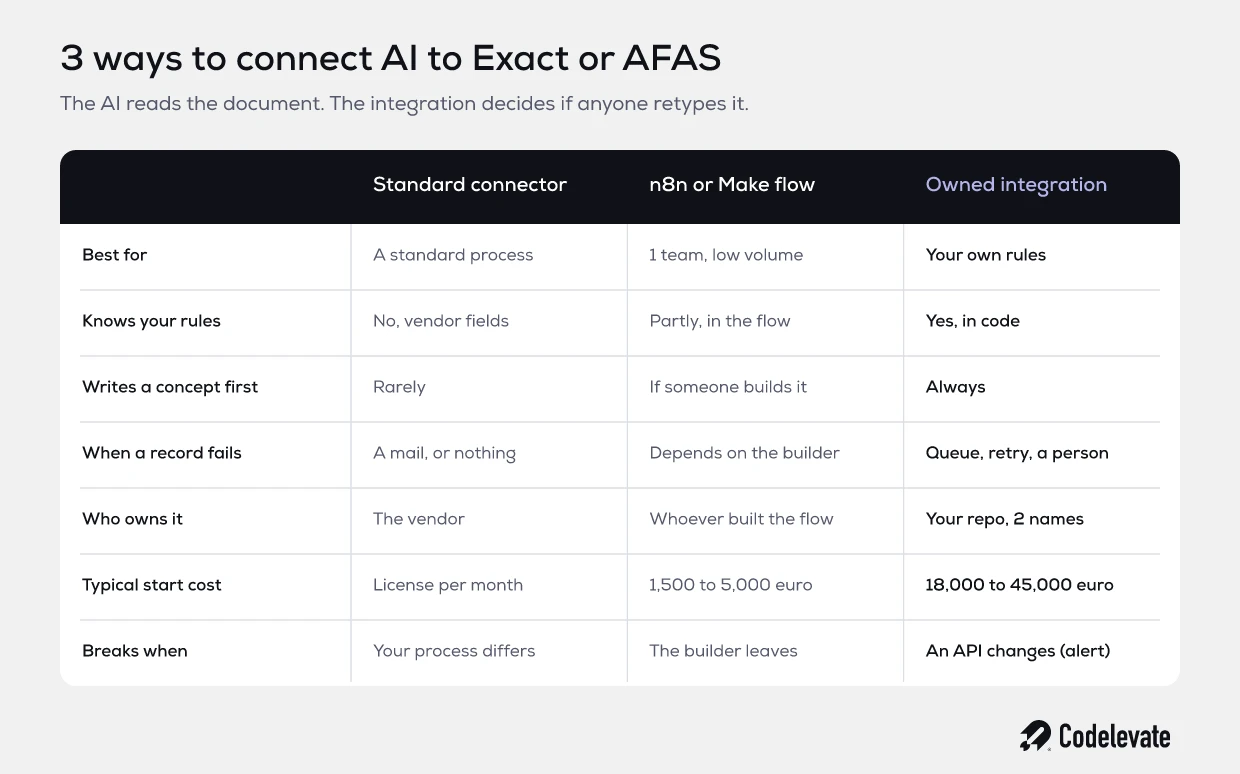
A standard connector is a ready made link offered by a software vendor, for example between your time tracking and Exact. For a standard process it is often the best answer. You pay a license, someone maps the fields and it works. The trouble starts as soon as your process differs from what the vendor had in mind.
A flow in n8n or Make is the second route. With it you quickly build something that reads a document, calls the AI and creates a record in AFAS. For 1 team with low volume that can be fine. Many offices have had such a flow built for 1,500 to 5,000 euro. It works, until the builder leaves or a record fails and nobody knows where it went.
An integration of your own is the third route. It holds your rules in code: which scheme belongs to which ledger account, when an application goes to a senior advisor, which client has a different rate. It always prepares a draft first, keeps a queue for errors, and lives in your own repository. It costs more to build, and it is yours.
Take an administration office with 120 clients in Exact. With a standard connector it processes the invoices of the 80 clients that look alike. For the 40 clients with exceptions, someone still retypes. That is the choice: accept those 40, or build the integration that knows your exceptions.
Want to put this on paper for your own process before you ask for quotes? Our free AI product requirements template helps you record the systems, the direction of each integration and the cost of a mistake. Then you get quotes you can compare.
Worked example: a training provider with 6,000 registrations a year
An example, not a client. A training and certification provider with 25 people handles 6,000 registrations a year. They arrive by mail, through a web form and as Excel lists from large clients. Every registration has to go into AFAS: the debtor, the participant, the course and later the invoice. Then the participant is entered by hand into the planning tool.
The situation today
• Retyping into AFAS and the planning tool: 12 minutes per registration on average, 1,200 hours a year in total.
• Errors: 3% of registrations have a mistake in the name, the debtor or the course date, and fixing one takes 30 minutes. That is 90 hours a year.
• Total manual work: 1,290 hours a year. At an internal cost of 55 euro an hour, that is over 70,000 euro.
The situation with an integration
The AI reads every registration, whatever its form. The integration uses a GetConnector to check whether the debtor and the participant already exist in AFAS. Fixed code checks whether the course exists, whether there is a seat and whether the price agreement is right. Then the integration uses an UpdateConnector to prepare a draft.
• 80% of registrations are complete and correct: an employee approves them in a list, 2 minutes each, 160 hours in total.
• 20% have a deviation, such as an unknown debtor or a full course: they reach a person with the reason attached, 10 minutes each, 200 hours in total.
• Errors drop to 0.5%, because the check happens before posting: 15 hours of fixing.
• Total manual work: about 375 hours a year. That frees over 900 hours, more than 50,000 euro of capacity.
The costs. An integration of your own with AI checks and drafts in AFAS and the planning tool comes to around 30,000 euro with us for a process like this. Operations cost 1,250 euro a month, so 15,000 euro a year. Net, the training provider keeps about 35,000 euro a year. The build pays for itself in roughly 10 months.
If you only count the euro, that is reasonable. The real argument is elsewhere. With the same 25 people, the provider can handle 9,000 registrations instead of 6,000, without hiring anyone. And what if only 60% arrive complete? Then around 750 hours are still freed and the payback takes a little over a year. Always run your own version with the worse number too.
Draft first: why the AI never posts directly
It is tempting to automate the last step too. If 80% is right, why still approve? Because the 2 minutes of approval earn more than they cost.
The approval list is your measuring tool. Every week you see how often an employee changes something, and what. After 3 months you know per type of registration whether the integration gets it right. Only then can you remove the approval for a narrow group, for example existing clients on a fixed course.
The list is also your evidence. Your accountant wants to know who posted an entry. Your client wants to know why the invoice is so high. A draft with an approval and a name attached answers both questions.
And it makes a mistake easy to undo. A draft nobody approved is deleted in 1 click. A final posting in a closed period is a conversation with your accountant. In our experience that is the most expensive minute of the whole project.
What happens after launch
An integration is not a project that is finished. It is software that talks to other systems every day, and those systems change without asking you.
Tokens and logins expire. A vendor changes its API or introduces new limits. Someone renames a field in AFAS or adds a required one. The AI receives a new kind of document it has not seen before. Each of these can stop an integration, and with a poor integration nobody notices.
That is why every integration needs operations with 3 parts. Monitoring that alerts when nothing was processed for an hour while registrations did come in. An engineer by name who gets the alert. And a monthly report on 1 page: how many records were processed, how many landed with a person, what the AI cost per item and what was changed. The response time to an alert is set in the Blueprint, not in a general promise.
With us, 2 engineers by name work on it, from the first map of the process to year 2. The same 2 people who built the integration get the alert when it stalls. That saves the explaining. And if month 1 disappoints: Exit after month 1: pay for what is delivered, keep everything. By then the code is already in your repository.
What does an Exact Online integration with AI cost?
The honest answer depends on the route and on the number of exceptions. A standard connector costs a license per month. A flow in n8n or Make costs 1,500 to 5,000 euro to start with most small automation shops. An integration of your own with AI checks, drafts and an error queue costs 18,000 to 45,000 euro per major process with us, at a fixed price per milestone.
Running costs come on top. Operations sit around 1,250 euro a month per automation. The AI itself usually costs cents per document, and we put a cap per item on it so no month comes as a surprise.
What drives the price is mostly not Exact or AFAS. It is 3 things. The number of systems the process touches, whether the sector tool has an API, and how many of your rules currently live only in the heads of a few people. Map that first and you get a price that holds.
How to start this month
You do not need a large project to get this clear. You can do these steps with your own team.
• Pick 1 process with volume and a price per unit, such as registrations, applications or incoming invoices.
• For 2 weeks, count how many minutes the retyping takes per item. Use a tally sheet, not an estimate.
• Write down which systems the process touches, including spreadsheets and the sector tool.
• Put the 4 questions on paper per system: read or write, which record in which status, which identity, what on an error.
• Ask your Exact or AFAS administrator whether a separate user or App connector for an integration is allowed.
• Set aside the 20 hardest cases of the past month. They say more about the price than the 1,000 easy ones.
If you want to map the process first, it helps to list the AI opportunities in your workflow in a structured way. With that list and these 4 questions, you know within a month whether an integration pays for itself.
The integration is the product
An AI that reads documents is ordinary tooling by now. What makes the difference for your firm is the moment the result sits in Exact or AFAS without retyping, as a draft a person approves in 1 click, with a name on every change and an alert when it goes wrong.
Start by reading, write in drafts, give the integration its own identity, and agree who is on the alert after launch. Then that first integration is not a pilot that stalls, but the base your next automation builds on.
Want to record the systems and integrations of your process before you talk to anyone? Download the free AI product requirements template. It is the same list we use.
Codelevate turns Dutch B2B service companies into software companies: we map the expert process you run by hand, automate it so the same team handles the volume, and build the platform your customers pay for, with 2 engineers by name from the blueprint to year 2.
Send us what you have. 1 of the 2 engineers reads it with you in 20 minutes, and you get 1 of 3 answers in writing the same day: do it in house, hire, or the Blueprint.