
MCP server for SaaS in 2026: why your API is not your agent interface
Somewhere in the last 12 months, a new question started showing up in enterprise procurement calls: do you have an MCP server? It arrives casually, usually near the end, and it is now a real gate on deals. The reflex answer is to point a code generator at your OpenAPI spec, publish 80 tools in a weekend, and tick the box.
That server will technically work. It will also be close to useless. Agents that connect to it pick the wrong tool, invent arguments, blow through their context window on a single call, and produce results your customer cannot trust. The vendor gets blamed for the model being bad. The model was fine. The interface was wrong.
This article is for founders, CTOs, and product leaders at SaaS companies who are being asked to become agent-ready and would rather do it once, properly, than ship a wrapper and spend the next year apologising for it. If you are looking for a beginner explainer on the protocol, this is not that. In this article you will learn what an MCP server for SaaS actually is, why an endpoint-per-tool build fails, the specific failures we have hit running MCP servers in production, how to design tools an agent reliably picks, what security questions your buyer will ask, and how to decide between building, buying, or waiting.
The short version: your API is a contract with developers. Your MCP server is a contract with a model that has no documentation, no memory of your product, and a hard budget on how much it can read. Those are different products.
Key takeaways
• An MCP server for SaaS exposes your product to AI agents as a set of named, described tools, not as a raw copy of your REST API.
• The most common failure is auto-generating one tool per endpoint. It produces a server that is technically valid and practically unusable.
• Agents choose tools by reading names and descriptions. Tool naming and description quality is product work, not documentation work.
• Context is the scarce resource. A single unbounded list call can consume an agent's entire working memory and end the session.
• A successful API response is not proof of a correct result. Agent-facing systems need a separate read path to verify what actually happened.
• Write actions need a safe default. Ours create drafts, never published changes, so a wrong call is recoverable.
• Build when the agent surface is differentiating or the data is sensitive. Buy the commodity surfaces. Wait only if no customer has asked yet.
What is an MCP server, in plain terms
An MCP server is a program that exposes a system's capabilities to AI applications through the Model Context Protocol, a shared standard for how models connect to tools and data. Anthropic released MCP in late 2024 and donated it to the Agentic AI Foundation under the Linux Foundation in December 2025, alongside more than 10,000 active public servers and client support in ChatGPT, Claude, Cursor, Gemini, Microsoft Copilot, and Visual Studio Code. It is no longer one vendor's format. It is the connector layer.
A server has three things to offer, and the difference matters more than most teams realise. Tools are functions the model decides to call on its own, like searching records or creating an invoice. Resources are read-only data the host application pulls in as context. Prompts are templates the user explicitly invokes. The official server documentation is direct about who controls what: tools are model-controlled, resources are application-controlled, prompts are user-controlled.
That single distinction kills most naive designs. If you dump your entire read surface into tools, you have handed the model a hundred decisions it did not need to make. If you never expose resources, you force the model to spend a tool call and a chunk of its context on something the host could have loaded for free.
So the honest one-line definition is this: an MCP server is the agent-facing product surface of your SaaS, and like any product surface it has to be designed, not generated.
Why "do you have an MCP server?" became a procurement question in 2026
The pressure is not coming from your engineering team. It is coming from your customers' internal AI programmes, and it has a specific shape.
Large organisations have spent two years building agent workflows on top of the tools they already pay for. Those workflows are only as broad as the connectors available to them. When an ops team asks their assistant to pull last quarter's contract renewals and your platform is the one system it cannot reach, you are not a minor gap in the workflow. You are the reason the workflow does not exist. Your competitor with a working MCP server becomes the system of record by default, because it is the one the agent can see.
There is a second, quieter effect. Agent-readiness has become a proxy for technical seriousness. A buyer's platform team can look at your MCP server in an afternoon and learn whether your permissions are real, whether your data model is coherent, and whether your write operations are safe. It is a faster signal than a security questionnaire, and they know it.
None of which means every SaaS product should ship one this quarter. It means the question is now a commercial one, so it deserves a commercial answer rather than a reflexive engineering sprint.
The mistake almost everyone makes: one tool per endpoint
Here is the pattern we see constantly. A team takes their OpenAPI spec, runs it through a generator, and ships an MCP server with a tool for every endpoint. Ninety tools, complete coverage, faithful to the API. It feels like the responsible engineering choice, because in every other integration project it would be.
Then a customer connects it to their assistant and asks something ordinary, like "which of our accounts are past due and who owns them". The agent has to figure out that this means calling list_accounts, then list_invoices with a status filter it has to guess, then get_user for each owner ID it found. Three tools it picked correctly and one it did not, ten round trips, and a context window full of JSON fields nobody needed. The answer comes back wrong, or slowly, or not at all.
Your endpoints are shaped for developers, not for agents
A REST API is designed for a developer who has read your documentation, understands your object model, and is writing code that runs the same way every time. They compose five calls into one function and test it. The model has none of that. It sees tool names and short descriptions, and reasons from a human sentence to a sequence of calls in one shot, without being able to test anything.
So the unit of design changes. The right unit for an agent is the task, not the resource. Instead of exposing list_accounts, list_invoices, and get_user, expose find_overdue_accounts with a clear description of what it returns. That one tool does the joining and filtering server-side, where you control it, and hands back a compact result. You have moved the hard part from a probabilistic system to a deterministic one, which is the whole game.
The context window is the real constraint
Every tool definition you publish costs tokens before the agent has done anything, because the client sends the whole list to the model. Ninety verbose schemas eat a meaningful share of the available context on connection, and every result you return costs more. A session that starts bloated and returns bloated payloads has less room for the actual work, which is exactly when models make poor decisions.
Fewer, better tools beat complete coverage. In practice that usually means 10 to 25 well-chosen tools rather than one per endpoint, with the long tail left to your API where it belongs.
Ambiguity is expensive in a way it never was before
If two tools do nearly the same thing and their descriptions do not separate them, the model picks between them close to randomly, and it will not tell you it is guessing. A developer resolves that by reading your docs. An agent resolves it by committing to a choice and moving on.
This makes tool descriptions load-bearing product copy. They need to say what the tool does, when to use it instead of the neighbouring tool, what it returns, and what it costs. We have improved agent accuracy more by rewriting five descriptions than by adding any new capability.

Get the SaaS AI blueprint
If you are working through this decision now, our SaaS founder's AI blueprint covers how to scope an AI surface for a product that already has paying customers, including where agent access creates value and where it just creates support tickets. It is free and takes about 20 minutes to read.
What we learned running MCP servers in production
We are not writing this from the outside. At Codelevate we build and operate MCP integrations for client platforms, and we use them on our own systems every day, including the content pipeline that produced this article. Four failures cost us the most, and none of them appear in the protocol documentation.
A single list call returned 1.6 million characters
We connected an agent to a CMS to run a routine content audit. The first thing it did was call the list-items tool with a sensible limit of 100. That tool returned every field on every item, including full article bodies. The response was over 1.6 million characters, which is far more than the agent could hold, and the session was effectively over before any work started.
Nothing was broken. The API did exactly what it was asked. The design was wrong. An agent-facing list tool needs a hard cap on response size, field projection so callers get identifiers and summaries rather than complete objects, and a separate get-detail tool for the one record that actually matters. If your tool can return an unbounded payload, assume it will, on the first call, in front of your most important customer.
A success response is not proof of a correct result
We write content into a CMS through its API. The write returns 200, the stored value reads back exactly as sent, and the published page still comes out wrong, because the platform normalises certain markup after the write and silently drops what it does not like. Verifying by reading the raw stored value does not catch it. Only reading the rendered output does.
That is one system's bug, but the lesson generalises. Agents cannot see your UI, so any quiet transformation between accepting input and showing output is invisible to them and they will confidently report success. If your product normalises after a write, give agents a verification path that reflects the final state, and document the constraint in the tool description.
Write actions need a safe default, not a confirmation dialog
Our CMS tools never publish. They create drafts. A human reviews and publishes. That is a deliberate constraint, and it has saved us more than once when an agent misread an instruction and created the wrong thing in the wrong place. The cost of that mistake was someone deleting a draft.
MCP supports human oversight through approval dialogs and permission settings, and you should use them. But approval fatigue is real, and a user who has clicked approve 40 times is not reading the 41st. The stronger protection is write tools whose worst outcome is recoverable: create drafts instead of publishing, stage instead of committing, propose instead of executing. Reserve hard confirmation for the few operations that genuinely cannot be undone.
Tool names collide once more than one server is connected
Real agent sessions connect to several servers at once. Yours is not alone in the list. If you ship a tool called search or update_item, it is competing with every other vendor's generic tool for the model's attention, and the model will sometimes call theirs when it meant yours. Namespacing tool names to your product, and making descriptions state the system they act on, is a small change with a measurable effect on accuracy.

The security model your buyer's platform team will ask about
Expect this conversation to be more serious than a normal API security review, because an MCP server hands a probabilistic system the ability to act inside your product. Three areas come up every time.
The first is identity and scope. Your buyer wants the agent to act as a specific user with that user's permissions, not as a service account holding the keys to the tenant. If your authorisation model only supports broad API keys, that is the work to do before you build any tools at all. Tenant isolation has to hold on every call, including the ones that look like harmless reads.
The second is what the model is allowed to reach. Agents will call anything you expose, and a tool that returns other customers' data because of a missing filter is a breach, not a bug report. Enterprise buyers increasingly want per-tool scoping so an admin can turn write tools off entirely, or allow reads across the workspace while restricting writes to one project.
The third is auditability. Every tool call needs a log line with the acting user, the arguments, the result, and the timestamp, in a format a security team can query. When something goes wrong in an agent workflow, and eventually it will, the ability to reconstruct exactly what was called and by whom is what turns an incident into a five-minute answer.
Prompt injection deserves a mention. If your tools return content users can write, such as ticket bodies, comments, or file contents, that content can carry instructions aimed at the model. Treat everything a tool returns as data, never as instructions, and say so in your documentation. Buyers with mature AI programmes ask about this now, and a clear answer stands out.
Build, buy, or wait: how to decide
The framing that leads teams astray is treating this as a binary. It is a portfolio decision, and the right answer for most SaaS companies is a mix.
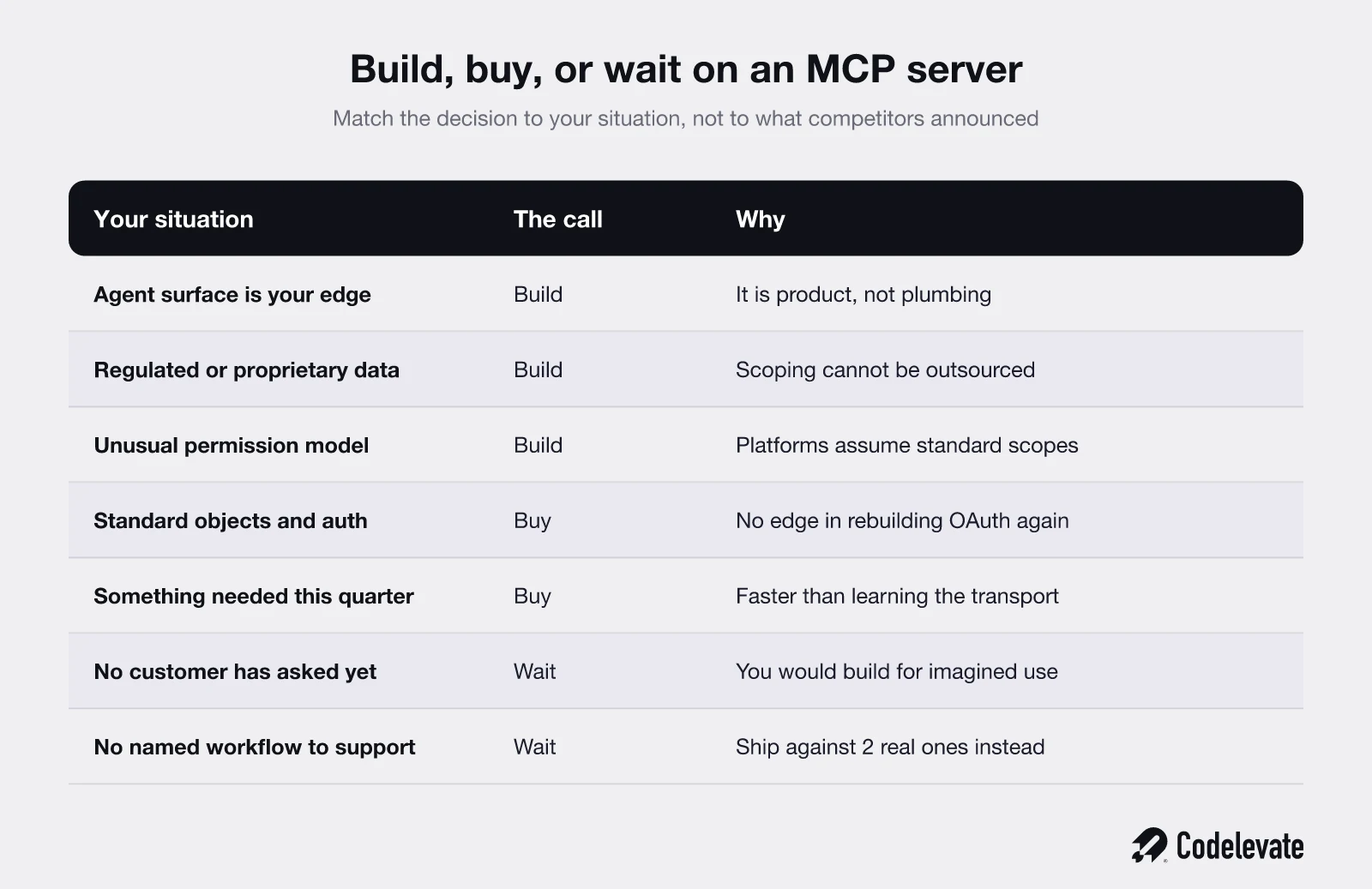
Build when the agent surface is part of your product's value. If your differentiation is a proprietary data model, a workflow nobody else has, or a regulated dataset, then how agents interact with it is a product decision you should not outsource. Build also when your permission model is unusual, because managed platforms assume conventional scopes and you will fight them.
Buy the commodity surfaces. If what you need is agent access to standard objects through standard auth, a managed MCP platform will get you there faster and cheaper than a team learning transport, session handling, and token refresh for the first time. There is no strategic advantage in hand-rolling OAuth for the fifth time.
Wait when nobody has asked. Genuinely. If you have no customer asking, no competitor shipping, and no agent workflow anyone can describe, a server built on speculation will be built against imaginary use cases and will need rewriting when the real ones arrive. Waiting three months and building against two named customer workflows is a better outcome than shipping something generic today.
The cost question deserves honesty too. A working demo takes days. A production server with real auth, tenant isolation, rate limiting, audit logging, versioning and support is a proper engineering project with ongoing maintenance, and industry estimates put annual upkeep in the tens of thousands. Budget for the second year, not just the launch.
A 90-day path to an MCP server worth shipping
When we run this with a client, the sequence looks the same almost every time, and the first month contains no protocol work at all.
In the first 30 days, write down the 5 tasks customers would actually ask an agent to do in your product. Get them from real conversations, not from a workshop. Phrase each one as a sentence a user would say. Then check your API can serve each task in one or two calls. Usually it cannot, and that gap is the real work.
In the next 30 days, design the tool set against those tasks. Aim for 10 to 20 tools. Write the descriptions before the implementations, because the description is the interface. Decide what belongs in resources rather than tools. Set response caps and field projections on every read. Pick your safe default for every write.
In the final 30 days, harden and test it with agents, not with a test suite. Run real prompts from your task list through at least 2 different clients and watch where the model goes wrong. Every wrong tool choice is a description problem or a boundary problem, and fixing it is cheap now and expensive after launch. Add audit logging and per-tool scoping before the first customer connects, not after their security team asks.
Ship it to 3 customers before you announce it. Agent behaviour under real data is not something you can predict from a staging environment.
How we approach this at Codelevate
We treat the MCP server as a product surface with its own design phase, which in practice means the first deliverable is a task list and a tool specification, not code. Our AI development teams build the deterministic layer underneath the tools first, because every piece of logic you move server-side is a decision the model no longer has to get right. Then we test with real agents against real data before anything is exposed to a customer.
The reason we are opinionated about this is that we run it ourselves. The failures described above are ours, found the expensive way, on live systems. If you are further back and still connecting agents to internal systems rather than exposing them to customers, our guide to connecting AI agents to your existing systems covers that stage.
The takeaway
An MCP server for SaaS is not an integration task, and it is not your REST API in a different envelope. It is the interface through which a reasoning system with no context and a limited budget tries to use your product. Designed well, it makes your platform the one an agent reaches for, which will soon matter as much as being the one a user reaches for. Generated carelessly, it makes your product the thing that gave a wrong answer.
The transformation worth aiming for is simple: from a product agents cannot see, to a product agents use correctly and a security team signs off on without a fight.
If you want the wider picture on where AI belongs in a product that already has customers, the SaaS founder's AI blueprint is free and covers the scoping decisions that come before any of this. And if you would rather talk it through against your own roadmap, book a free call with our team and we will tell you honestly whether you should build, buy, or wait.

.svg)
.svg)


